




Skip to content
View in the app

A better way to browse. Learn more.

Unraid

A full-screen app on your home screen with push notifications, badges and more.

To install this app on iOS and iPadOS
  1. Tap the Share icon in Safari
  2. Scroll the menu and tap Add to Home Screen.
  3. Tap Add in the top-right corner.
To install this app on Android
  1. Tap the 3-dot menu (⋮) in the top-right corner of the browser.
  2. Tap Add to Home screen or Install app.
  3. Confirm by tapping Install.

elpatron

Members
  • Joined

  • Last visited

  1. Changing PORTSSL to 4445 in /boot/config/ident.cfg and restarting Nginx daemon helped. Now the unsecured port 8084 works again. Thanks, @JorgeB!
  2. Yes, I tried both, Browser fails with "Rejected". As I have no acces to the UI: Is it possible to set the port from the command line? This is my Nginx error.log. Maybe a problem with IPv6 or Tailscale?
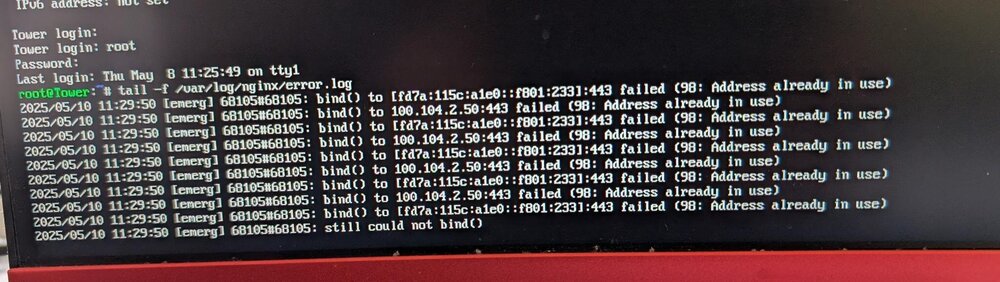
  3. That was the port the web interface was bound to before the update. Can´t remember that I ever changed it. It was the unsecure HTTP port.
  4. Same problem here, deleting config/network.cfg did not help. `nmap` from client PC shows port 8084 seems not to be listening. Any other ideas?

Account

Navigation

Search

Search

Configure browser push notifications

Chrome (Android)
  1. Tap the lock icon next to the address bar.
  2. Tap Permissions → Notifications.
  3. Adjust your preference.
Chrome (Desktop)
  1. Click the padlock icon in the address bar.
  2. Select Site settings.
  3. Find Notifications and adjust your preference.