





j0nsunraid
Members
-
Joined
-
Last visited
-
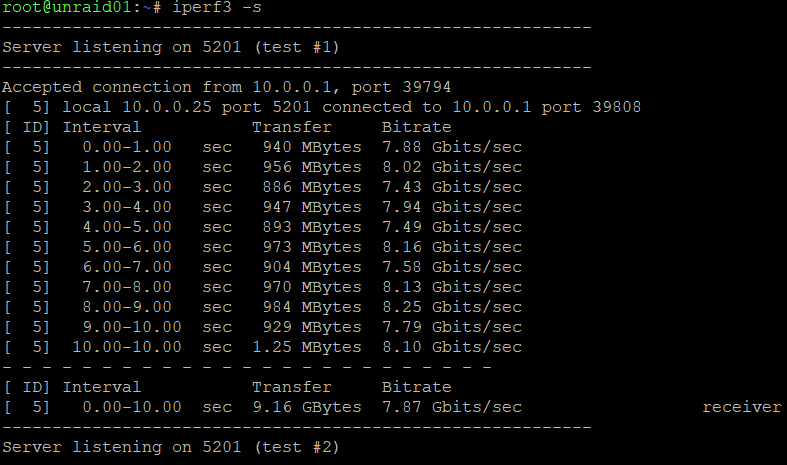
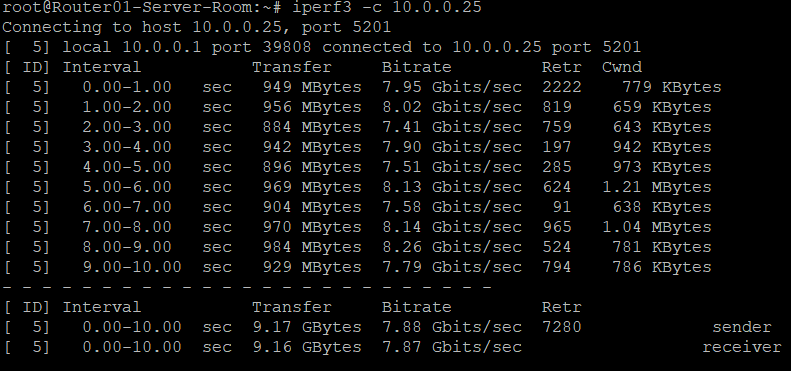
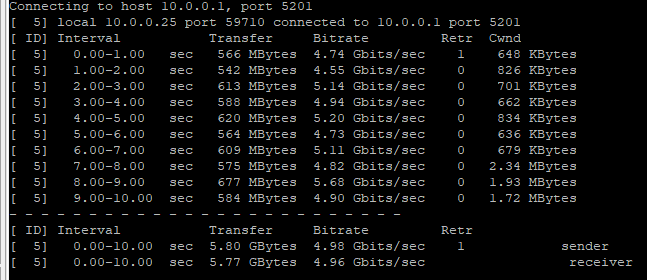
Thanks! I did spot that, I just was confused by the iperf3 outbound vs inbound, outbound shows 5 Gbps, inbound (as server) runs almost full speed.
-
Update, so those tests went FROM my Unraid TO my router. When I went FROM my router TO Unraid... I get much higher speeds. e
-
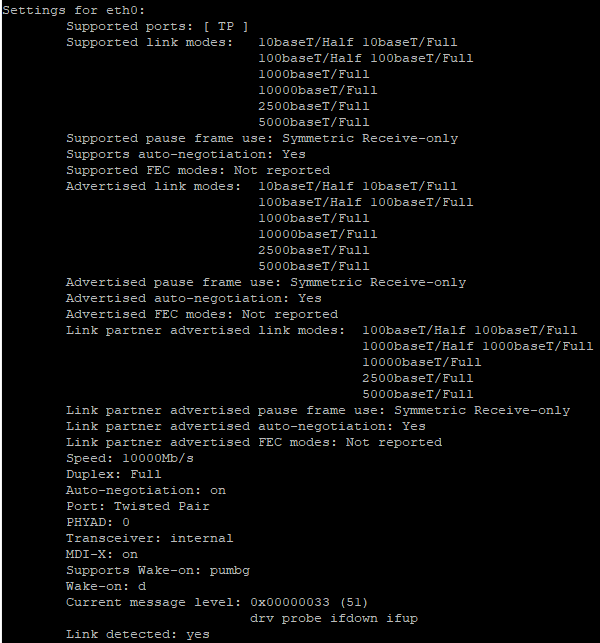
Anyone else experiencing this issue? I have the same thing. I've tried the custom package here: https://github.com/ERSTT/unraid-r8127-driver I've also tried the baked in ones. My Ubiquiti shows the unraid server at 10 Gbps, but ethtool eth0 shows link supported modes at 5 Gbps. Interestingly enough it says it can do 10000Mb/s, but the auto negotiation only has 5 Gbps. Supported ports: [ TP ] Supported link modes: 10baseT/Half 10baseT/Full 100baseT/Half 100baseT/Full 1000baseT/Full 10000baseT/Full 2500baseT/Full 5000baseT/Full Supported pause frame use: Symmetric Receive-only Supports auto-negotiation: Yes Supported FEC modes: Not reported Advertised link modes: 10baseT/Half 10baseT/Full 100baseT/Half 100baseT/Full 1000baseT/Full 10000baseT/Full 2500baseT/Full 5000baseT/Full Advertised pause frame use: Symmetric Receive-only Advertised auto-negotiation: Yes Advertised FEC modes: Not reported Link partner advertised link modes: 100baseT/Half 100baseT/Full 1000baseT/Half 1000baseT/Full 10000baseT/Full 2500baseT/Full 5000baseT/Full Link partner advertised pause frame use: Symmetric Receive-only Link partner advertised auto-negotiation: Yes Link partner advertised FEC modes: Not reported Speed: 10000Mb/s Duplex: Full Auto-negotiation: on Port: Twisted Pair PHYAD: 0 Transceiver: internal MDI-X: on Supports Wake-on: pumbg Wake-on: d Current message level: 0x00000033 (51) drv probe ifdown ifup Link detected: yes

-
I to have been having issues with CP1500PFCLCD and this filling the syslog: May 12 15:11:40 unraid01 usbhid-ups[672254]: nut_libusb_get_report: Input/Output Error I've confirmed the following: ups.conf on line 9: pollonly xnut-nospam.conf :msg, regex, "nut_libusb.*rror" -/var/log/nut-spam :msg, regex, "nut_libusb.*rror" stop I've tried adding new lines to specifically call out the error: :msg, regex, "nut_libusb_get_report: Input/Output Error" -/var/log/nut-spam :msg, regex, "nut_libusb_get_report: Input/Output Error" stop No such luck. It keeps coming back and is filling up my syslog every 2-5 seconds. I've even tried adjusting my pooling to every 60 seconds, but it keeps changing its pooling effort on its own: May 12 15:14:06 unraid01 usbhid-ups[672254]: nut_libusb_get_report: Input/Output Error May 12 15:14:08 unraid01 usbhid-ups[672254]: nut_libusb_get_report: Input/Output Error May 12 15:14:10 unraid01 usbhid-ups[672254]: nut_libusb_get_report: Input/Output Error May 12 15:15:20 unraid01 usbhid-ups[672254]: nut_libusb_get_report: Input/Output Error May 12 15:15:40 unraid01 usbhid-ups[672254]: nut_libusb_get_report: Input/Output Error May 12 15:15:42 unraid01 usbhid-ups[672254]: nut_libusb_get_report: Input/Output Error May 12 15:15:44 unraid01 usbhid-ups[672254]: nut_libusb_get_report: Input/Output Error May 12 15:15:46 unraid01 usbhid-ups[672254]: nut_libusb_get_report: Input/Output Error May 12 15:15:58 unraid01 usbhid-ups[672254]: nut_libusb_get_report: Input/Output Error You can see it does every 2 seconds, then jumps to 70 seconds, then 20 seconds, then 2 seconds, then 12 seconds. Its all over the board...

