





tykateetee
Members
-
Joined
-
Last visited
-
Good catch. I think I jumped from 6.12.10 to 6.12.14 first and that was more when the issue started for me. At this point, I really don't remember and my guestimates should be taken with a grain of salt. Still a weird issue that I feel was amplified by GPU Statistics constantly polling the card but I don't feel that my issue was caused by it. Had it back for almost 2 weeks now and still no issues after reinstalling.
-
See my messages on this page and the previous one as they may help you. I had the same issue and it was not related to my GPU dying, but something that was present on my flash device. I had no issues for years and then I had my log filled with these errors too. I think it has something to do with updating Unraid to 7.x.x as from 6.x.x as that was roughly when my issues started. I ended up reinstalling and the issue went away.
-
You may or may not be in luck. I was just coming back to do my one week later update. Yes - I have fixed my issue. It has been a week and the error has not appeared once. You're probably not going to like how. I recreated the Unraid flash device. I went out, bought a new USB stick, downloaded the creation tool, chose 7.1.3 as the version (latest when I did it), and restored my systems hardware to what it was before (read my previous posts). Once completed, I recreated the array and cache in the exact order it was before and chose the option that parity was valid, redownloaded the Nvidia-Driver plugin chosing the latest driver at the time (575.57.08), and rebooted. Once complete, re-setup my docker containers knowing that the bulk of the configuration was in the appdata share and I just had to re-setup the docker aspect. I did not have any VM's on the device. I am now back to a BIOS that just has DOCP enabled and an almost identical OS install as to what I had before. No tricks anywhere else - just a plug and play configuration. I am unaware as to how the flash got to be the issue, as I secretly was agreeing with @ich777 in thinking it was something firmware related. For my case, it appears that it was not. Hopefully this helps. I know re-installing the OS is not feasible for most but I knew that I could be back to where the system was within the hour. It totally beats seeing those yellow lines in the syslog ever again.
-
2000ms. Don't think I have change it from the plugin being installed.
-
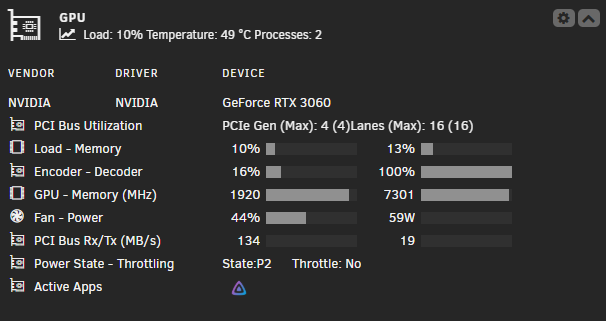
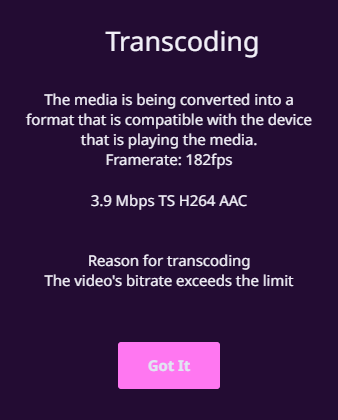
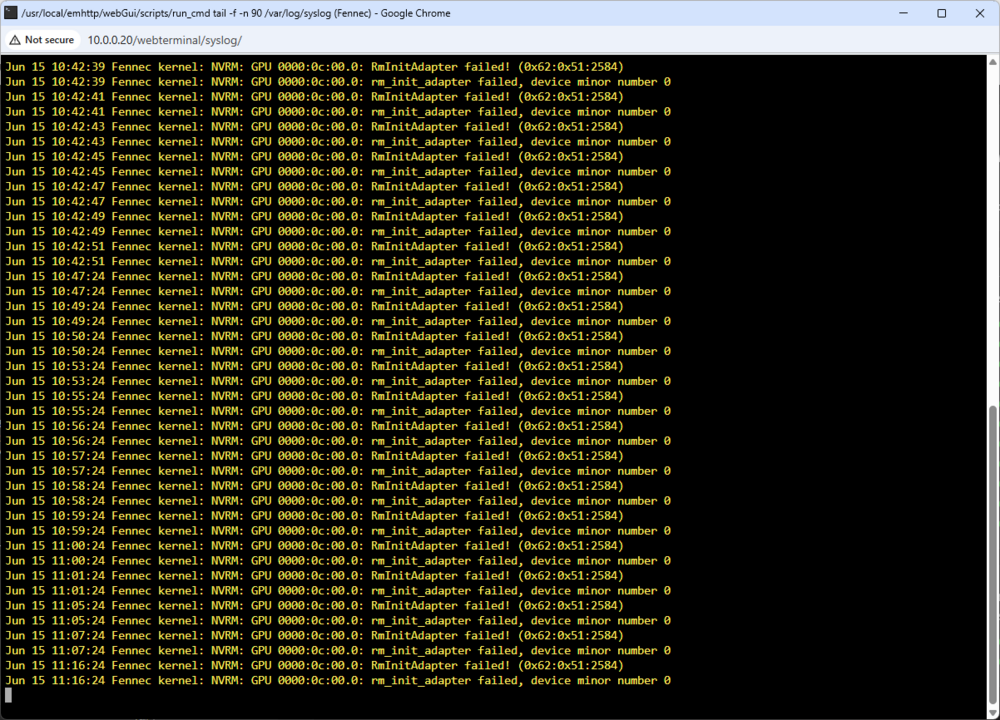
Welcome to my last month XD. I've thrown in some screenshots to show that I'm not fully crazy.
-
Yes, transcoding is working for some time after initial boot. Even after the error occurs the card will re-attach and transcoding will work again. I have seen that the error normally occurs when the card can't be initialised after standby or initially on boot. I do not have standby enabled and the error is never present on boot.
-
The dashboard is open, and GPU Statistics is installed. This error still occured before I installed GPU Statistics for the first time. The error did show up one time at 3AM and I don't think a dashboard was open at that time, but I could be mistaken there. Good to know that sometimes it is just funky. I really thought a complete hardware switch would fix it but as you mention the issue could be relating to AMD CPUs. I do have 2 other Unraid instances with AMD CPUs + Nvidia GPUs, and this includes one that has the exact same motherboard + CPU combo, just with a 2060 Super instead. I haven't needed to perform any trickery with power states on them (thankfully) and have never seen this issue. Totally agree with the link speed tip - there was that and more I found reading through the forums to no avail. While I agree with stock for important systems, my Unraid instance is primarily just for Jellyfin. Plus I have 3600Mhz RAM, so I just want to use 3600Mhz RAM :). I did try a week ago at stock frequency and the issue was still present. The power supply is a 1200w unit from Asus. I don't think it's bad but hey - you never know. Realistically, I'm going to reinstall from scratch tomorrow. It just seems like one of those things that is not worth the time to try to troubleshoot anymore and the OS is the last thing I have left to change. Thank you for the support. I'll probably update here soon regarding if blowing everything up and starting over fixed it. While that tip won't be that helpful to most, it would at least rule out (for my situation at least) if it was funky hardware.
-
Everything works fine when the system boots. This includes transcoding. I have also notices that the error occurs in the syslog randomly, even when there is no transcode running. It seemingly just happens at random. It has happened twice more since the above diagnostics with the system being idle. Your second point describes the scenario well. I don't have an Intel system to test with, although it is strange that it has now happened with 2 seperate AMD CPU/Motherboard combinations. Setting the link speed to gen 3 does not solve the issue, as the B450 board is only gen 3 and it still had the issue. The latest BIOS images were downloaded from here and here. They both were up to date when the error occured. There is no PCIe riser involved. All power saving methods are disabled in the BIOS. The issue is still present. It is also should be noted that with a "stock" bios and only DOCP enabled these issues did not occur for the better part of 2 years. Thanks for you help so far. Any other thoughts are appreciated.
-
This unfortunately did not work. The "RmInitAdapter failed!" message is still present in the syslog. I'm open to any other suggestions that you or others may have. New Diagnostics Thanks
-
Both of those changes have been applied so now I wait and see. Interestingly enough the B450 board that the server was originally running on did have its latest BIOS revision applied. It did, however, not have C States disabled. If you don't hear from me again, I'll go with C States being the issue.
-
tykateetee joined the community
-
Hi all, I am having issues using this plugin and retaining a "connection" to the GPU. The GPU attached is an RTX 3060 (was a 1660 Super -> same issue) and is using driver version 575.57.08 on Unraid 7.1.2. The GPU is being passed through to Jellyfin in docker for transcoding and is not utilized anywhere else. Within 24h of the system being booted if a transcode attempts to occur, my syslog will be filled with: Jun 12 01:54:01 Fennec kernel: NVRM: GPU 0000:0c:00.0: RmInitAdapter failed! (0x62:0x51:2584) Jun 12 01:54:01 Fennec kernel: NVRM: GPU 0000:0c:00.0: rm_init_adapter failed, device minor number 0 This will cause my transcodes to not start and the media will fail to play. Things I have tried include: Swapping the RAM Downgrading to 7.0.1, 6.12.15, or 6.12.14 (Last OS I used before the issue started) Downgrading the driver to version 570.153.02 or 565.77 Swapping the GPU (same issue occurs on a 1660 Super) Moving the GPU to the secondary PCIE slot Swapping the motherboard (B450 -> B550) Changing the CPU (5600G -> 5800x) I have not tried recreating the Unraid flash yet, although I am not opposed to doing this. Just though I would see if anyone can see anything in the logs. I took a look through the forum but the only other issues with the keywords "RmInitAdapter failed" were for individuals with a faulty GPU and the message was present on boot. This has only started in the last month and everything was fine up until then. Not to say that the GPU didn't go bad, but the 3060 was known working to test with and both still work consistently until the system has some uptime. Diagnostics Thanks

