enyoh
Members
-
Joined
-
Last visited
Everything posted by enyoh
-
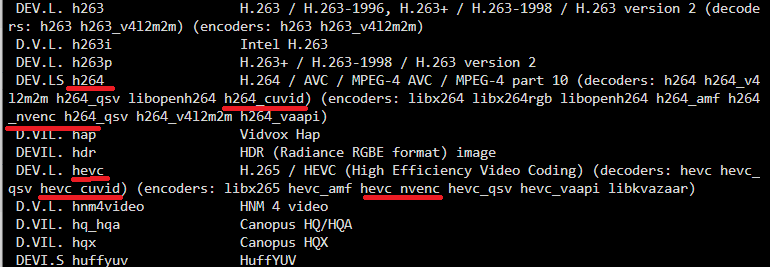
Hi, good evening Since a long time ago, I always have this issue with the Docker "shinobi-pro-cctv" - and it'd happened again last night, when I've updated my dockers with new network parameters - So, you are right in your inquiry. About the issue: the FFmpeg build inside the aforementioned shinobi docker version does not have ANY hardware acceleration for our nvidia gpus (you'll can check with the command "ffmpeg -codecs" inside your docker console). About the solution for this issue, you'll have to (if you have the same docker): Disable any kind of autoupdate for this docker. If it eventually does update, you'll have to do inject the FFmpeg build again; "Inject" a FFmpeg build that was compiled with hardware acceleration in mind; This is simple if you search for a compatible already compiled FFmpeg build from around the same date of your nvidia driver plugin. For example, my driver is: Nvidia Driver Version: 550.67. Date: 2024.01.19 So, my FFmpeg build is from around: autobuild-2024-01-31-12-54 Put your FFmpeg build in the same share folder that you informed in your docker as shinobi config, since you'll have to access inside Docker. For example, mine is registered as: "/mnt/user/appdata/shinobi"; Now, in the aforementioned Shinobi Docker console, you'll have to: stop cameras with: pm2 stop camera.js copy your corrected FFmpeg build to overwrite the other one. Obs.: change YOURBUILDHERE with the name that its your FFmpeg build folder: cp /config/YOURBUILDHERE/bin/* /usr/bin/ For example, in my docker I used: cp /config/shinobi/bin/* /usr/bin/ Obs: "/usr/bin/" is where the FFmpeg is located in this Docker. You can check yours with the command "which ffmpeg". Restart those cameras with: pm2 start camera.js Obs.: you'll have to use a FFmpeg build from around the same date, because the FFmpeg build has a minimum nvidia driver request that works. Now, with that out of the way, you can check with the command ffmpeg -codecs if it worked. Mine is reported as: And, like that, it'll work as it should.