





Thorman
Members
-
Joined
-
Last visited
-
Ok perfect! I found out it was Unraid Storage History. Specifically this plugin https://github.com/rka/unraid-storage-history
-
So I added a new drive today and everything looked good until I hit clear when all of a sudden I had issues with my shares being gone on starting the array. So I cancelled the clear and hit stop array preparing to shut down. I got a message on the buttom left next to array stopping that says "Retry unmounting user share(s)..." Then I tried shutting down and on reboot I checked the logs and saw a constant spam before I started the array of emhttpd: error: malloc_share_locations, 8948: Operation not supported (95): getxattr: /mnt/user/system. Then I tried restarting again without starting the array because I saw missing shares is a bug fixed on reboot and upon reboot checked my flash drives /shares directory and all of my shares are there. I then started the array and saw that out of all of my shares only system, appdata, and data was mounted. I then checked the file manager was showing /user as owned by root and some really odd permissions something along the lines of ------rwx (I can't remember off the top of my head what exactly it was). appdata, system, and data inside was showing the same permissions and owner even though appdata and data was never owned by root. I also had all 3 of these errors in the log emhttpd: error: malloc_share_locations, 8948: Operation not supported (95): getxattr: /mnt/user/system emhttpd: error: malloc_share_locations, 8948: Operation not supported (95): getxattr: /mnt/user/data emhttpd: error: malloc_share_locations, 8948: Operation not supported (95): getxattr: /mnt/user/appdata I also have another oddity where I have all of my drives showing up as disk shares when I only have user shares. Upon checking the disks they all have the files from the missing shares. I have simply copied the syslog-previous and started a syslog server and copied the syslog and then shut down until I get some help from you guys. I have attached both. How in the world would I go about fixing this???? syslog syslog-previous thor-unraid-nas-diagnostics-20260908-2324.zip
-
hmm for some reason the notification isn't happening now... I woke up and checked my notification tab and there was nothing there. If it comes back I will gladly help with testing.
-
I have upgraded the plugin and still have the issue. The issue isn't that mover is still running when starting a new run, it's that it sends me a notification when it's explicitly told not to do so. from the same log ``` 11:40:01.728 ----------------------------------------------------------------- Global settings --------------------------------------------------------------- 11:40:01.733 Using global (cache:yes) moving threshold: 90 % 11:40:01.736 Using global (cache:yes) freeing threshold: 50 % 11:40:01.738 Using global (cache:prefer) fillup threshold: 90 % 11:40:01.745 Age: Automatic (smart caching) 11:40:01.759 ATIME: yes 11:40:01.767 mover: already running 11:40:01.788 Notify: no ... Notify is set to no but I still get the notification, why would that be?
-
The weird part is that it's still sending notifications when set to no and error only. I have previously changed it to an hour, 3 hours, 6 hours, and 12 hours and I still had the notification. I just changed it to an hour right before exporting the debug zip file but I have had debug logging enabled for a few days now so hopefully you can pinpoint what the issue is. ca.mover.tuning-debug-20260818-1813.zip
-
Mover Tuning Notificationmover: already running and it's category is warning so it was sending an email on every notification so I have disabled all warning notifications going to email until this get's fixed, which is very annoying.
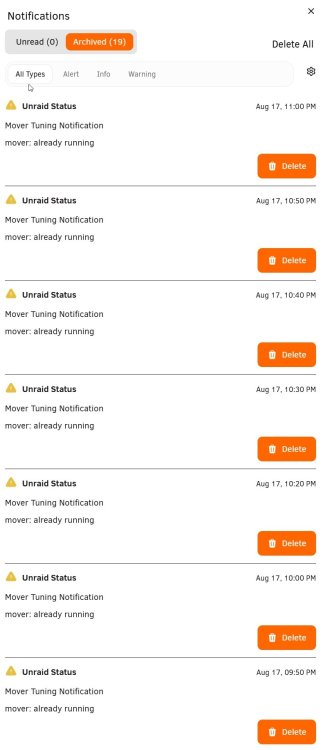
-
What else do you need to get this figured out? Do you need more logs or some other diagnostics?
-
So I restarted my NAS and I started getting the notifications again. I have tried all of these fixes to no avail Turning off notifications turning off logging changing mover type to rsync and back disabled plugin cron and added a user script with the command disabled plugins that I thought would interfere like unspin, folder caching, and RAM-disk for docker logs changed the cron time from 5 minutes to 10 minutes to 1 hour to 1 day and none of them fixed it I have tried running it manually and no matter how many times I run it manually I can't get the notification to show up. It is also extremely inconsistent and random when the notification appears. I have attached the diagnostics zip file ca.mover.tuning-debug-20260726-1834.zip
-
OK so for some reason enabling both logs disabled the notification... I have tried disabling logging before because of this issue but I have always had debug logging disabled and I don't know which one caused the fix but anyway it's fixed now. Weird way to fix it...
-
ca.mover.tuning-debug-20260708-0827.zip
-
Do you have any ideas on how to fix my problem? It is still giving me the notification hourly and it is really annoying.
-
Hello, ever since the newest update I have an issue with all of my docker and flash backups failing with some kind of error related to the recycling bin plugin. I have already excluded the offending folder on the docker backups but the flash backup doesn't allow excluding paths. Can you please add either a blanket exclusion for the recycling bin folder or a way to exclude paths on the flash backups? Here is the error backup Flash Drive: writing folder metadata: open /mnt/RecycleBin/.vault-stage/backup-3036621833/folder_meta.json: no such file or directory Here is the docker backup error backup exampledocker: archiving volume /mnt/user/appdata/exampledocker: creating archive file: open /mnt/RecycleBin/.vault-stage/backup-2727435221/volume_1.tar: no such file or directory
-
It is set to no and the cron for that is 20 4 1 * * That shouldn't interfere with my cron of * /60 * * * * For the mover tuning schedule
-
How would I check that? I am not really understanding what you are asking me to check...
-
I have the only move when above set to 75% of the cache and the notifications happen even when the cache is at 50%. And the move now button is not grayed out the minute before the 30 minute mark. I have even done the age_mover stop command the minute before and it still gives a notification. Also I have mover schedule: disabled

