yamanobe
Members
-
Joined
-
Last visited
-
thankyou! Update: I was finally able to make the server generate and keep save data. What I changed: Added a new path mapping in the Unraid Docker template: Host Path: /mnt/user/appdata/craftopia/DedicatedServerSave Container Path: /serverdata/serverfiles/DedicatedServerSave Mode: rw Edited ServerSetting.ini and changed the save path from savePath=DedicatedServerSave/ to savePath=/serverdata/serverfiles/DedicatedServerSave/ After these changes, save files are generated, and the world persists between restarts (not reset). However, two issues remain: Every time the server restarts, the “Welcome to Craftopia World” / tutorial window shows up again, even if “Skip tutorial” is enabled. Player spawn location is reset to the initial starting point each time the server is restarted. So the world data itself is saved and loaded, but player-specific state (tutorial flag, spawn position) doesn’t seem to persist. Could this be a known limitation of the current dedicated server build, or is there another config/flag needed to persist player state?
-
Thank you. When setting up the Craftopia Docker container on Unraid, if there are any parameters I need to add manually beyond the default ones, I would appreciate it if you could let me know.
-
The following files have been created in the unraid docker craftopia directory: "\mnt\user\appdata\craftopia\DefaultServerSetting.ini" "\mnt\user\appdata\craftopia\libsteamwebrtc.so" "\mnt\user\appdata\craftopia\ServerSetting.ini" "\mnt\user\appdata\craftopia\steamclient.so" "\mnt\user\appdata\craftopia\UnityPlayer.so" "\mnt\user\appdata\craftopia\UnityPlayer_s.debug" "\mnt\user\appdata\craftopia\Craftopia_Data" "\mnt\user\appdata\craftopia\linux64" "\mnt\user\appdata\craftopia\steamapps" "\mnt\user\appdata\craftopia\craftopia.log" "\mnt\user\appdata\craftopia\Craftopia.x86_64" "\mnt\user\appdata\craftopia\Craftopia_s.debug"
-
Thanks for your reply. I checked again, here is my current setup: Docker run command from Unraid template file Paths: /serverdata/serverfiles/DedicatedServerSave → not created Logs show: Server ready appears But every reconnect starts with “Welcome/Tutorial” dialog Repeated error: Unable to load player prefs So it seems the server runs fine, but no save data is generated anywhere in the container or mapped volumes. Do I need to configure a specific environment variable or mount path to make the dedicated server generate saves? dockersettings.txt
-
Subject: Dedicated server does not generate or save world data Body: Hello, I am running a Craftopia dedicated server in a Docker container (ich777/craftopia:latest on Unraid). The server starts correctly and players can join, but no save data is created. Environment: Host: Unraid (Linux, AMD Ryzen 5700G, no discrete GPU) Docker image: ich777/craftopia:latest Behavior: Server starts, log shows Server ready Clients can connect and play normally Every time we reconnect, the game shows the “Welcome / Tutorial” dialog again No save data folder is generated under /serverdata/.config/unity3d/PocketPair/Craftopia/Saved/SaveGames Logs: Error line: Unable to load player prefs Multiple shader warnings (probably harmless in headless mode) Things I tried: Played for several minutes, then stopped server → no save folder Restarted server → still no save, always new world Checked both /serverdata/.config and /root/.config → no save directory Question: Is the current dedicated server build supposed to generate save data? If yes, where should the save files be located? Is there any additional configuration or environment variable needed (e.g., XDG_CONFIG_HOME) to enable saving? Thanks in advance for your help.
-
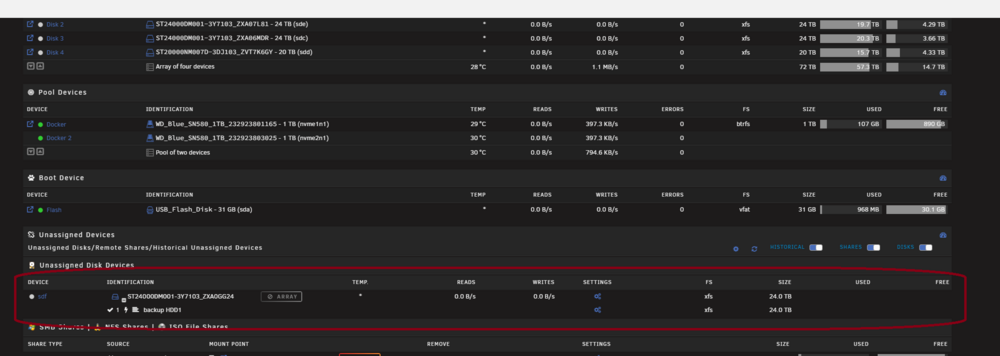
Hello, I'm using Unraid 7.1.4 and connected an external HDD (24TB ST24000DM001) via USB. At first, it mounts and works fine using Unassigned Devices. However, after about half a day, the drive suddenly becomes unavailable — the mount/unmount icons are greyed out, and it appears as an Array disk (even though it’s not). Here is the issue timeline and relevant logs: The drive is detected normally: Jul 5 21:59:43 YURIANAS kernel: sd 7:0:0:0: [sdf] 46875541504 512-byte logical blocks: (24.0 TB/21.8 TiB) Jul 5 21:59:43 YURIANAS kernel: sdf: sdf1 Jul 5 21:59:43 YURIANAS kernel: sd 7:0:0:0: [sdf] Attached SCSI diskコピーする編集する Jul 5 21:59:43 YURIANAS kernel: sd 7:0:0:0: [sdf] 46875541504 512-byte logical blocks: (24.0 TB/21.8 TiB) Jul 5 21:59:43 YURIANAS kernel: sdf: sdf1 Jul 5 21:59:43 YURIANAS kernel: sd 7:0:0:0: [sdf] Attached SCSI disk But later, I get an XFS error: Jul 6 11:49:21 YURIANAS kernel: device offline error, dev sdf, sector 23624466960 op 0x1:(WRITE) Jul 6 11:49:21 YURIANAS kernel: XFS (sdf1): log I/O error -19 Jul 6 11:49:21 YURIANAS kernel: XFS (sdf1): Filesystem has been shut down due to log error (0x2). コピーする編集する Jul 6 11:49:21 YURIANAS kernel: device offline error, dev sdf, sector 23624466960 op 0x1:(WRITE) Jul 6 11:49:21 YURIANAS kernel: XFS (sdf1): log I/O error -19 Jul 6 11:49:21 YURIANAS kernel: XFS (sdf1): Filesystem has been shut down due to log error (0x2). Then the system cannot access the block device anymore: Jul 6 12:10:54 YURIANAS kernel: /dev/sdf1: Can't lookup blockdev コピーする編集する Jul 6 12:10:54 YURIANAS kernel: /dev/sdf1: Can't lookup blockdev And finally: Jul 6 12:11:50 YURIANAS kernel: XFS (sdf1): Unmounting Filesystem コピーする編集する Jul 6 12:11:50 YURIANAS kernel: XFS (sdf1): Unmounting Filesystem After this point, the mount/unmount buttons disappear (grey out) and the drive ends up with an icon that says "Unallocated Device" array, even though it's not part of any array. This seems to happen frequently after a few hours of uptime. My questions: Is this a known issue with external USB drives on Unraid? Is the XFS log I/O error due to power saving, USB disconnect, or something else? How can I avoid the system treating the drive as an Array disk after failure? What’s the proper way to recover from this without rebooting? Thanks in advance for your help. Let me know if you need full diagnostics or more logs.