





ursicin
Members
-
Joined
-
Last visited
-
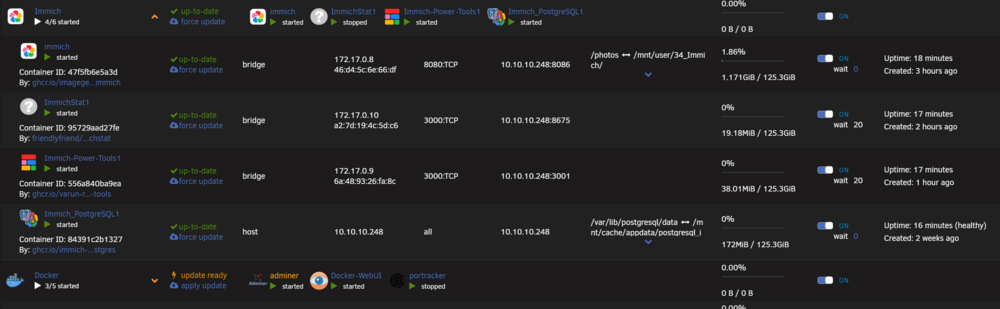
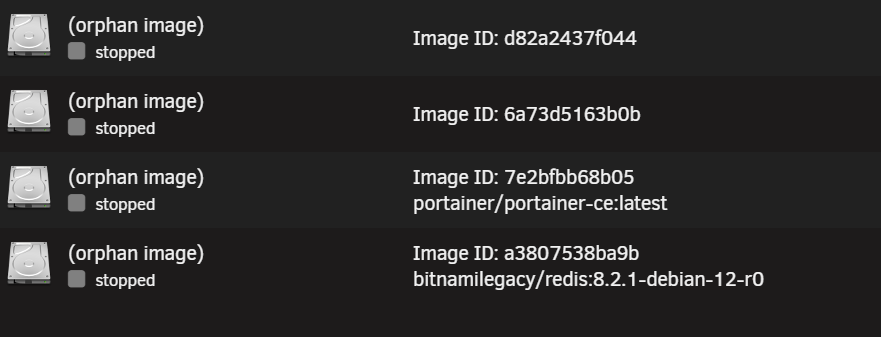
Hello, For some time now I am experiencing a weird behavior with my containers. I'm running on 7.3.1 but the problem existet also on 7.3.0 or even before. And I'm using FolderView3. The Problem: I have now experienced lots of containers disapearing and some times reapearing again. Most of the time after a reboot I get missing containers and some orphaned ones. Also some times after a "bulk"-Update in Folderview3 (Update all) I get orphaned images afterwards. Notice in the sreenshot that it shows 4/6 started, but it shows only 4. The missing ones will probably be Immich-redis and the second one I'm not to shure right now which one it should be. Also notice the docker folder showing 3/5 started, but only 3 container showed. One of the missing ones will be this one: And there are more orphans by the way: Whai I wxperience now for the first time is that the first 2 of them don't even show the name anymore, so I have no idea which ones are missing. I can now delete the orphans and reinstall them, but I allways get an error: docker: Error response from daemon: Conflict. The container name "/PortainerCE" is already in use by container "5d1124ae90bacea5f5725436caa80045b1e40cb755179f1ead0639029dfde56c". You have to remove (or rename) that container to be able to reuse that name. Run 'docker run --help' for more information The command failed.I can now rename and install it as PortainerCE1, but then it is not in the correct Folder anymore and so on... And sometimes a "lost" Container magicly reapears again after a restart, so it hapened with Luckybackup, of which I duddenly had 2, Luckibackup and Luckibackup1 (but normally I get more orphans after a reboot). Any idea what is going wrong and how I can solve it? That is getting a little annoying... unraid-diagnostics-20260623-2143.zip Please be aware that errors concerning Ip-Adresses (especially 192.168.1.x and 10.10.10.x ) have to do with the fact that I had to change from the 192. -net to the 10. -net. last week/weekend, so ther may still be problems there I have to figure out, but the here decribed problems existed way before but have become more apparently because I had to restart the Unraid server a few times. Btw, for me no signs of an unclean shutdown or reboot so far... Thank you

-
Thanks for your reply. I have been using ZFS since quite the beginning. Definitely created the shares on different ZFS-pools (because an Array didn't work for me) and never experienced any issues...so I don't really understand this restriction... So what might be the possible issues?
-
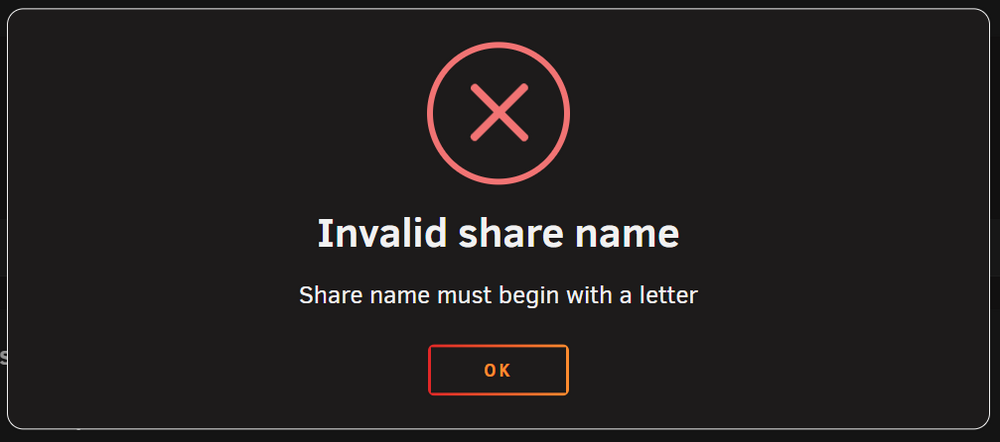
Hello, Last year I set up an Unraid server with quite a few shares. Those are named like 01_xx, 02_yy, 03_zz what has worked for me for decades on different servers. Now I tried to rename one of these shares from 03_zz to 03_aa and I get an error that the name is invalid and has to start with a letter! The same if I try to create a new share starting with a number. Why??? And how can I override this? Btw: I am on Unraid 7.2.4 and that was not the case on earlier versions when I set up Unraid . Thx
-
Hi elliotcz97 and everybody else, On the search for a solution to exactly the same problem with the same Oki scanner I found this thread. I know that this is a very old thread but I hope you (or somebody else) may be willing to share your configuration because I don't get that scanner connectet to the Unraid server, no matter what I am doing. My goal would be to repalce my QNAP-NAS with the unraid-NAS to have quite a bit more space. That said, the scanner works flawlessly to scan to the QNAP-NAS directly to a share \\QNAP\Okiscan or \\192.168.1.250 (just to have it mentioned, it didn't work with \\QNAP\25 Okiscan...it didn't like the space after 25 but since I changed the share to Okiscan I had no problems whatsoever). So I set up an exact copy of the Qnap-profile for the unraid nas, same users, same credentials, everything the same, except the IP (192.168.1.248 instead of 192.168.1.250). Unfortunately with no luck. What I have done so far: Tried with 2 different users (okiscan and urs) with theyr credentials on 3 different shares (25_Okiscan, Okiscan, scan). Tried with public, secure and private, enabled r/w to these two users and the mentioned shares. Enabled SMBv1 (probably?) with setting enable NETBIOS to yes in Unraid. On the scanner i changed under Admin Setup - Network - NBT/NETBEUI - SMB Version from Auto to 2 and 1, not sure doh if that has any relevance to my problem. Tried to set up an Ftp connection with port 21 instead of CIFS on port 445. Tried to access the share with \\192.168.1.248\scan and \\unraid\scan (both work on the QNAP-NAS on 192.168.1.250 as stated before) and many more things... Nothing works. The scanner allways tells me "abborted" and "Check Server configuration". So far, for me it is obvious that the Server is the Problem, but I have no further ideas what else I could try... So, what am I doing wrong and what else can I try? Or where can I at least find a log or whatever who tells me what is going wrong with that connection on the unraid server-side? Thank you Urs
-
Hallo liebes Forum, Seit gut 3 Wochen bin ich daran diverse Betriebssysteme für mein neues NAS am evaluieren und dabei werde ich, so wie es aussieht wohl an Unraid hängen bleiben ;) Im Moment läuft die Testlizenz provisorisch auf einer SD-Karte welche über einen USB-SD-Kartenleser angeschlossen ist. Wird aber bei der deffinitiven Installation auf einem USB-Stick laufen. Als Hardware bin ich zu einem guten Preis an folgende Komponenten geraten welche eigentlich für ein anderes Projekt gedacht waren welches nicht umgesetzt wurde. Die HDD liegen auch alle schon hier rum und wurden immer wieder ersetzt weil sie schnell zu klein wurden. Es ist mir daher bewusst dass das daher vielleicht nicht die Stromsparmaschine werden wird oder auch sonst die eine oder andere Sache drin hat welche vielleicht overkill oder nicht Ideal (wie der non ECC-Speicher) ist. Damit kann ich aber leben und werde das besste draus machen. Hier also eine Liste der vorhandenen Komponenten. -Asrock Z890 NOVA WIFI -Intel Core Ultra 5, 245K, 6P & 8E Cores, 5.2Ghz -Noctua NH-U9S CPU-Kühler -Crucial Pro DDR5 128GB (2x64GB), Erweiterbar auf das doppelte (glaub nicht dass ich das brauche, aber besser haben als brauchen ;) ) -2x Namvo M2 NGFF NVME M-Key PCI Express to SATA 3.0 6Gbps 6 Ports Adapter Converter Hard Drive Extension Card mit ASM1166 Chip -Fractal Design Ion+ 2 Platinum 760W Netzteil -Fractal Design Define 7XL Gehäuse -3x 4TB WD Red Pro -4x 8TB WD Red Pro -2x 4TB Acer Predator GM7 NVMe -4x 20TB Toshiba MG10 SATA d ** -2x 1TB Samsung 860 EVO NVMe ** ** Die 20TB SATA und 1TB NVMe sind momentan in einem Qnap verbaut und enthalten die Daten welche auf dem neuen NAS umziehen werden. Vorerst bis der neue NAS sauber und stabil läuft werden die beiden paralell betrieben. Die Festplatten stehen daher im Moment noch nicht zur Verfügung für das neue NAS und sollen später darin integriert werden. Die ganzen Daten sind auch noch auf einem 2. QNAP mit 6 bay gesichert, dieser ist aber nur über LTE (externe Location, Zugang über Wireguard) an mein Heimnetz angebunden. Der Grund warum ich nun vom ersten QNAP weg will ist dass der mit 4 Bay schon wieder in absehbarer Zeit einfach zu klein werden wird. Der 2 Grund ist dass ich dort die 3x 4TB WD red mal drin hatte, die dann durch die 4x 8TB ersetzt habe und vor einiger Zeit durch die 4x 20TB-Platten. Das wäre im Moment zwar genug, aber leider kann ich von den theoretisch im Raid5 zur Verfügung stehenden und nutzbaren 54.54 TB im Moment nur etwa 32TB wegen irgendwelcher Limitierungen vom Dateisystem nutzen. Da will ich im Moment auch keine Experimente machen bevor die Daten nicht auf dem neuen NAS kopiert sind und dieser stabil läuft. Für das Wöchentliche externe Backup von einigen GB reicht es ja locker, aber ca 25-28TB an Daten vom 2. QNAP über LTE mit 50kbps kopieren muss ja irgendwie auch nicht sein... ;) Nebst Daten (Persönliche Dokumente, Fotos, Videos, Backups von diversen VMs) sollen vielleicht auch der eine oder andere Container darauf laufen (Immich oder PhotoPrism, Luckybackup, ...., ???, Daneben läuft im Moment noch ein NUC mit Proxmox und einige Sachen wie Iobroker, InfluxDB, Grafana, Pihole usw drauf. Wenn das auch noch auf dem neuen NAS umziehen könnte wäre wünschenswert, aber nicht erste Priorität. Geschwindigkeit hat 2 Priorität da im Moment eh noch alles über 1Gbit-LAN läuft und das reicht vorerst auch aus. Wichtiger ist mir soweit mit der vorhandenen Hardware möglich Zuverlässigkeit, die Möglichkeit für Snapshots, Backups von containern Deduplizieren zu können, Mobile Geräte automatisch synchronisieren wenn im Heimnetz (oder im Wireguard-VPN-Netz), Synchronisieren/Backup einmal pro Woche mit dem 2. QNAP über LTE (RSYNC?), Festpaltten spinndown da ausser auf den Containern oft nicht darauf zugegriffen wird, usw. Soweit zur Vorgeschichte. Nun hoffe ich dass ihr mir den einen oder anderen Tipp geben könnt damit ich beim festlegen der Grundlagen vom neuen Unraid NAS nicht kardinale Denkfehler mache oder falsche Entscheidungen treffe welche mir das Leben später unnötig erschweren. Im Moment geht es darum wie ich den Speicherplatz am bessten einrichte. Eine Idee wäre die 2x 4TB NVMe als Mirror und dann für die Container zu nutzen, dann die 3x4TB als Pool für Daten und die 4x8TB als Pool für Multimedia, jeweils mit einer Parity. Zur not und überbrückung könnte ich noch 2x WD 12TB Platten (als Mirror) einbauen bis die 20TB dann mal zur Verfügung stehen. Somit sollte ich genug Platz haben um all meine Daten auf dem neuen Server kopieren zu können. Wenn die 20TB-Platten dann umgezogen sind überlege ich allenfalls die 3TB-Platten auch wieder ausser Betrieb zu nehmen, ist aber noch nicht entschieden. Die dann vom QNAP auch frei werdenden 2x 1TB NVMe könnten dann als Cache installiert werden. Die Frage die ich mir noch nicht sicher beantworten kann ist ob für mein Anwendungsfall Aray mit Pools oder nur Aray und alle Platten da rein packen oder gar kein Aray und nur Pools... Ab Unraid 7.x sind ja da die Möglichkeiten noch grösser und leider für mich die Langzeitfolgen in meinem Fall noch nicht so klar ersichtlich. Desweiteren welches Dateisystem? Wenn ich es richtig verstehe so bräuchte ich ZFS oder BTRFS für Snapshots wobei vom letzteren eher abgeraten wird da immer noch nicht stable. Für Dedup (gerade für die Backups vom Proxmox wo sehr viele Daten anfallen welche fast identisch sind) gibt es wenn ich es richtig verstehe auch 2 Möglichkeiten. 1. auf ZFS-Ebene (viel Speicherbedarf, wovon ich vorerst eigentlich genug haben sollte) und 2. auf Dateiebene (Wie QNAP das macht??? Keine Ahnung ob das mit Unraid umsetzbar ist und mit welchen Vor- und Nachteilen). Bin dankbar für jegliche Tips welche mir das Leben in Zukunft erleichtern. Auch Tips für Sachen die ich jetzt vor lauter Bäumen grad nicht sehe und von Neulingen wie mir gerne übersehen werden und später nicht oder nur mit grossem Aufwand änderbar sind, sind sehr willkommen. Vielen Dank und Gruss Urs


