Programbins
Members
-
Joined
-
Last visited
-
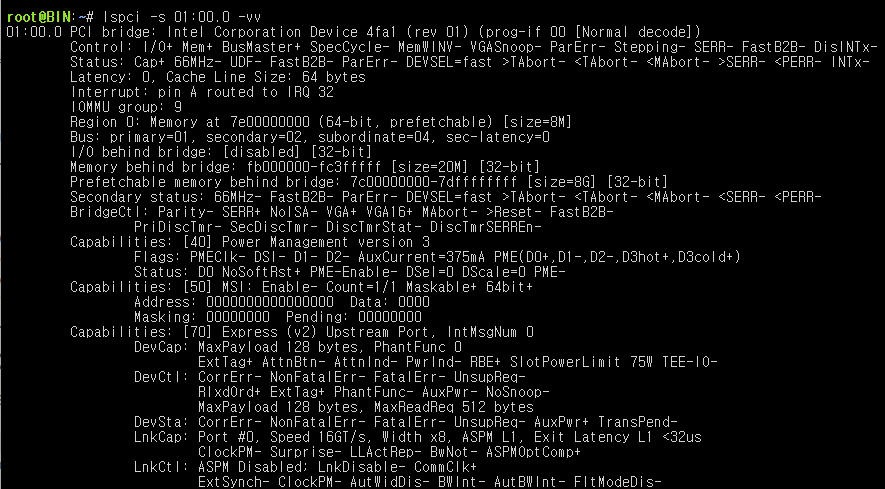
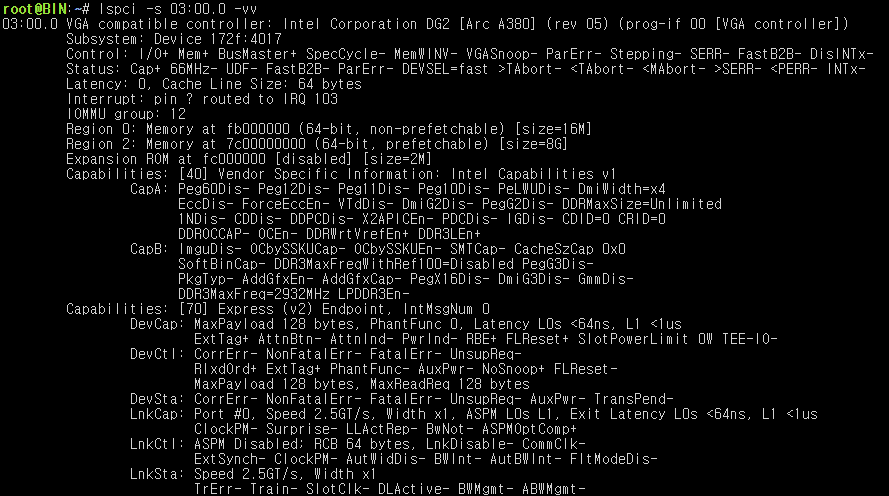
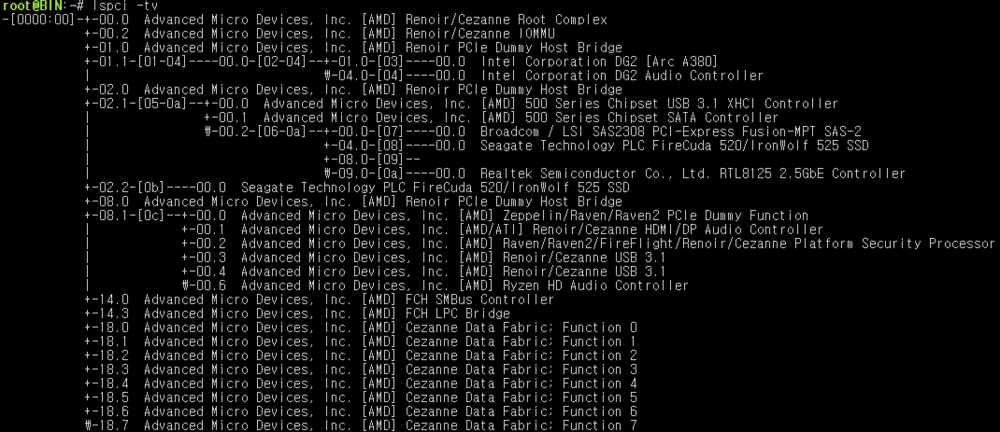
I copy-pasted an image, but it left some artifacts. I edited the post to clean it upHi everyone, I’m looking for some help diagnosing a weird PCIe link issue. 1) Problem summaryOn my ASUS TUF B550M system, my Intel Arc A380 negotiates as PCIe x1 (max appears to be x1). What’s confusing is that when I check the device at 01:00.0, it sometimes looks like the capability is x16/x8 (so it looks normal on paper), but when I check it elsewhere (ex: 03:00.0) the actual link reports x1. I’ve seen people mention “Arc sometimes shows x1 but isn’t actually limited,” but in my case hardware transcoding is unstable (sometimes works, sometimes fails with errors), so I don’t think it’s just cosmetic. I also tried a dummy HDMI plug (no change). 2) Software / versionsUnraid: 7.2.2 Jellyfin: 10.11.5 (Docker) FFmpeg: 7.1.3 Jellyfin with Hardware Acceleration: None → plays fine (but CPU usage is high). With HW accel enabled → transcoding is intermittent / errors occur. 3) Hardware specsMotherboard: ASUS TUF B550M (BIOS: latest) CPU: Ryzen PRO 5750G (APU) Also tested with Ryzen 7 5700X (same issue) RAM: SK hynix ECC 32GB ×2 (64GB total) GPU: Intel Arc A380 (75W, slot-powered) PSU: SuperFlower 850W Platinum HBA/RAID card: LSI 9207-8i (IT mode) (tested removed as well) 4) Cross-tests (important)The Arc A380 works perfectly on other motherboards: On an X670E board: works great (x8) On a B850 board: works great (x8) On my current ASUS TUF B550M, other GPUs work fine: GT 710 works RTX 5060 LP works I swapped cards back and forth to confirm. So it really seems like a compatibility/handshake issue between A380 and this specific B550M setup, not a dead GPU or a completely broken PCIe slot. 5) Everything I’ve tried (full list)Reseating / physical checksReseated the GPU multiple times (power + seating checked) Suspected it wasn’t fully seated due to case alignment → removed/disassembled I/O area and reseated carefully Cleaned GPU gold fingers with an eraser Tried dummy HDMI plug CPU / socket pressure testsLoosened CPU cooler pressure / adjusted mounting tension Reseated the CPU Swapped CPU (5750G ↔ 5700X) to test BIOS / settingsTested ASPM ON and OFF (both) BIOS reset / defaults loaded CSM OFF Resizable BAR ON Above 4G Decoding ON Forced PCIe speed: Auto Gen3 locked (no change) PCIe configuration simplification (lane sharing / conflicts)Removed the LSI 9207-8i HBA and tested GPU as the only PCIe card Removed all NVMe drives Still negotiates x1 Boot / kernel parameters (Unraid)Disabled boot options like “Wait for F1 if error” Tried booting with: append initrd=/bzroot i915.enable_guc=2 pcie_aspm=off pci=realloc Power suspicionConsidered PSU/power limits, but A380 is 75W and PSU is 850W Platinum, so I’m treating power as unlikely. 6) Questions / what I need help withAre there known cases of Arc A380 negotiating x1 only on certain B550 boards (BIOS/AGESA/PCIe training/compatibility)? Any idea why 01:00.0 shows normal capability, but another address like 03:00.0 reports the link as x1? What does that usually imply? Are there any specific BIOS options I should check beyond what I already tried (AER, PCIe native power management, SR-IOV, ACS, etc.)? What’s the best way to prove whether it’s “display-only x1” vs a real x1 limitation? (Which logs/commands are most reliable?) 7) Info I can provide immediately if neededFull lspci -vv output (especially the 01:00.0 and 03:00.0 sections) lspci -tv Thanks in advance—any pointers or “check this one specific thing” suggestions would be really appreciated.