Tom7320
Members
-
Joined
-
Last visited
Everything posted by Tom7320
-
Aaahhhhh. Alles klar. Danke! Das geht aber nur 1x pro Script, richtig?
-
Until yesterday, I didn't even know what a Docker Storage Driver was... 😁😂🫣 https://dev.to/abhay_yt_52a8e72b213be229/understanding-docker-storage-drivers-choosing-the-right-driver-for-your-containers-3m72
-
Ah. Danke. Ich las das "You can have the system pop up with a request to enter in arguments" so, dass es ggf. doch möglich sei...
-
It still seems to work perfectly! I will keep observing it further... What's the recommended Docker storage driver? Overlayfs2 or native? There was a problem with native Docker ZFS storage driver in the past: https://blog.chlc.cc/p/docker-and-zfs-a-tough-pair/ https://test-dockerrr.readthedocs.io/en/latest/userguide/storagedriver/zfs-driver/
-
Moin Hast du dafür eine Lösung gefunden? Ich habe bisher noch nicht rausgefunden, wie ich eine simple ja/nein Abfrage hinbekomme... Grüße Thorsten
-
Ok. Thanks again! I'll try this evening at home...
-
Tja. Gute Frage. Ich war schon im Studium "Jäger und Sammler" und habe so ziemlich alles an Literatur gesucht, gesichtet und archiviert. Und was ich mal hatte, das hab ich auch behalten. Ist jetzt 30 Jahre her und es wurde irgendwie nicht weniger über die Jahre. Ich lese viel. Leider kann ich mir nur einen Bruchteil davon merken... 🙄
-
Ja! Auf jeden Fall! Daher fragte ich ja anfangs auch nach einer indizierenden LAN Suchmaschine. Keine Ahnung wie Paperless skaliert, wenn man 40.000 PDFs auf einmal an es verfüttert. 🤷♂️
-
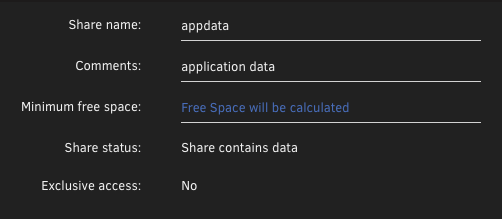
Aaaahhhhh. Thx! That is interesting! But it is not enabled by default (I never changed default settings): Is it advisable to enable this feature? I always feel uncertain if such a feature is not set as default....
-
Ja. Verstehe. Ab einer gewissen Menge verliert nur leider auch der Sortierende (ich) den Überblick, wo er irgendwann einmal was einsortiert hat. pdfgrep wäre schön und erstmal ausreichend. Das alles an Paperless zu verfüttern, wäre auch ein Weg. Aber nur, wenn ich es schaffe, die bestehende Ordnerstruktur beizubehalten.
-
Sorry! I misunderstood! /mnt/disk1|2, /mnt/tank are mountpoints of "real" file systems: root@Unraid:/mnt# mount | grep -e xfs -e zfs /dev/md1p1 on /mnt/disk1 type xfs (rw,noatime,nouuid,attr2,inode64,logbufs=8,logbsize=32k,noquota) /dev/md2p1 on /mnt/disk2 type xfs (rw,noatime,nouuid,attr2,inode64,logbufs=8,logbsize=32k,noquota) /mnt/tank on /mnt/tank type zfs (rw,relatime,xattr,posixacl,casesensitive) [...]/mnt/user is a mountpoint of a "combined", "virtual" fuse file system, I think: root@Unraid:/mnt# mount | grep user shfs on /mnt/user0 type fuse.shfs (rw,nosuid,nodev,noatime,user_id=0,group_id=0,default_permissions,allow_other) shfs on /mnt/user type fuse.shfs (rw,nosuid,nodev,noatime,user_id=0,group_id=0,default_permissions,allow_other) [...] So I asked myself whether it would be better to use /mnt/tank/appdata instead of /mnt/user/appdata.
-
https://pdfgrep.org/ Das wäre erstmal ausreichend, denke ich. Was muss ich machen um das in Unraid zu installieren? 🤔
-
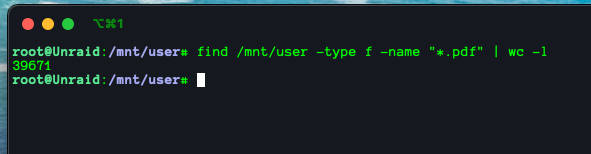
Ja, das stimmt. 9337 PDFs stecken in bestehenden Dokumenten. Bleiben aber immer noch rund 30.000 übrig...
-
Na dann werde ich mal versuchen einen separaten Paperless Container mit knapp 40.000 PDFs zu bewerfen.... ;-)
-
Ok. Thank you! I did the switch. It was really easy without data loss, without manual configuration. Just stopped the Docker service, switched to "directory", enabled Docker service, marked all apps in Apps -> Previous Apps -> Docker, waited an hour and that was it... Is there anything else I could do to prevent database corruption? What about the overlayfs? Better to use /mnt/tank instead of /mnt/user?
-
Ich wollte da jetzt gar keine Grundsatzdiskussion starten, wer wie seine Daten organisiert und durchsucht. Natürlich stecken auch meine Dokumente im engeren Sinne in Paperless. Meine Papers für die Arbeit in Zotero. Die Urlaubsbilder in Immich. Die Verzeichnisse appdata, isos usw. würde ich auch nicht indizieren. Allerdings habe ich noch tausende PDFs, die zwar halbwegs sortiert sind, wo es aber dennoch schön wäre, einen Volltextindex zu haben. Sharepoint macht das ja auch serverseitig, ist also nicht allzu exotisch, mein Wunsch. Wenn ich mal viel Zeit habe, werde ich mich mal in Apache Solr einlesen denke ich....
-
Interesting! "image" was the default in Unraid, so I didn't even question it. Why did Lime Tec decide to use an image? What are the advantages/disadvantages of this approach? Is it easy/safe to switch to "dir"?
-
Hi everyone, A couple of weeks ago, I moved from another Linux based server to Unraid. Since then, I have observed a noticeable increase in corrupt SQLite databases of Docker containers. I never had this problem in the past for many years. But now I see two or three corrupt databases per week?! Docker (docker.img and appdata) is stored on a mirrored ZFS pool consisting of two SSDs with no file system errors. I tried to increase the Docker stop timeout to 60 seconds, but this does not seem to help. I know, that this has been an issue in the past (there are many threads about it) but not lately anymore. Is database corruption still an issue, or am I an exception? Is there anything I can do to prevent this? Or anything else I could try? Thanks a lot! Thorsten unraid-diagnostics-20250819-0715.zip
-
Moin! Achso. Naja. Gar nicht ist auch ne Lösung... 😉 Nein im Ernst: sowohl Suche im Finder/Explorer über ein Network share als auch Linux "find" sind irgendwie keine Lösung für schnelles Suchen in großen Datenbeständen. Wundert mich ja schon, dass das so ein "Nischenwunsch" zu sein scheint. Beste Grüße
-
Hallo allerseits! Seit ein paar Wochen habe ich mein altes NAS durch einen Unraid Server ersetzt. Mit grundlegenden Linux- und Dockerkenntnissen (die ich mir einbilde, zu haben ;-) war es auch kein großes Problem Unraid aufzusetzen, rund 30 Docker Container ans Laufen zu bekommen usw. ... Was ich derzeit jedoch sehr vermisse, ist eine indizierende Suchmaschine für alle Shares. Ich meine nicht ein DMS wie Paperless, sondern eine lokale Suchmaschine für PDFs und Officedokumente aller Art auf dem Server. Gibt es so etwas? Apache Solr könnte ja eine Basis sein, aber das ist so komplex, dass ich mich da nicht dran traue. Wie macht ihr das? Wie mache ich tausende PDFs und andere Dokumente durchsuchbar und über ein Web GUI auffindbar? Besten Dank für Eure Ideen! Thorsten
-
Hi! I tried to set up a simple https webdav server using this webdav server written in go in a docker container. Since I can not directly install (activate) Tailscale for this container (it fails) I tried to access it via the Unraid host Tailscale address webdavs://unraid.funny-name.ts.net:6060. But this also fails. The solution was to export the Tailscale Let's encrypt cert with a custom user script into the docker container, restart the container and enable TLS within the webdav server itself. My question is, is there a simpler way to make webdav server accessible via Tailscale with TLS enabled? Thx a lot! Thorsten