





Bodo_SU
Members
-
Joined
-
Last visited
-
Vielen Dank für den Hinweis und die Geduld ;-) Ich war wohl noch nicht weit genug am Limit der 1. Platte. Jetzt habe ich noch mal 50GB hochgeladen und siehe da..... es funktioniert.
-
....und was habe ich jetzt falsch gemacht ?
-
etwas genauer



-
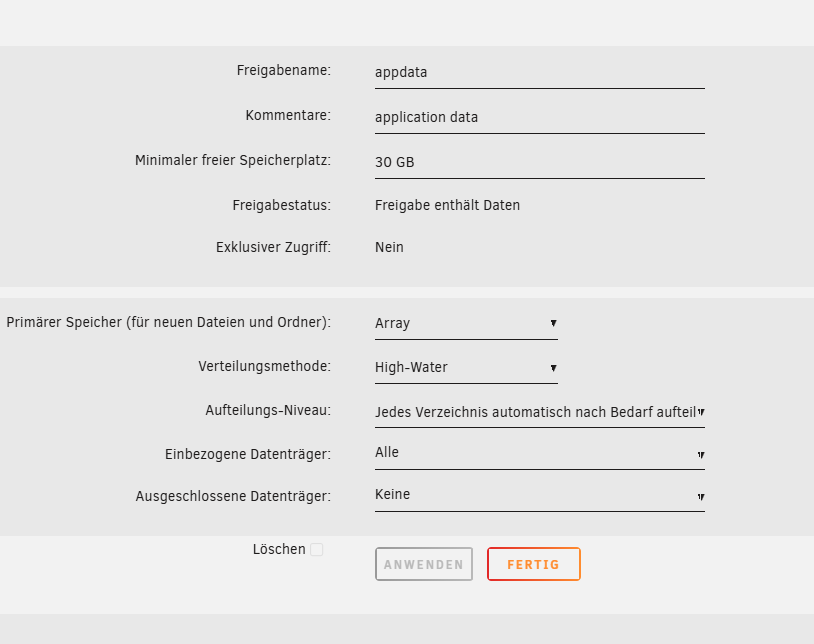
siehe Screenshot
-
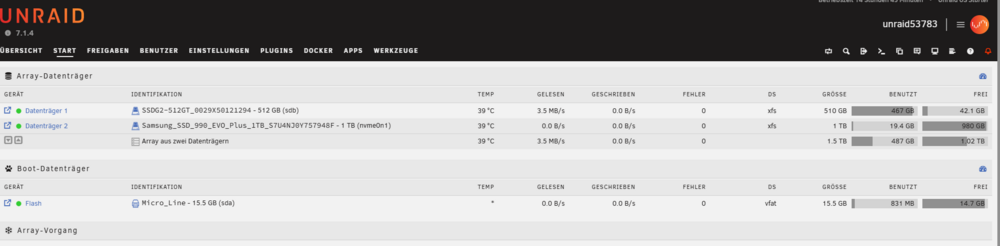
Hallo zusammen, ich bin Unraid Anfänger. Ich habe ein Array aus zwei Platten erstellt. Die erste ist nahezu voll und die zweite wird nicht aufgefüllt. Was mache ich falsch ? Viele Grüße Bodo
-
Hat sich erledigt, ich habe im Dateimanager das Docker Image gelöscht und Docker neu konfiguriert
-
Hallo nachdem ich Docker anfangs 480 GB zugewiesen habe, wir nun angezeigt, dass mein Datenträger mit 510 GB belegt sei. Daraufhin habe ich den Bereich für Docker auf 300 GB reduziert. Dennoch bleibt der Datenträger mit 510 GB belegt (voll). Was kann ich tun ? Viele Grüße Bodo

-
is there any solution ???


