




-
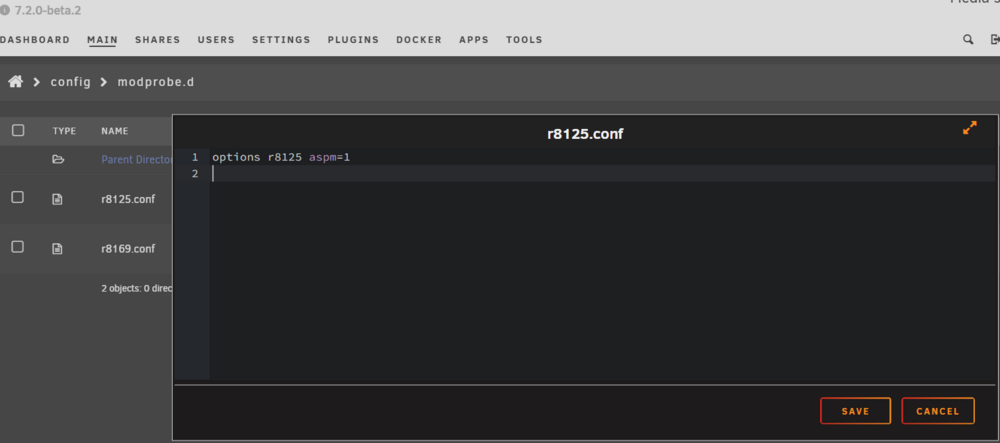
Yes you need to create the r8125.conf file and then restart your server. In the screenshot below you can see what I did...
-
I had never done an iperf test, but just tried using my Windows laptop as the client. My laptop and network switches are all 1GbE so I can't comment on 2.5GbE performance, but in the iperf3 test I averaged about 920 Mbits/sec, so seems like the settings are ok!
-
I don’t know for sure, I never made it this far in my experimenting with 7.1, but my guess is that the same tweaks of using this driver and modprobe conf file would have worked to get to higher c states as well. 7.2 has been working pretty well thus far so I’m not planning to downgrade to check though.
-
I just would like to post some appreciation for this driver and thank those in this thread for their suggestions. I have a Gigabyte B760M DS3H motherboard with an RTL8125 Ethernet controller. Adding the modprobe.d r8125.conf file with the line "options r8125 aspm=1" has taken me from only reaching C2 to now seeing C10 at times (mostly C8 though) with all of my docker containers running. This is on Unraid 7.2.0-beta2. This took my typical low load power use (drives spun down, 12 containers running but not doing much) from ~23 W to ~18W.

View in the app
A better way to browse. Learn more.

