





0xjroc
Members
-
Joined
-
Last visited
Everything posted by 0xjroc
-
I rebooted the server again, and it appears the user shares are back. Why it didn't do that the first time i rebooted, I don't know. It's fixed, thanks for your time looking into this @Frank1940 !!
-
I will look for the Krusader thread and post there too. It appears the location /user was deleted. I can still see almost all of my array data by accessing it through the built in unraid file manager, but under shares tab there are no user shares with the message "There are no exportable user shares". The disk shares still exist. After many years of changes and some silly mistakes I am wondering if starting fresh by wiping the usb would work? I have backed the usb up and know to copy super.dat to the new flash of the usb to save parity and my array, but I am wondering if that will resolve my issue or the user shares will still be gone after the fresh start if i save the array. I have successfully backed up the entire array (post deletion incident) to an external drive so copying it back to a completely fresh install isn't the end of the world, however I'm a little uneasy with all my important data only on the external drive during the process.
-
I was in the process of moving some files from the array to the cache pool using Krusader, and accidentally deleted the appdata folder from my array. It now says all user shares are deleted in my shares section. Is there any way to correct this? I have backed up the array files (post deletion mistake) to another external drive but am unsure on how to proceed. attached is the diagnostics file. Thanks in advance for your support! I really need to pay more attention to what I'm doing when working on this thing.... reclaimer-diagnostics-20251108-1029.zip
-
I just want to confirm I'm doing it right. Stop the array, assign the disk, and then start the array again and Unraid will take care of the rest?
-
here you go, thanks again for your help! reclaimer-diagnostics-20251003-1203.zip
-
it completed, output of blkid /dev/md2p1 is: /dev/md2p1: UUID="31b5f662-7d37-43fa-93ee-b65c20e8bb92" BLOCK_SIZE="512" TYPE="xfs"
-
It's printed about 100 lines of ..... after saying "Phase 1 - find and verify superblock... bad primary superblock - bad magic number !!!" Any use installing the removed 2TB drive and trying again?
-
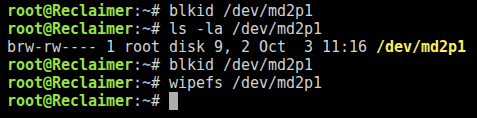
same thing as blkid, returns to console without any output
-
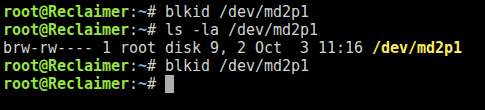
nothing shows up in the terminal with that command, but it exists...

-
I'm fairly certain I was using xfs, as disk1 is also an xfs disk and I wanted them to be the same, but i could be mistaken and was using zfs. @trurl I cannot seem to find a way to check filesystem in the webUI based on the instructions you linked, I'll keep trying but as of now, nothing is showing me a way to check it.
-
Here's the fresh diagnostics after starting in maintenance, with parity already valid checked. then stopping, unassigning the drive and starting again. Thanks again. I'm curious what you're looking for in the diagnostics. I'd love to learn more about this stuff! reclaimer-diagnostics-20250930-1533.zip
-
Just to confirm, should I have the failed 4tb disk installed or the replacement for this procedure?
-
Digging through my chatgpt logs I can see I posted a smart report from the failing 4TB drive that was taken on September 2nd, so I must have removed the 2TB drive prior because it was when I turned on the system after removing the 2TB drive the harddrive erros began and the array would not start. Thanks again!
-
Yeah, I got a little overconfident and trusting of what the AI's were telling me instead of coming here first. It's definitely my fault and a painful lesson to learn! Some of the files were backed up to cloud services, but some I don't have other backups for yet. I am in the process of putting together a second NAS for offsite backup of this one, but haven't completed it yet. Live and learn.... I do have diagnostics from before I hit new config. One dated September 22nd and the other September 2nd. I've attached both. Thanks so much for your help with this! reclaimer-diagnostics-20250922-1219.zip reclaimer-diagnostics-20250902-2222.zip
-
I do still have the 2tb drive. No data was ever transferred to it, and I don't know if it was ever added to the array. I have attached the Diagnostics zip file as well, taken just now without the 2TB drive installed. Thank you!! reclaimer-diagnostics-20250929-1332.zip
-
I have a 4TB drive that failed and am trying to replace it with a new one. My array has one 4tb parity drive(sdc), one healthy 4tb data drive(sdd), the failed drive(sde, which has been replaced with a new one). Where I went wrong was trusting AI to walk me through my situation. I had added a spare 2TB drive to the machine but when I was testing it there were smart errors and so I then removed it. The 4tb drive started to fail catastrophically once the 2tb drive was removed. Chatgpt told me to select "new config" and retain drive assignments, but I'm worried I have now ruined my chance at avoiding data loss on that failed drive. I checked the parity-checks.log in my flash backup download and it stated the last parity check was Sep 1 and was a non correcting parity check. This was before I had added the 2TB drive that had smart errors, and I believe I had not added it to the array. I tried to use ddrescue on the failed drive but only a very small percent of the data was recoverable. The array would not come online with the failed drive, and I have not started it since selecting "new config" and have given up trying to ask AI for help. Any help would be greatly appreciated on what my next steps should be, or any further information about my setup may be required to assist in troubleshooting.
