





Einar Eliassen
Members
-
Joined
-
Last visited
Everything posted by Einar Eliassen
-
So I just formatted the drive, and it all seems to be stable, for now at least. Hoping the random drive faults wont happen again now that I hopefully have the best possible powercable that is available to me.
-
So it stopped trying to fix it now I guess. The status window kinda bugged out, so I couldnt see the final message. But I can now press FIX again if I want to fix it. But that will just result in nothing again I think. So I guess my next step is just to format the sucker....
-
Encrypted XFS
-
Yes, it was running all night, then this morning I had the option to click FIX. It has been working since then on "fixing". Taking way longer than I thought, so maybe not sure it will work. But I can take the loss of the drive if needed, its a price I am willing to pay to get this up and running again.
-
I kinda improvised as the disks didnt show up as faulty. Just the single one. Pretty sure there wasnt anything precious on that drive, just annoying to have it replaced. But if this works I hope the system will be stable again. I am hoping the root of all this evil was the cable splitters. Because of all the molex connection needed. There simply wasnt enough of them provided by the PSU. One of the cables was power to SATA + adapter for SATA-to-Molex-splitter. So yeah...that might have been a bit of a hack to get it all powered. Now I have 2 cables with 4 molex-power connectors each from the PSU manufacturer.
-
Running through the night it just finished and found filesystem corruption. Pressed Fix....is this going to run for the same amount of hours ?
-
I have started a check on the drive....looks like its gonna take many hours.
-
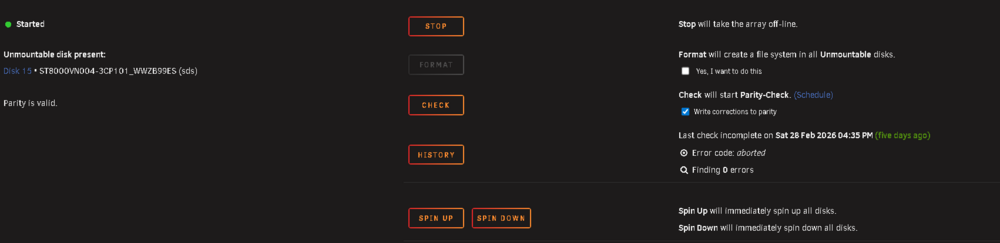
Disk 15 is now showing as unmountable: wrong or no filesystem If I click to format this, it doesnt seem this will rebuild it ?
-
They were the old disks but they were disabled. Emulated. So to try to use them again/rebuild, I try to have them switch places. But now it seems to have them both working again ? Right now Write Corrections to Parity is checked. I kinda want to uncheck it, start the array up in normal mode and see if I can browse the drives for any data.
-
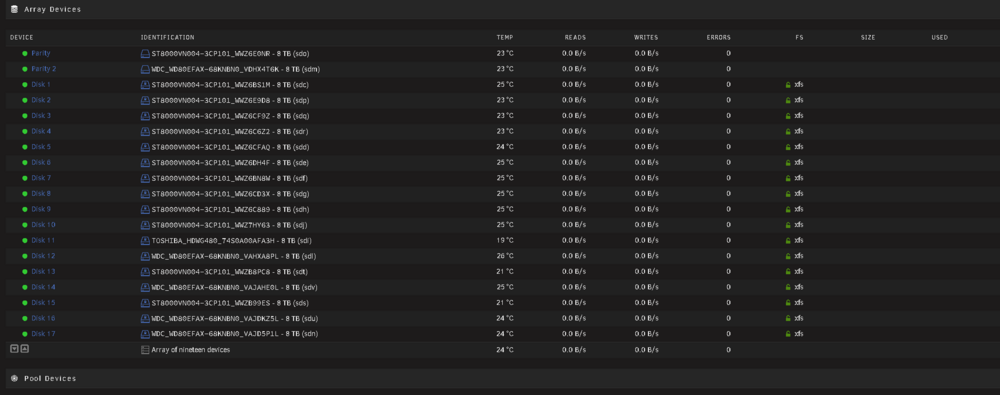
After just starting the array again the first time it all looks good ? All disks are green. Do I still need to remove and assign the drives again ?
-
This will not erase the data in the array right ?
-
/dev/sdu7: UUID="e45da7a6-4b00-4e35-9ff3-53af5d1a590a" TYPE="crypto_LUKS" PARTUUID="b3419e82-856d-4bd7-8f33-4a7c3b80ab74"
-
Disk /dev/sdu: 7.28 TiB, 8001563222016 bytes, 15628053168 sectors Disk model: WDC WD80EFAX-68K Units: sectors of 1 * 512 = 512 bytes Sector size (logical/physical): 512 bytes / 4096 bytes I/O size (minimum/optimal): 4096 bytes / 16773120 bytes Disklabel type: gpt Disk identifier: AD4E49B8-BC08-4B08-8BEC-E58153393E5E Device Start End Sectors Size Type /dev/sdu1 2048 4982527 4980480 2.4G Linux RAID /dev/sdu2 4982528 9176831 4194304 2G Linux RAID /dev/sdu5 9453280 5860519007 5851065728 2.7T Linux RAID /dev/sdu6 5860535104 7814023007 1953487904 931.5G Linux RAID /dev/sdu7 7814039104 15627846207 7813807104 3.6T Linux RAID
-
I booted into safemode to see if that helped me do anything....but I guess not. nexus-safemode-diagnostics-20260305-1736.zip
-
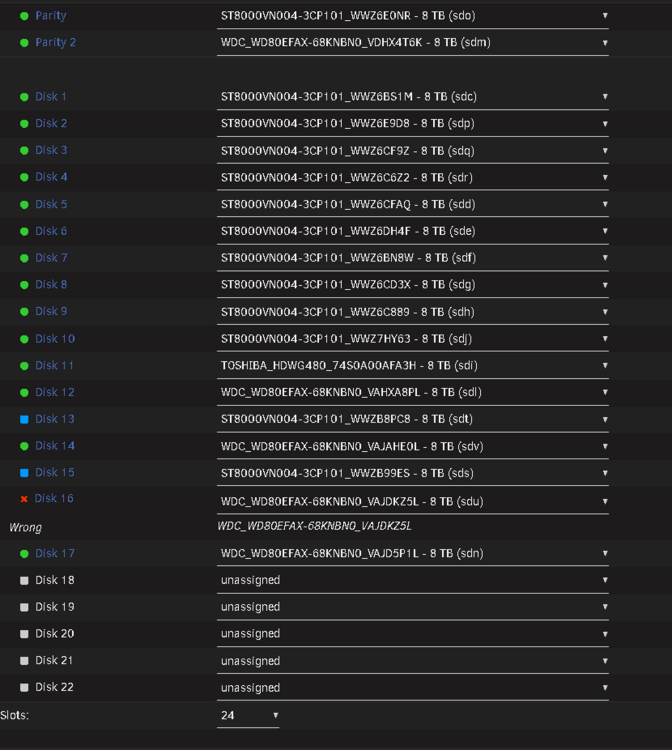
Ok, I have finally gotten hold on some new cables. So to get this working again, I tried switching around the 2 drives that were failing to get them to erase and rebuild. But as I was doing this...drive 16 suddenly reported to the a wrong drive. And it was stating which drive was the correct one (serial number), but that IS the drive assigned in that slot. What is going on ? Now the array wont start in normal or maintenance mode!
-
Yes, there are some splitters because the backplane has those Molex power connections which doesnt exist on current PSU cables these days. I will take a new look at how its all managed and maybe redistribute the load somehow. How do I get the drives enabled again for a new try ?
-
I have kept the drives that were failing because I had a feeling something wasnt right. So I can maybe get them working again. But how can the connections be stable for like 6 months...then suddenly become unstable? Server is sitting pretty with no changes....
-
I have an array of 17 drives with a XFS encrypted filesystem. Last months I have had some problems with drives suddenly failing, pretty new drives. And when I replace them, the new ones fail right away...or after hours/days. Its all in a pretty decent enclosure with SAS backplate. All drives are 8TB with 2 drives for parity. Powersupply is 1200W (I overestimated a bit, intend to add GPU later) and is currently peaking at 320W. I am left with either a cable or backplate problem. But that also seems a bit unlikely. I had this issue 2 months ago and couldnt for the life of me figure it out. I ended up swapping drives twice, and it suddenly worked fine again. Now its back. I am pretty sure I have 3-4 drives on my shelf that actually are working fine. Also, this time a ghost-drive has appeared. I have double-checked the serial of all drives 4 times, yet the system claims there is an active drive plugged in, that is not there. I think I have created a diagnostic file, I can see some error about the drives disconnecting. Hoping someone more experienced in Unraid can help out. EDIT: The current problem is that 2 drives have failed, I replaced them with 2 new drives that failed immediately as well. nexus-diagnostics-20260228-1037.zip



