





casper2467
Members
-
Joined
-
Last visited
-
I was able to add a Windows and Ubuntu VM's. I added VPNs to them both. I was able to download docker and download containers.
-
Could a VPN be installed to possibly solve the ISP issue?
-
Docker is running
-
I was able to download plugins.
-
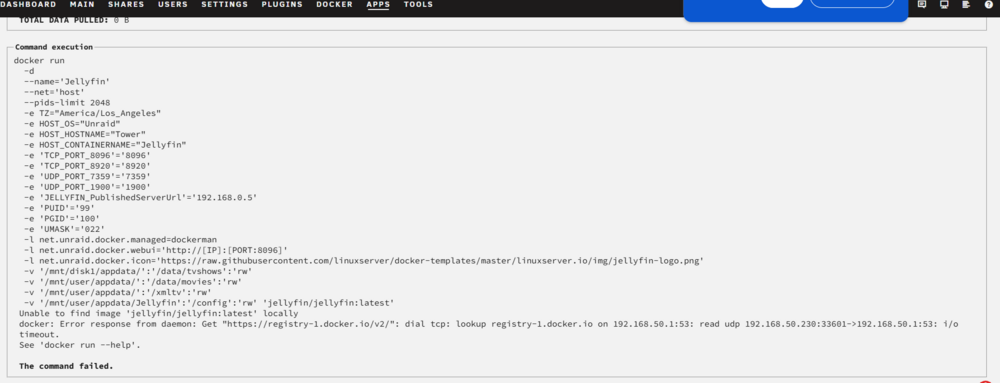
I was able to install CA after using a new flash drive. Still was not able to install containers. Attached the diag and screenshot of the download fail. tower-diagnostics-20260110-1323.zip
-
I'm leaning towards my ISP being the issue.
-
DNS Set to 208.67.222.222, 208.67.220.220. New Diag attached. tower-diagnostics-20260110-0058_2026_01_10_1259.zip
-
Community Applications show "not available".

-
New Diag file with current config. tower-diagnostics-20260110-0046_2026_01_10_1247.zip
-
This all happened before I tried adding the VLAN. The VLAN was a last desperate attempt! It has since been removed. I still have the same issues.
-
I am not able to consistently connect to community applications. I'll remove the plugin and download again. This sometimes gives me access to the applications. When I do have access, i can not download containers. Unraind 7.2.3 My IP matches my LAN gateway. I can ping 8.8.8.8, 8.8.4.4, 1.1.1.1, Google.com, local gateway, any URL all from the terminal. tower-diagnostics-20260109-2249.zip
-
casper2467 joined the community
-
I had Unraid running fine a a few months ago. I changed ISP and waited to run a new CAT cable. In the mean time I build a new server tower with the same HDDs. I am now able to parodically connect to the Community Applications. When I can connect the container downloads time out.

