




Skip to content
View in the app

A better way to browse. Learn more.

Unraid

A full-screen app on your home screen with push notifications, badges and more.

To install this app on iOS and iPadOS
  1. Tap the Share icon in Safari
  2. Scroll the menu and tap Add to Home Screen.
  3. Tap Add in the top-right corner.
To install this app on Android
  1. Tap the 3-dot menu (⋮) in the top-right corner of the browser.
  2. Tap Add to Home screen or Install app.
  3. Confirm by tapping Install.

Nicalion

Members
  • Joined

  • Last visited

Everything posted by Nicalion

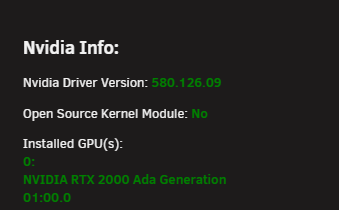
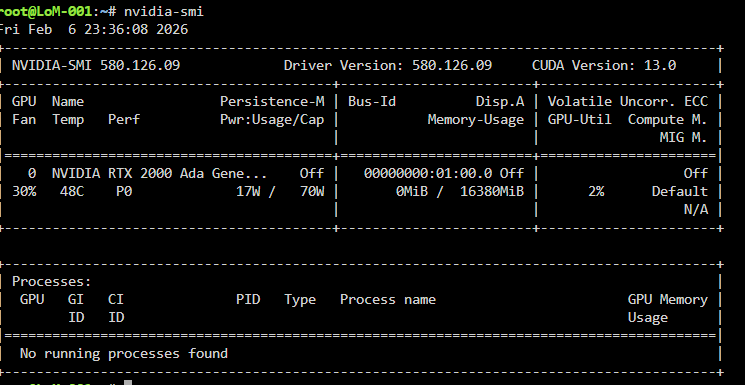
  1. Hi everyone, 👋 I already talked about this problem on the Discord server, and they suggested that I open a post here. My issue is the following: I recently installed my first GPU, an RTX A2000 Ada Gen with 16GB. When the Nvidia Driver Plugin is not installed, my CPU and RAM usage are completely normal. ScreenRecording_02-05-2026_22-37-39_1.mov However, as soon as I install the Nvidia Driver Plugin in order to use the GPU, my RAM usage almost doubles, and one CPU core is constantly at 100% usage. Overall CPU load also increases significantly. ScreenRecording_02-05-2026_22-18-35_1.mov lom-001-diagnostics-20260206-2222.zip Important is I tested it for the latest and the 580. driver! I would really appreciate any help with this issue. Thank you! 🙏🏻 Nicalion
Account

Navigation

Search

Search

Configure browser push notifications

Chrome (Android)
  1. Tap the lock icon next to the address bar.
  2. Tap Permissions → Notifications.
  3. Adjust your preference.
Chrome (Desktop)
  1. Click the padlock icon in the address bar.
  2. Select Site settings.
  3. Find Notifications and adjust your preference.