killian
Members
-
Joined
-
Last visited
Everything posted by killian
-
Currently running mover after setting Disc2 as "Emptying disk(s)" in Global Share Settings...
-
I posted in Reddit about this same topic and some people recommended using Unbalance but there's also an interesting suggestion of utilising mover. Thoughts? - https://www.reddit.com/r/unRAID/s/02vKfzm4yQ
-
So I just had a disc fail (link to original post), I'm going to remove the disc and but not replace it immediately, I just want to move the existing data to my current array discs and disable emulation. So from reading, I think I should be able to copy the files from mnt/deadDisc to mnt/GoodDisc in Krusader, then remove the deadDisc and then rebuild parity? I want to sanity check this stuff before I start moving files and break anything so advice/handholding is appreciated. I've checked and all I have on the deadDisc is media (movies/tv) and some torrents. If I copy those to the corresponding folders on goodDisc, I'm thinking/hoping Plex and QBittorrent et al will continue working just fine? I've stopped those images for now anyways.
-
ST12000NM0008-2H3101-20260215-1724.txthomenas-diagnostics-20260215-1735.zip
-
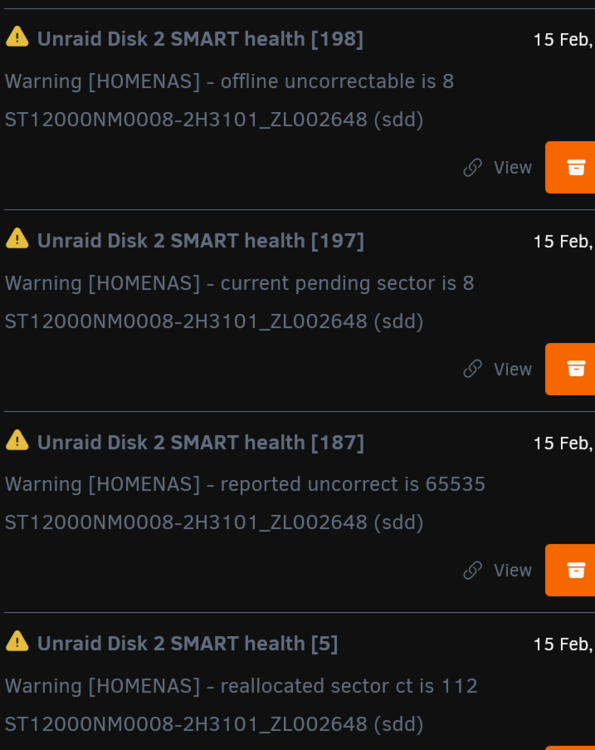
Hmm extended test ended out of no where, now I can't start any smart test. Log just says "Read SMART Log Directory failed: scsi error aborted command" Also got the following warnings since boot up. Reallocated is now at 216 I'm guessing disc dead, check warranty?
-
I've swapped the sata and power cables and rebooted. 0 errors listed but the disc is still disabled. Short smart completed without error. I've kicked of an extended now. If that's clear do you think I'm good to re-enable the disc?
-
When I click Start short SMART test is stops instantly. This is what is shown under SMART Selftest history and SMART error log. === START OF READ SMART DATA SECTION === Read SMART Log Directory failed: scsi error aborted command Read SMART Error Log failed: scsi error aborted commandHere's the downloaded smart report. I'm unsure how to check connections as you suggested? ST12000NM0008-2H3101_20260210-1354.txt
-
I have a 5x12tb drives + 1 parity. Today I logged into my NAS to find the following alerts/errors. The drive is from 2024 and currently listing 2496 errors. Currently my array shows as "Read-Check 63.5 % • Paused" and I have the option to resume Can someone please review the diagnostics and let me know how I should proceed? I've not done anything else since seeing the error. The drive is currently disabled and emulated. homenas-diagnostics-20260210-0258.zip