Angelis
Members
-
Joined
-
Last visited
Everything posted by Angelis
-
When open those shares - I dont see any data. I suppose all I can do is start sorting though the lost and found and put them in the right places. Any advice? Also while Im here. Are the appdata, domains,system and Media supposed to be "unprotected"? I have only 1 cache drive, so Ive read thats the reason. Just confirming. I think I'll move Media to Array but not 100% sure if that means it will be slower to access via Plex.
-
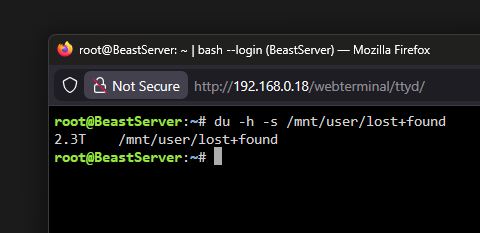
Looks like thats all the data I've also tried to mount the old Hard Drive - No luck, I tried it on a SATA cable that had a working HD.
-
Not at home to enter it yet. I'll post that before I do anything else - thanks for all the help thus far.
-
I do - but hesitant to tinker with the new setup - I suppose if theres no data on the new setup (other than the Lost+Found) theres little risk and only benefit. Will give it a go. When mounting it as a standalone - anything I need to lookout for or take into account?
-
Yeah I still have the original drive - was tempted to try mount it - probably need to buy a SATA-USB connection cable (Happy to take recommendations) - All my drives are WD 4TB Red Plus 3.5" So I'm guessing the Share config files being in the Share folder and not showing up doesn't mean much when it comes to the data right? I have backups but its more the time spent setting it all up that I'm lamenting.
-
I see some data but not sure if its everything. Was hoping reactivating the shares would allow me to find the data in their original locations
-
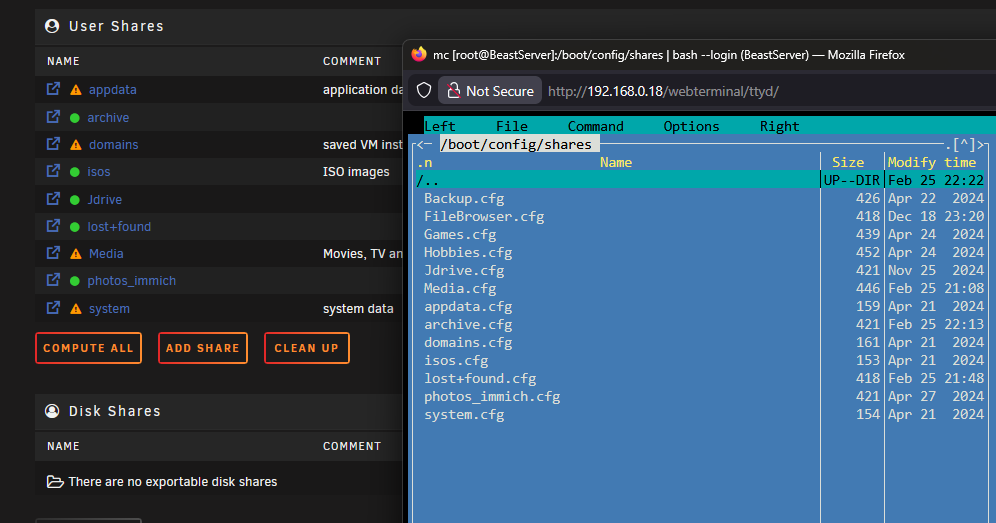
I found via MC the old config files for the shares - not sure if this helps. I suspect all my data is in the lost+found file. Not sure where to enter that command. Im quite new to this (followed tutorials for setup but that was step by step).
-
Hi there, first time having an issue after 2 years. One of my Hard Drives died but I had a parity drive. Installed the new one, plus an additional one. Parity began and completed. Things seemed to be working correctly. Immich started having issues and then my Shares disappeared. I ran xfs repair and it enabled the array to work again but only a few shares returned but I cannot see data within them. Still says theres data within it though. Just cant view it. Not sure what the next steps could be. beastserver-diagnostics-20260225-2130.zip