rbf351
Members
-
Joined
-
Last visited
-
having an issue where the backup fails immediately. added what you have posted above into the SMB settings, and getting this in the logs the username and password are correct... chpasswd: password for 'timemachine' changed Found user 'avahi' (UID 86) and group 'avahi' (GID 86). Successfully dropped root privileges. avahi-daemon 0.8 starting up. WARNING: No NSS support for mDNS detected, consider installing nss-mdns! Loading service file /etc/avahi/services/smbd.service. Joining mDNS multicast group on interface eth0.IPv4 with address 10.1.1.2. New relevant interface eth0.IPv4 for mDNS. Joining mDNS multicast group on interface lo.IPv6 with address ::1. New relevant interface lo.IPv6 for mDNS. Joining mDNS multicast group on interface lo.IPv4 with address 127.0.0.1. New relevant interface lo.IPv4 for mDNS. Network interface enumeration completed. Registering new address record for 10.1.1.2 on eth0.IPv4. Registering new address record for ::1 on lo.*. Registering new address record for 127.0.0.1 on lo.IPv4. Server startup complete. Host name is timemachine.local. Local service cookie is 3365937263. Service "timemachine" (/etc/avahi/services/smbd.service) successfully established. INFO: CUSTOM_SMB_CONF=false; generating [global] section of /etc/samba/smb.conf... INFO: Creating /var/log/samba/cores INFO: Avahi - generating base configuration in /etc/avahi/services/smbd.service... INFO: Avahi - using timemachine as hostname. INFO: Avahi - adding the 'dk0', 'TimeMachine' share txt-record to /etc/avahi/services/smbd.service... INFO: Group timemachine doesn't exist; creating... INFO: User timemachine doesn't exist; creating... INFO: Setting password from environment variable INFO: INFO: CUSTOM_SMB_CONF=false; generating [TimeMachine] section of /etc/samba/smb.conf... INFO: Samba - Created Added user timemachine. INFO: Samba - Enabled user timemachine. INFO: Samba - setting password INFO: SET_PERMISSIONS=false; not setting ownership and permissions for /opt/timemachine INFO: Avahi - completing the configuration in /etc/avahi/services/smbd.service... INFO: running test for xattr support on your time machine persistent storage location... INFO: xattr test successful - your persistent data store supports xattrs INFO: Detected filesystem for /opt/timemachine is btrfs INFO: entrypoint complete; executing 's6-svscan /etc/s6' dbus socket not yet available; sleeping... nmbd version 4.22.8 started. Copyright Andrew Tridgell and the Samba Team 1992-2025 smbd version 4.22.8 started. Copyright Andrew Tridgell and the Samba Team 1992-2025 become_local_master_stage2: ***** Samba name server TIMEMACHINE is now a local master browser for workgroup WORKGROUP on subnet 10.1.1.2 ***** apply_new_nt_acl: inherit_new_acl failed for .com.apple.timemachine.supported-36e4d899-8310-4276-9f68-3d4a6c88a18 with NT_STATUS_ACCESS_DENIED
-
just found it in the root directory, and moved it to where it needs to be seems like it's now running properly. Thank you
-
I ran the command for YOLOv9 for other detectors. It completed with no issues, but there is no /config/model_cache/yolo.onnx file. the script says exporting to client directory, but where exactly is that?
-
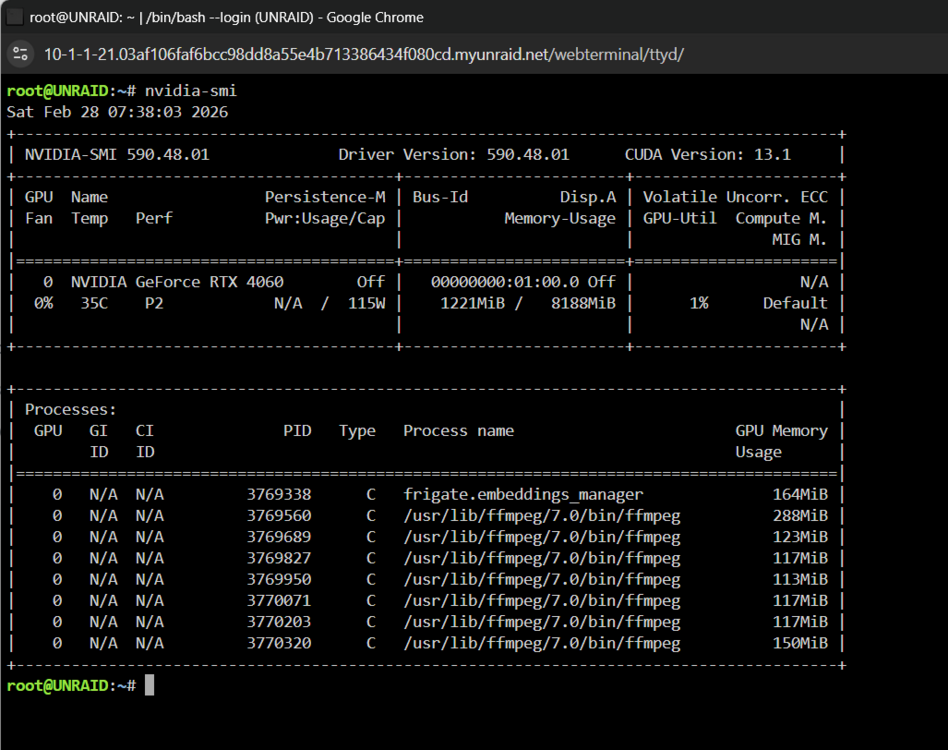
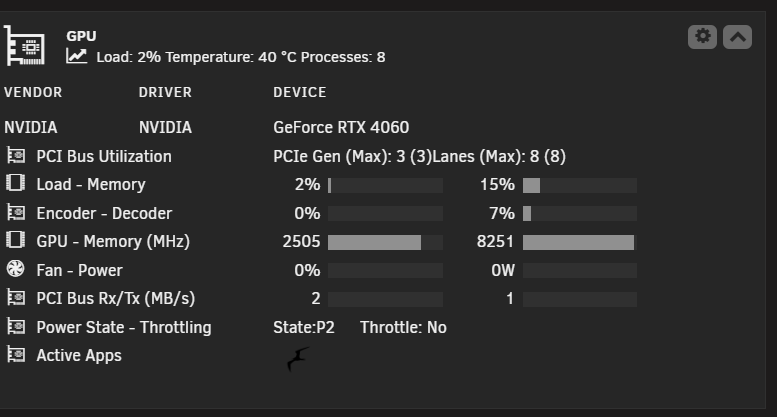
I'm using it for both, or at least that it what I thought I was doing I'm using the ghcr.io/blakeblackshear/frigate:stable-tensorrt branch looks like I was missing ffmpeg: hwaccel_args: preset-nvidia from the config file now I am seeing this when running nvidia-smi I am unable to get the detector to function when i put this line into the config file detectors: tensorrt: type: tensorrt device: 0 #This is the default, select the first GPU Frigate crashes.
-
hoping for some help as I can not get my GPU ( Nvidia 4060) workingfrigate-logs.txt When I installed frigate it was using the GPU, then after adding a few camera it just sits idle, and only uses the CPU Is there something I need to change in the config file?