





jandcolsen
Members
-
Joined
-
Last visited
Everything posted by jandcolsen
-
So, it was somehow a problem with the flash drive. I do not know how it worked with the old hardware, but I switched drives according to the instructions linked by trurl and it has been up and stable for over 36 hours. Thanks to all of you for your help!
-
Do you think that is my best option at this point?
-
Should I try to write my flash backup on the new flash drive? How does that work with my license?
-
No, I don't. I didn't think I would need any because it worked perfectly fine. Including my Hytale server having absolutely no issues after using it for several hours.
-
Hopefully that helps. I tried my idea out and created a new Unraid flash with a trial version. It stayed up for over 13 hours before I shut it down to try out your suggestions. That makes me think it might all be flash related somehow, and not necessarily a corrupted file. What do you think?
-
It just crashed again a couple of times so here is the new syslog: syslog-127.0.0.1.log
-
Ok, I captured a log file. Here it is: syslog-127.0.0.1.log
-
Ok, I will try that. Thanks!
-
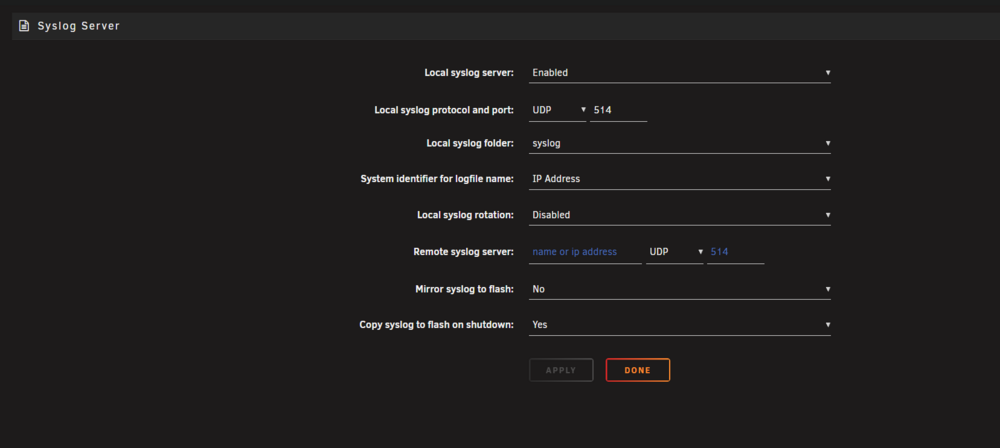
Here are my syslog settings:
-
Over the past couple of days I enabled the syslog server and got the server to crash multiple times. But, there are no files in the syslog folder. I tried different setting for the syslog server and still nothing. With my inexperience I do not know the correct or best way to setup a syslog server. I used the directions linked by Veah, but it doesn't really detail all of the possible settings - if they are even applicable. Unless you have something else I should try I think this is what I am going to do: I am going to install the trial version of Unraid on another flash drive and see if it will be stable that way. Since I only have the two services running and a handful of plugins it shouldn't take more than a couple of days. Should I pursue this course?
-
Can the flash be the problem when it works perfectly in the old hardware? I will set it up for local syslog since I have been able to reboot it with no problem.
-
Ok, I will see about enabling that and get back with you. Thanks!
-
Does this mean I cannot get diagnostic information about the actual issue since I do not know when it will crash in that way?
-
I have tried both USB 2.0 ports on the back of the motherboard, and I have used a small hub attached to the USB 2.0 header on the motherboard. Neither port prevents the issue.
-
I hope this is the right place to post this because this is the same situation that I am dealing with right now. I have been trying to move my existing Unraid server to completely new hardware and am running into an issue. First some background: I have been using Unraid for a total of six months. I have built multiple PCs over many years, starting in the early 2000s. At the end of last year I got tired of paying for streaming services so I researched starting a Jellyfin server, which I was able to do thanks to Unraid. I started using an HP AIO to see how easy it was going to be, then transferred everything to a Dell Optiplex with a SATA SSD 500GB as cache and a three bay DAS for my parity disk and two 2TB drives. Interestingly, this hardware change did not cause any issues. I knew that I did not have much of an upgrade path using that hardware, but it was what I had around to start with. I got Jellyfin working perfectly and decided to start collecting parts for a new server build. I recently finished building it and followed Spaceinvader One's video of how to transfer to new hardware, and this begins my ongoing issue. The server will boot up and act perfectly normal for a random interval of time (usually between 15 minutes to multiple hours, but never more than eight) and then the server crashes and I see a warning about my flash drive being corrupted or disconnected. I can reboot the server with no issues, but it will disconnect again at a random time. I will attach the newest diagnostic log for more information. I do not believe that the issue is solely a fault of my hardware because I can boot a live instance of KUbuntu and have it running for many hours (well more than 8) with no issues. I also do not believe that my flash drive is corrupted because I can re-setup with the old hardware and it works with no issues of any kind. Since I am so new to Unraid and self-hosting I am sure that the problem is my lack of experience. Here is what I have tried so far: Reinstalling Unraid to my flash drive using a backup Booting into safe mode without plugins (I thought the issue was a plugin incompatibility with the hardware, but the second time I did this it only lasted 15 minutes before crashing in the same way) Stopping all Docker containers collectively and individually (I am only running two services on my server: Jellyfin and a Hytale game server for personal use) Removing and reinstalling all plugins: Appdata backup, CA Cleanup Appdata, Community Applications, Dynamix Active Streams; System Buttons; System Information; System Temperature, Fix Common Problems, GPU Statistics, Intel GPU TOP, NUT, Tailscale, and Unraid Connect. Changing various BIOS settings like enabling legacy USB, disabling XHCI hand-off Other things recommended by multiple web searches that I cannot remember right now. The only thing that works is going back to the old hardware. Here is a list of the new hardware (I do not have a complete list of the old hardware as I do not want to go to the trouble of building it again if I can help it): Jonsbo N3 case Aorus b760i pro DDR4 Intel i5 12600k PNY 32GB DDR4 RAM LSI HBA card (IT mode) for the 8 HDD bays (I am trying to add one extra drive in addition to the three already mentioned, but the server crashes before disk-clear finishes. This is not the cause of the problem as I have tried it when I finished the build with only the original three drives. The LSI card itself is not the issue because it still crashed using the four onboard SATA ports before I got the LSI card.) Corsair 750 watt PSU Still using the original four drives; 1 SATA SSD as cache, one 8TB parity, two 2TB data. (plus the new 4TB unassigned disk mentioned above.) Other than the diagnostic ZIP let me know if you need any more information. Any help is greatly appreciated! jacricorp-diagnostics-20260312-1759.zip

