





m3sl
Members
-
Joined
-
Last visited
-
@uncut-commodity4118 No issues after i downgraded to v7.2.6. I was on internal boot as well in 7.3.0 and i downgraded from Tools > Downgrade OS and kept my USB plugged in before downgrading. I was surprised that my USB was not backlisted and booted just fine.
-
Until now my server is up for 10 days with no issues. What i have done: Downgraded to v7.2.6 Disabled CPU C state & Turbo mode. Lowered my RAMs frequency one step. Recreated my docker image again. Installed my apps. No crashing and no DB corruptions so far. i'll mark it as solved and stay on 7.2.6 for a while.
-
Hi, Can you see the iGPU name under Plex transcoder for example? if not, Unraid is not seeing it. Even if you add (--device=/dev/dri) in extra parameters I had the same issue, checked from bios it was bypassing the iGPU and the server was only using my Nvidia GPU. I had to attached a dummy monitor and enabled iGPU Multi-Monitor. Doing this enabled igpu for me on Unraid and i was able to see my iGPU on Plex again. in my case this was the settings for my motherboard https://www.asus.com/us/support/faq/1045574/#bbb I hope above can help you.

-
UPDATE: I modified some settings in the bios after above segfault errors Disabled CPU C state. Lowered my RAMs frequency one step. Recreated my docker image again. Installed my apps. After that the server is up for ~4 days, i didn't see any segfault errors, no containers crashing and no DB corruptions. I'll probably stay on 7.2.6 for a while.
-
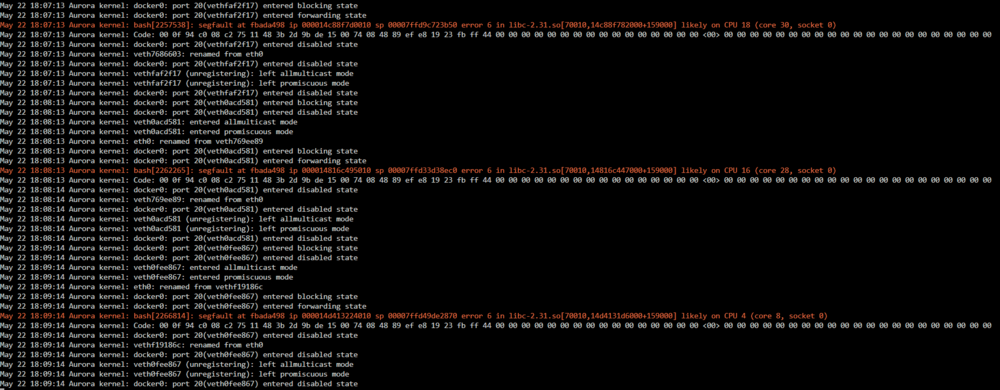
Hi again, I have downgraded Unraid to 7.2.6. After 24 hours the server is stable, i will monitor it for 1-3 days and close/mark the topic as solved. I didn't see any syslog errors until just now, a few segfault "error 6 in libc-2.31.so", below are the logs;
-
Hi JorgeB, Thanks for your reply, i was actually using this cpu since July 2024, never had any issues and the server would be running for months. Can it be related to the Kernel upgrade when i upgraded to 7.3.0? Also, if i wanted to downgrade to 7.2.5 or 7.2.6, is it possible?
-
Hi All, I really appreciate if someone can help and support me to fix the issues i'm facing I have upgraded recently to Unraid 7.3.0 from 7.2.6. After the upgrade, i encountered WEB GUI and SSH freeze and had to do unclean shutdown. After that most of my containers started to crash and some are reporting database corruptions. Reinstalled my apps from Previous Apps. Just now, Docker daemon crashed and not starting tried to start it manually but failed. root@Aurora:/var/run# /etc/rc.d/rc.docker status Docker daemon is not running. root@Aurora:/var/run# /etc/rc.d/rc.docker start rc.docker: Starting Docker daemon... rc.docker: Docker daemon... Failed. rc.docker: Starting network...i'm seeing in syslog some red highlighted related to CPU, segfault and Plex May 21 14:50:35 Aurora kernel: Plex Relay[421145]: segfault at 0 ip 0000149aa81f80fd sp 00007ffffabde4c8 error 6 in Plex Relay[3640fd,149aa7fea000+322000] likely on CPU 4 (core 8, socket 0) May 21 15:28:32 Aurora kernel: smartctl_type[557680]: segfault at 0 ip 0000000000000000 sp 00007ffe34489cc8 error 14 likely on CPU 14 (core 26, socket 0) May 21 15:28:32 Aurora kernel: Code: Unable to access opcode bytes at 0xffffffffffffffd6. May 21 15:28:50 Aurora kernel: Plex Relay[558003]: segfault at 0 ip 000014bc51eb30fd sp 00007fff02ce3cd8 error 6 in Plex Relay[3640fd,14bc51ca5000+322000] likely on CPU 12 (core 24, socket 0) May 21 15:28:50 Aurora kernel: Code: 00 00 00 00 00 00 00 00 00 00 00 00 00 00 00 00 00 00 00 00 00 00 00 00 00 00 00 00 00 00 00 00 00 00 00 00 00 00 00 00 00 00 <00> 00 00 00 00 00 00 00 00 00 00 00 00 00 00 00 00 00 00 00 00 00 May 21 16:00:21 Aurora kernel: node[27672]: segfault at b ip 000055d32249b1ff sp 00001524777be430 error 4 in node[129b1ff,55d321e40000+26cf000] likely on CPU 2 (core 4, socket 0) May 21 16:42:59 Aurora kernel: smartctl_type[677811]: segfault at 4 ip 0000000000a66a14 sp 00007ffedf1cf9f0 error 4 in php[666a14,600000+48e000] likely on CPU 4 (core 8, socket 0) Things i have done and tried before: Recreate docker image. Formatted the cache pool from btrfs to xfs ( i have single NVMe) and recreating docker image again as docker-xfs. memtest86, all 4 test passed CPU is not overclocked or undervolted. XMP is disabled BOIS is updated Restored most of the corrupted containers from backup before the upgrade. i'm suspecting the cache drive have issue due to the unclean shutdowns after the upgrade but i have not replaced it to test. Also, is it possible to downgrade to 7.2.6 ? Diagnostic file is attached. aurora-diagnostics-20260521-1629.zip

