





ivolution
Members
-
Joined
-
Last visited
-
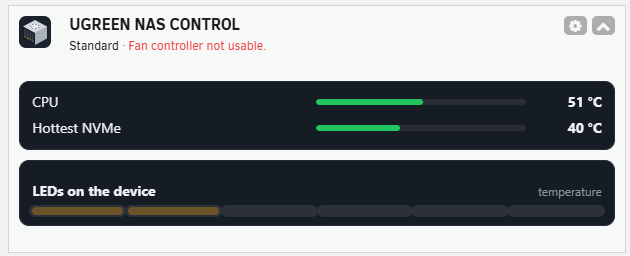
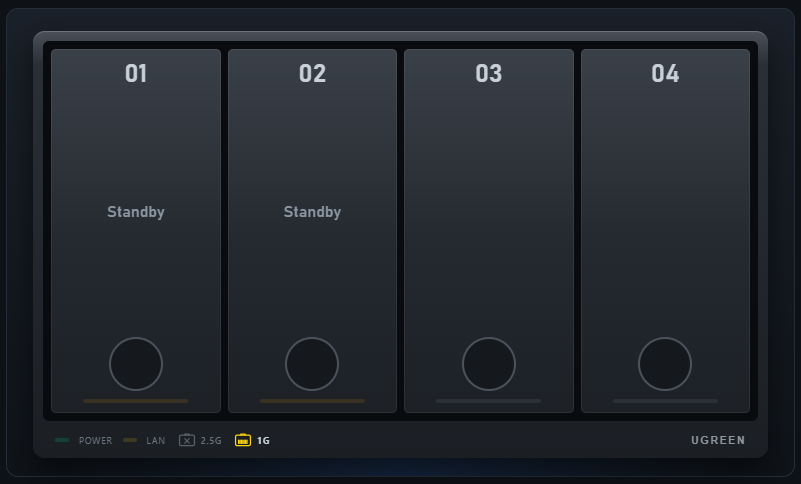
Works great overall (apart from the known limitations) on my DXP4800Plus (Unraid 7.3.4, UGREEN NAS Control v2.0). One little issue: On the respective tile in the Unraid Dashboard I get 6 bays shown, though the plugin runs on a 4 bay model in my case, which is also detected and displayed in the plugin itself: vs. Just FYI one little surprise while switching from UGREEN LED Control: Immediately after switching LED control on there was a refresh of the page and therefore I could not press anymore the "Take over the settings" button. In the end it looks like all the settings where taken over anyway, so the end result is the same. 😃 If that is a feature now, I suggest to just change that part in the description above (so less future users might be as surprised as I was for some seconds).
-
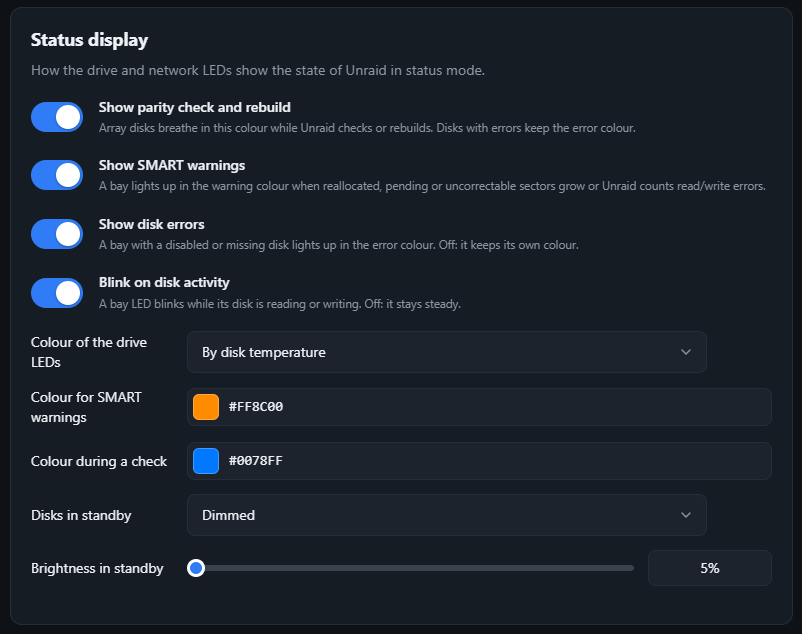
What do you mean by "power/standby" for the drives? My interpretation: Power="Spun up + Read/Write activity" vs. standby="spun-up but without head activity". In the Drive menu, do you see the following screen when scrolling down? There you could deactivate the Blink on disk activity slide button. for Colour of the drive LEDs pick By disk temperature for Disks in Standby pick Dimmed and choose the brightness below (in steps of 5%). I have a DXP4800Plus, so you have to confirm the existence (and functionality) of this menu by yourself on your DXP4800Pro. I assume that by "above a temperature threshold" you mean a threshold picked by the user individually, correct? If I am not missing anything we as users cannot (yet) choose a temperature threshold for change of colors (both for the drives as well as the CPU temperature). I would welcome this function though. @Schubi05 could you have a look into this and it's feasibility?
-
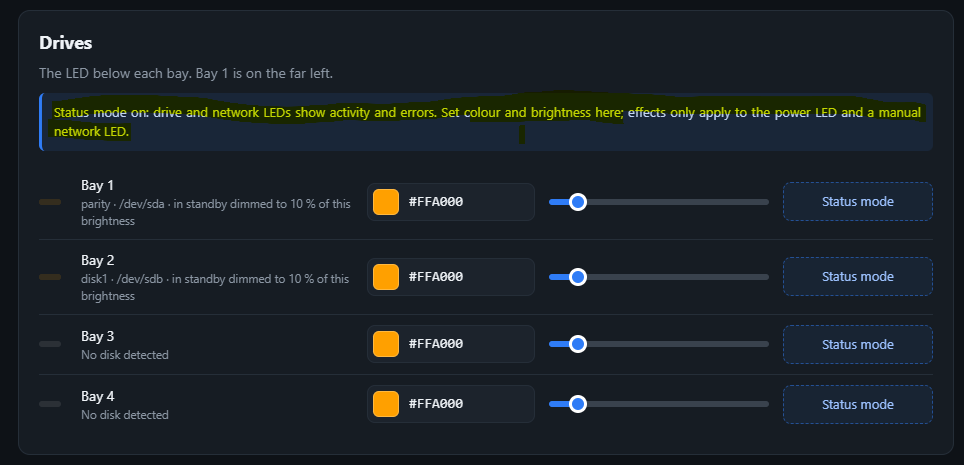
I get your point. Personally I would not call it "odd", but rather the effects of different functions/modes on each other is rather complex and takes a while to understand. I think the developer @Schubi05 does a good job with the explanations where necessary. If you have constructive suggestions what/where to improve, I got to know him as very open and responsive to suggestions by users. We just have to express them, obviously. Regarding your specific issue (which I partly interpreted, therefore more info what you speak about would be helpful though): Could this be due to the mode you have chosen/is the preset under Overview -> General settings -> Default mode? I use that mode (on purpose) myself, but get an info shown in the Drives section: Do you also speak about this part or something else? Does it show you such an info or not?
-
I am not the plugin author, but in the past when I reported errors, more information nearly always helped the author to identify the issue faster/easier. Questions that came up for me: What version of Unraid is your machine running? Any other observation? E.g. did this feature work properly in ich777's plugin before (in case you used that before)? Feedback from my end (with a DXP4800 Plus and Unraid 7.3.3): No issues, works as I expect it to work.
-
Thanks - that was one of the use cases I thought of (and also assumed I have described) and for me it was just unimaginable that users who are sufficiently interested in the link speed would actually "test"/confirm their setup via the network led instead of what the (Unraid) OS shows them via the WebGUI. So I think it was rather a lack of imagination or a strict view on how it makes more sense (to me!) to test that - solely on my end! 😅
-
Quick question: Apart from it being cool (I do no doubt that and thought about it the same way, assuming you speak about the deprecated plugin by ich777), your comment made me wonder if there are operation scenarios where the change of colors due to different network speeds gives the admin/user a real information advantage. At least I do not know any set-ups where the link speed is changing a lot/regularly (and I could detect the change by a quick glance on the according led) and when testing equipment I would rather check it via a desktop computer or laptop than plugging in and out of a server with potentially spinning disks and running applications.
-
Once again and first of all: You are very welcome! Thank you for your work on this helpful plugin. I am happy I can "give back" with the translation in some way. I was aware of the placeholder names and their function. But the "hora" unfortunately slipped through - good that you/Claude catched that. And the translation you used (“Advertencias y alertas” / “Solo alertas”) in the end for alerts.level_warning and alerts.level_alert sounds good and correct for me. Thank you also for your feedback on my ideas/thoughts. I also get the decision regarding keeping the whole sentences. One information regarding the feedback from native speakers: Keep in mind when receiving it that "array" in the computer science/IT field is usually translated differently to Iberian and Latin American Spanish. As this is the only case that I came across here, I decided to simply give both translations, more or less side by side ("Los discos de la matriz/de arreglo muestran ..."), as 2 different Spanish language versions, as they would only differ in one sentence, would be overkill imho. Correct catch with my "misgendering" of an adjective that describes Iluminación, as it is feminine, but yes, I would definitely prefer one Spanish term for the English "brightness". I lean towards "luminosidad" when to decide between this word and "Iluminación", as it the semantic is narrower towards the English "brightness". Definitely "brillo" should not be used, as it's semantic is more towards the English "shimmer" or "glow". While checking I saw I also kept "brillo" one time in a translation. (Those are good examples for why I asked before if modularization of the translations/words is a viable option. 😄). I will add a new version of the json code with the Spanish translations on Github (and correcting all errors hopefully).
-
You are very welcome and thank you for your fast implementation. I will check it out right after posting here. I just posted it on Github, with some observations (obviously they should be seen as "imho") at the end to keep in mind/maybe change in one of the next versions of the plugin.
-
Thanks, will do. Thank you for the extensive explanation. I was only aware of the Favorites function that's build in, to be activated for a single app/plugin via the small heart icon on the upper right of the bigger app/plugin's icon; and available on different parts of the Unraid WebGUI. For plugins (to my best knowledge) this is only available under "Settings" and in case of your plugin in the "User Utilities" section. I run the current Unraid 7.3.3.
-
You are welcome and thank you! Is the lack of persistency when I mark your plugin as a favorite and update it some time later something you can influence? Unfortunately I cannot compare it with other plugins, which I have marked as favorites, as they did not get an update since then (at least I think so). I am on it. For now I will call it a night and sleep, but will likely finish tomorrow. I plan to post it in the Github discussion you also proposed. I already stumbled upon one question though: What do you refer to by 'below' in the sentence "... colour without a connection; below it can glow steadily ..."? I assume you described the position of the different choices in the dropdown menu. If this is the case, I would drop/replace that word entirely (in English as well as other languages). If my assumption is wrong, please let me know what you refer to.
-
I can just confirm what others already wrote: Amazing tool! Works already very well in the current version 0.17.2 on my DXP4800Plus with Unraid 7.3.3 at the moment. All Identification of component was done automatically and therefore hassle-free. Some small issues that I have experienced and could be improved in my point of view: Inconsistent mode for saving the settings. Out of a user perspective: On all pages settings should either 1. be saved automatically (like it is the case on the overview page of the settings menu) or 2. by clicking on the "Save" button (as it is the case on the schedule page of the settings menu). During night mode, the brightness bar in the general settings gets set to the night mode brightness setting. Maybe this is just me, but I would have expected to set the general brightness there and that the value stays like that, also during night mode. If it is of interest for you, I can offer a translation from German or English to Spanish.
-
Thank you for the answer. With that info it all makes more sense. And don't worry - we all miss things from time to time. All the best for you!
-
Thank you for the reply. I still do not understand why the release notes do not mention this, but instead the info is the same as the previous release, as mentioned before: but you will likely have your reasons, and if it is only "being in a hurry" or "not investing a lot of time because this is deprecated". Anyway, thank you a lot for your work - it helped me a lot with my machine!
-
So what was/is the update from two days ago (5th of September 2026) for? Release notes state the same as the last one (from 2024) before the current one.
