





chocin
Members
-
Joined
-
Last visited
-
Hi, been busy fixing up all the issues, and rebuilt multiple times after checking for xfs issues. This morning the drive got disabled again, UI is still working though unraidvm-diagnostics-20261029-1034.zip
-
Hi, please find the new diagnostics files here This is the 2-3rd reboot after the last time and due to it erroring out, and has millions of errors since last parity check unraidvm-diagnostics-20260925-1600.zip
-
As of speaking, unRAID has crashed, I cannot properly extract any diagnostics logs as the documents ends up being empty and cannot be compressed into an archive. Web UI diagnostics returns the download URL to 404 not found, and I'm getting spammed with 500 Internal Error messages in my browser session Current dmesg output. dmesg
-
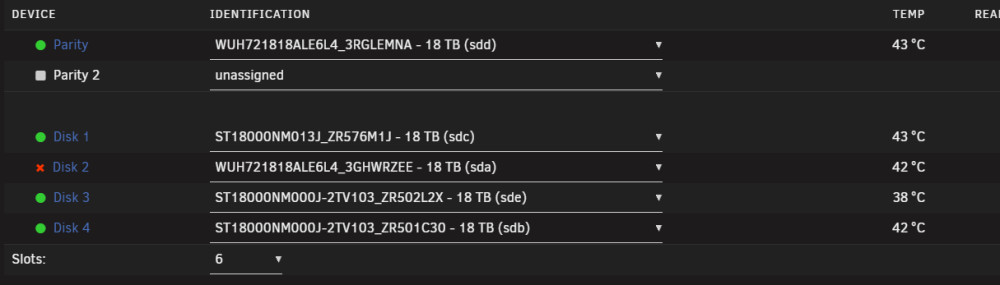
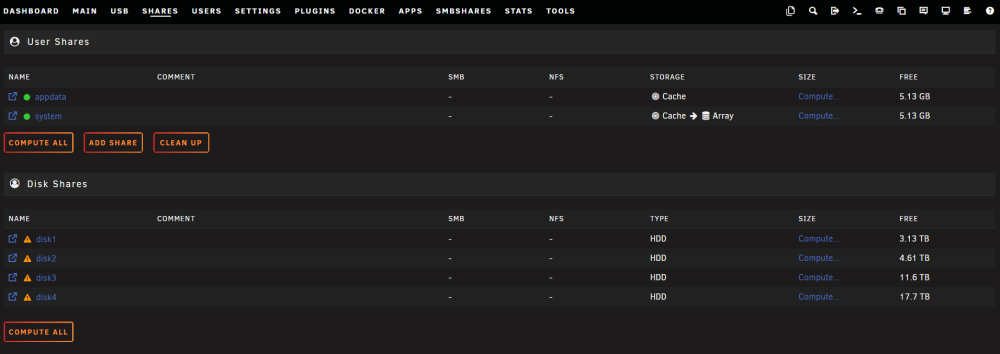
Currently my unRAID has been running into issues with the array going offline. My setup consists of 5x 18TB with single drive for parity. Parity: WD HC550 Parity S.M.A.R.T. Data *This drives has a lot of errors as of the last failure on my array. 19k errors shows in WebUI. Disk 1: Seagate Exos X20z Disk 1 S.M.A.R.T. Data *Disk 1 comes with known S.M.A.R.T. errors, but this drive doesn't get disabled in unRAID. Disk 2: WD HC550 Disk 2 S.M.A.R.T. Data *Disk 2 always gets disabled if the array errors out. Error count as my last failure stayed at 2 in the WebUI. Disk 3: Seagate Exos X18 Disk 3 S.M.A.R.T. Data *No issues with this drive. Disk 4: Seagate Exos X18 Disk 4 S.M.A.R.T. Data *No issues with this drive. This is after I changed out my LSI HBA 9300-8i on 16.00.11.00 firmware to a new LSI HBA 9300-8i running 16.00.16.00 firmware, and I changed out a SAS-8643 to SAS-8643 24 bay backplane to a SAS-8643 to 4x SATA adapter. But the issues persists across the two different setup. I also don't use any 1x SATA to multi SATA splitter, it's all connected to SATA power cables directly from my PSU. Is this just plain drive issues or is there something more serious going on with my hardware? I run unRAID in a virtualized environment but I passthrough my LSI fully directly to my VM and it's not shared with my hypervisor. I've tried to dump the logs into LLM for it to do some basic diagnostics but it just turns back blaming a power supply is the issue or cabling but I've swapped all I can so far. I will be attaching two different diagnostics zip as the latest one doesn't show much info pertaining to the errors. The bigger zip file is what happens when a drive falls out and locks up my whole instance and render it unusable and inaccessible until a reset is performed. *Adding on, seems like my shares are currently all gone. But the data is still in the drives if I open it manually from the main tab. unraidvm-diagnostics-20260727-2237.zip unraidvm-diagnostics-20260828-1021.zip
-
Just an update for people that might be looking at this thread The issue is with Proxmox Display settings. Instead of using default, try changing to VirtIO-GPU (virtio) or other display adapters and see if it will fix it. I'm personally using VirtIO-GPU and got it working The garbled output actually doesn't matter, it will still boot up in the background. I got a working instance of unRAID after waiting a while even with the garbled output on Proxmox.
-
Just upgraded from 7.0.3 to 7.3.2 and saw it supported internal boot, hence I give it a try for that. But it couldn't boot and I still can only use USB boot. Anyone has any idea on what is exactly happening? I'm able to provide more info if required 2026-07-10 13-54-32.mp4

