





luke.smith.name
Members
-
Joined
-
Last visited
-
Auto-unlock makes manual unlock impossible when the box is off the bound network (uploaded key always overwritten) Love the concept of the plugin — hardware-bound auto-unlock is exactly the right way to do this, and the README's promise that "your original passphrase/keyfile remains completely unchanged and functional" is what bit me. Setup Unraid 7.3.4, plugin 2025.09.27.1424. Array auto-unlocks via the hardware-derived key (slot 31) while on the bound LAN. I moved the box to a different network, so — correctly, by design — auto-unlock fails and the Main page asks for the key manually. The problem Uploading my original key via Choose File always fails with "Wrong key" — not because the key is wrong, but because it is never actually tested. The plugin registers fetch_key as a webGui "starting" event handler (/usr/local/emhttp/webGui/event/starting/fetch_key). Every time Start is clicked, that handler regenerates /root/keyfile with the freshly-derived hardware key after KeyUpload.php has written my upload, and cryptsetup then runs against the regenerated file. Syslog shows it clearly: emhttpd: Auto-start is enabled. Proceeding with keyfile generation. emhttpd: Keyfile generated successfully at /root/keyfile kernel: mdcmd (35): start STOPPED emhttpd: disk1: Wrong encryption key Proof it's the overwrite and not the key: after removing that one event file, the exact same key file unlocked the array on the first try. Worse, there's no way to turn auto-unlock off from the UI when you need it: the plugin's toggle only renders when the array is already running (the page JS checks systemState !== 'array_stopped' first). Chicken-and-egg — you can't start the array without disabling auto-unlock, and you can't disable it without a running array. Why this matters beyond annoyance The plugin's whole security model is "if the box is stolen, the network changes and auto-unlock fails — then you use your original key" (README: "Manual intervention with your original passphrase/keyfile is required"). But in exactly that scenario, manual intervention via the GUI is impossible. The overwrite adds zero security in the theft case (an attacker with my key could just delete the event file too), it only locks out the owner who has the key. Having the key should be sufficient — right now it isn't, unless you know to do surgery via CLI. Suggested fixes (smallest first) 1. fetch_key should check the plugin's own AUTO_UNLOCK_ENABLED flag, not just startArray=yes in disk.cfg. Right now the config flag doesn't stop the event handler from regenerating the keyfile. 2. Better: have the manual upload use a different path than /root/keyfile, or skip generation for that start when a fresh upload was submitted. 3. Show the disable toggle (or at least a hint) when the array is stopped and auto-unlock is enabled, instead of hiding it behind array_stopped. 4. Docs: note that after moving the box, auto-unlock must be disabled before a manual key upload can work. Workaround for anyone hitting this Needs a terminal — your admin login via the GUI is useless here since the GUI itself is the broken path: rm /usr/local/emhttp/webGui/event/starting/fetch_key sed -i 's/AUTO_UNLOCK_ENABLED=true/AUTO_UNLOCK_ENABLED=false/' \ /boot/config/plugins/encrypted-drive-manager/config Then re-select your key file and hit Start. Restore with manage_events.sh enable when the box goes back to the bound network. Not complaining about the encryption itself — slot 31 staying hardware-bound is exactly as advertised. It's the manual fallback path that needs to actually work. (sure, I got my bot to write this because it's the only way I figured out what was going on, so it's in a much better position to explain it than I am)
-
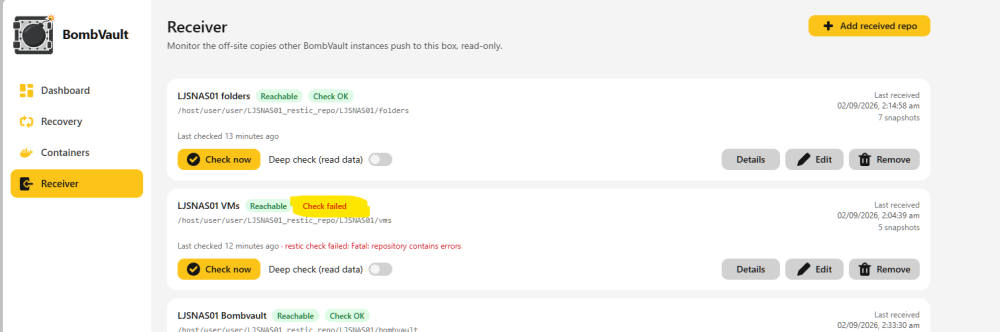
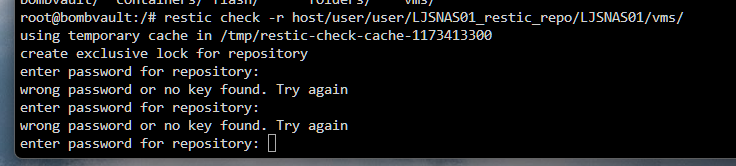
Thankyou for the comprehensive reply, with the new release and this help I've got a few steps further forward but have now hit this on the remote end: I then connected to the bombvault container on the remote end and tried to use the restic cli there to check and repair, but I don't have the password. Bombvault says that the restic password is derived from the bombvault key.. but doesnt say how. Can I translate it? (I'm fairly sure the password restic is asking for is separate from the restic-server password thats used for connections over the network, but i have tried that too.) EDIT- somewhat obviously the password is in my recovery kit!
-
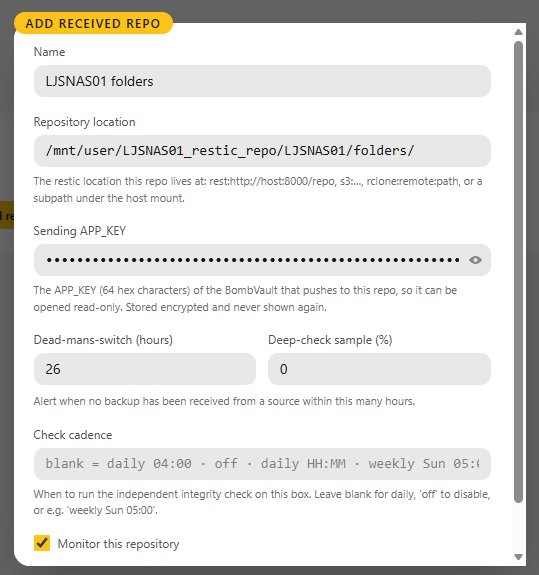
I'm trying to set up an offsite and have two issues. On the remote end I'm trying to monitor the destination but i get an error message trying to save the settings - "could not open the received repository: wrong APP_KEY, or the location is not a BombVault[path] repository" Secondly, I'd also like to set up the remote restic to be immutable, but the test always fails. Despite the fact that the remote restic reports in its logs that it is- Data directory: /data Authentication enabled Loaded htpasswd file /data/.htpasswd Append only mode enabled Private repositories disabled Group accessible repos disabled start server on [::]:8000 Broadly the docco is too light - it really needs more examples so I don't have to spend so much time reading between the lines and guessing at settings until things work. I couldn't get the scripted deployment of a restic docker functional, and it couldn't be edited in the docker UI, so I used one from CA instead. As I suggested in a feature request on github, I think the immutable offsite should be baked into the product, not instructions for a docker you can't manage in the Unraid UI. All the components needed are there inside bombvault. I'd also find it more logical if the flow of the app was more like other backup products where there are sources, jobs and repositories, but hey- I can manage with that.

-
Hi, I'm trying to use the replication feature, it connects, but doesn't seem to do much... is it still a work in progress?

