




Skip to content
View in the app

A better way to browse. Learn more.

Unraid

A full-screen app on your home screen with push notifications, badges and more.

To install this app on iOS and iPadOS
  1. Tap the Share icon in Safari
  2. Scroll the menu and tap Add to Home Screen.
  3. Tap Add in the top-right corner.
To install this app on Android
  1. Tap the 3-dot menu (⋮) in the top-right corner of the browser.
  2. Tap Add to Home screen or Install app.
  3. Confirm by tapping Install.

PhasecoreX

Members
  • Joined

  • Last visited

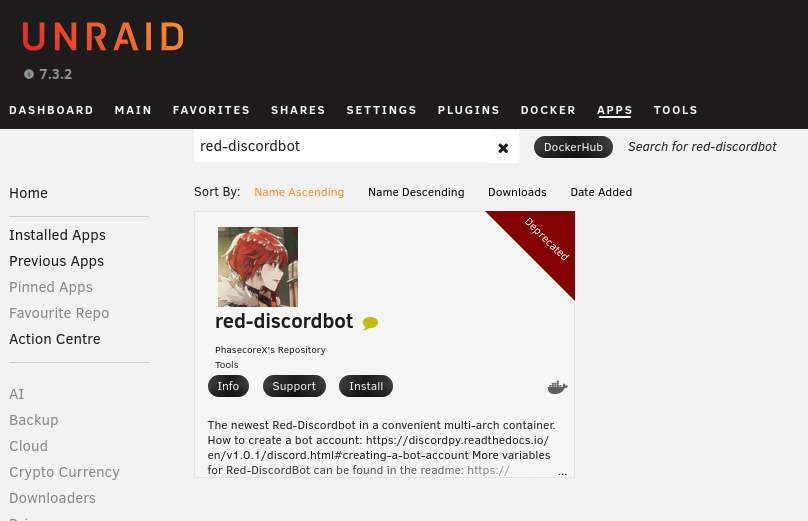
  1. I have worked with another team (Selfhosters) to migrate my Docker image from their repository over to mine. You can see them both here, the Selfhosters one now being deprecated: https://ca.unraid.net/apps?type=all&q=red-discordbot However, when you search for “red-discordbot” in the Apps page in Unraid, it only shows mine, but with a deprecated banner on it, which is incorrect. See attached screenshot; It should not have the deprecated banner on it. Any help with correcting this would be much appreciated! ( I also posed this here: https://product.unraid.net/p/plugin-migration, wasn't sure where to post it)
Account

Navigation

Search

Search

Configure browser push notifications

Chrome (Android)
  1. Tap the lock icon next to the address bar.
  2. Tap Permissions → Notifications.
  3. Adjust your preference.
Chrome (Desktop)
  1. Click the padlock icon in the address bar.
  2. Select Site settings.
  3. Find Notifications and adjust your preference.