





sonofdbn
Members
-
Joined
-
Last visited
-
Thanks, makes sense not to take additional risk on this, and I fortunately had an old (still in packaging) Sandisk Cruzer Blade so I shut down the server and took out the flash drive. A little testing of the flash drive on a Linux machine using fsck.fat showed a serious error, so it was clearly time to set up the new flash drive. Unfortunately that's been a huge headache. I use the Unraid Flash Creator tool, and tried to install both a backup that I just did from the flash drive as well as the backup from Unraid Connect. In both cases, the drive failed to boot. I suspect that the backups had corrupted files from the failing flash drive, so I reverted to an old backup from March 2025. Unfortunately that failed to boot as well, which was a bit surprising. (So separately I'm wondering how I can check the validity of a flash drive backup.) I have confirmed that if I download and install a fresh 7.0.1 OS (which is what I was on) the machine boots up, but I didn't proceed because I'd still prefer to avoid redoing too much of the old setup. Drive assignment should be fine, but I'm more worried about the settings I had for my Win 11 VM, which I recall were quite complicated (for me). Currently I'm writing another old flash drive backup to the flash drive, to see if that might work. But I was also wondering if there's a way to copy specific config files (especially for the VM) to a fresh install OS flash drive, so that at least some things can be recreated automatically on boot up. (To address the risk of using a corrupted config file, I would check the file against other older backups to make sure they're the same.)
-
I've been getting the "Directory Bread Errors found" message from the Fix Common Problems plug-in, and from what I can find, it seems that this indicates a problem with the boot flash drive. Unfortunately the flash drive is attached to an internal port on the motherboard of the server, so accessing it is a bit troublesome. So far, the server seems to be running fine (7.0.1). Obviously I could shut down and see what the problem is, but my fear is that I might have to replace the flash drive and with all the reports of the problems finding a flash drive suitable for use as a boot drive, I also worry that this might not be solved easily. So my question is whether I can live with this error, and if so, for how long? I've seen the Youtube video on booting from an internal drive coming (soon-ish?) - so am really tempted to wait for that. Just don't know how serious the Directory Bread Errors are, and whether I should focus on getting that fixed.
-
After upgrading to 7.2.3, the server appears in Windows Explorer Network, and so far this has persisted, including through a Windows reboot. So all is well. And my apologies for dissing the unRAID GUI earlier - my own fault with unRAID logs getting full.
-
Totally agree with the pinned servers - have had them for a while and totally reliable. This was more an ongoing irritation and mystery. I'm not convinced that it's solved, and tend to think it's a Windows problem, not an unRAID issue. I have a Windows VM that has no problem listing the server in Network.
-
Thanks for the replies. I might have sorted it out - if I set "Host access to custom networks" to Disabled under Settings/Docker I can see my unRAID server in Windows Explorer's Network section. I had two network interfaces assigned to my server's IP address: br0 and shim-br0 (apparently created by the Docker network). Removing host access removed that Docker interface (I think - can't confirm because the accursed unRAID GUI is acting up again and I can't get to the terminal) and now the server is showing up as it should in Windows. At least for now.
-
For a long time I've noticed that my unRAID server isn't listed in my Windows network. I can access it fine, it just doesn't show up in the Windows Network section of Explorer. I'm trying to sort this out and Gemini (apologies) helped quite a bit, and now I have the server showing up. Apparently in my case it was because the discovery service, WSD, was possibly being confused by different network services, like Tailscale and Docker shim (shim-br0). So as instructed, I ran killall wsdd2 and then /usr/sbin/wsdd2 -d -i br0 and now I can see the server listed. Now Gemini is saying that this fix will disappear on reboot, which seems logical, and it's suggesting that I disable WSD in SMB Settings and edit /boot/config/go to run the commands on boot. To me, as a novice in this, it sounds reasonable, but I know that at some point in the future, I'm going to be confused by seeing WSD disabled. I see that in SMB Settings there's "WSD options (experimental)". Is there something I can enter here to replicate the fix? Like "-d -i br0?
-
Of course, when I try now it works. (And I'm on exactly the same FF version on W11.) The only thing I did differently was to drag the images directly into the edit window. Previously I attached the files first and then inserted. Life is too short to test this further. If it works, it works. Thanks for verifying that it can be done.
-
I got Boooklore working. Here's my MariaDB setup: I left REMOTE_SQL untouched because I don't know what it does. Note the non-standard WebUI port, because I have another MariaDB container running. Here's my Booklore setup: Hope this helps, @Johnny Utah
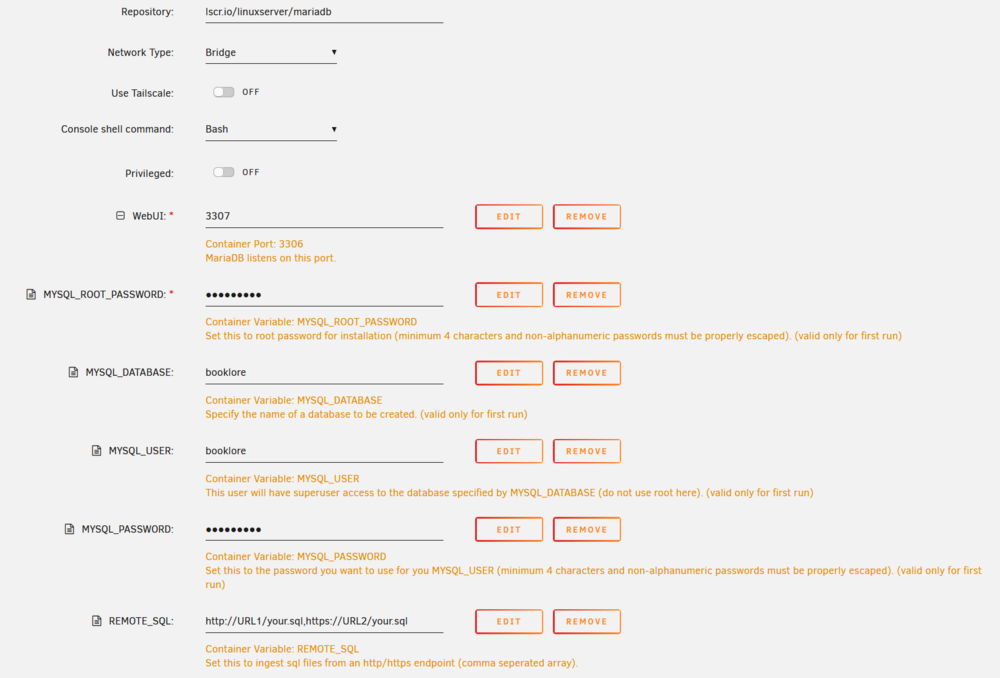
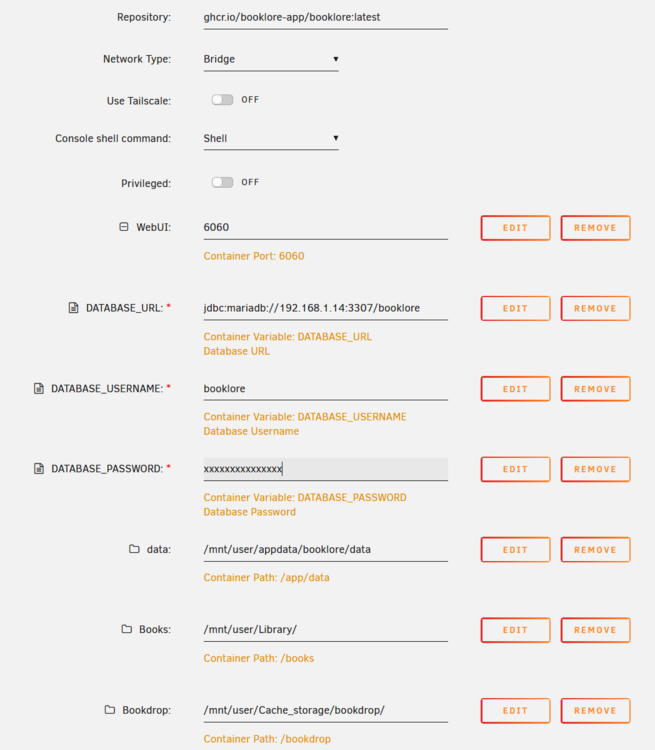
-
I'm using Firefox, and just tried saving a post with two images inserted. There was text above, between and below the images. Looked fine in the input window, but when I submitted the post, only the two images appeared, and the text had been deleted. Tried twice with the same result. What am I missing?
-
OK, user error here. I just noticed that there is a + sign, it's just that it's right up against the left margin of the page, and it's not visible when my browser window is not at full screen. But I do feel the GUI could be improved so that the + sign is more readily noticeable. I'm using Firefox. in case it's a browser specific issue. Having said this, the + sign might not be the solution, though. I'm trying to passthrough one of those portable disks in a USB case. It appears as /dev/dis/by-id/usb-JMicron_Tech_000000778899-0:0. But if I enter that as the path for the secondary vDisk, it gets promoted to the Primary vDisk on boot (this shows on the VM config page) and the VM fails to boot (perhaps trying to boot from there) and shuts down. I've tried both USB and VirtIO as the vDisk Bus. A short while later: After trying to revert to my original setup, it seems that the original hard disk was Bitlocker encrypted and I needed to enter the recovery key because a USB device had been added to the configuration. So that's a probably reason for the VM appearing to fail. If you don't enter anything at the Bitlocker screen the VM shuts down. I saw this only because I started the VM with the console. I'd experiment further, but it's such a pain entering the Bitlocker key using the function keys, and I'm not sure if there's a simple copy and paste that I can do into the console window. Anyway, if entering the Bitlocker key is required every time I add or remove the USB drive, it's not a practical option for me. Will try to assign the USB drive as a network share instead.
-
Not sure about the terminology here, but long ago I followed a SpaceInvader video on how to use a "real" Windows installation on a hard disk as a VM in unRAID. It's been running fine for a few years. Now I have added an external SSD to the server as an unassigned device, and want to mount it (or however I can access it) in the VM so I can use it for additional storage. I've read advice on how to do this via the VM configuration page, but the advice typically assumes that there is already a Primary vDisk assigned and then you just click the + sign next to it to add the device as a second vDisk. In my case, there is no Primary vDisk location (entry is "None") and therefore no + sign next to it. I'm worried that if I simply add the external SSD in that Primary vDisk Location, the VM will try to boot from that device. How can I mount the SSD?
-
Recently I had a power outage. Although I have a UPS, the performance is a bit patchy, as I often get an unclean shutdown (something to be sorted out later). I don't have any auto-restart on power restore set up; certainly in the past (quite a few years) the unRAID (7.0.1) server hasn't restarted when power was restored. Details are a little vague because I was travelling when the power went out, but I first found out the server was down when my phone, which was on Tailscale and uses the Tailscale exit node on the server, lost internet access. I disabled the exit node and internet access was OK again. I saw in the Tailscale app on the phone that Tailscale had lost connection with the server and some docker containers running on it (like Plex and Nextcloud). I was about to call home to see what had happened when I saw that suddenly I had access to the server again and everything was up, and in the Tailscale app I could see that the Tailscale exit node was up and the containers were connected. Then last night it happened again (I was still away): lost Tailscale exit node and server seemed to be down briefly. But this time the "recovery" was not complete. The Tailscale node came back up and I got Tailscale access to the server but the Plex and Nextcloud containers didn't have Tailscale access. I was able to log in to the server and I could see that the two containers were running; they just didn't have their usual Tailscale connections. I confirmed that the Tailscale plugin was up to date. My "evidence" of unclean shutdown and restart is that both times I got an email notification that a parity check had started because of unclean shutdown. This is not a huge problem, but I'm wondering why this is happening and whether it's symptomatic of some misconfiguration on my part tower-diagnostics-20250702-1041.zip
-
And now they're gone! root@T2:~# lsusb -vt /: Bus 001.Port 001: Dev 001, Class=root_hub, Driver=xhci_hcd/16p, 480M ID 1d6b:0002 Linux Foundation 2.0 root hub |__ Port 004: Dev 002, If 0, Class=Human Interface Device, Driver=usbfs, 1.5M ID 0665:5161 Cypress Semiconductor USB to Serial |__ Port 006: Dev 003, If 0, Class=Hub, Driver=hub/4p, 480M ID 174c:2074 ASMedia Technology Inc. ASM1074 High-Speed hub |__ Port 002: Dev 005, If 0, Class=Mass Storage, Driver=usb-storage, 480M ID 0781:5591 SanDisk Corp. Ultra Flair |__ Port 013: Dev 004, If 0, Class=Human Interface Device, Driver=usbhid, 12M ID 26ce:01a2 /: Bus 002.Port 001: Dev 001, Class=root_hub, Driver=xhci_hcd/9p, 20000M/x2 ID 1d6b:0003 Linux Foundation 3.0 root hub And so far none of those error messages in the logs. So I'm considering this solved. But in case it's needed for any future issue, I've attached the current diagnostics. t2-diagnostics-20250505-2318.zip
-
Hmm... the only Hitachi devices I have are these HGST (Hitachi Global Storage Technologies) drives. But they're connected to SATA ports on the motherboard. (If the USB add-on card is an issue, I can remove it. It's not being used for anything.)

-
Here's the output: root@T2:~# lsusb -vt /: Bus 001.Port 001: Dev 001, Class=root_hub, Driver=xhci_hcd/16p, 480M ID 1d6b:0002 Linux Foundation 2.0 root hub |__ Port 004: Dev 002, If 0, Class=Human Interface Device, Driver=usbfs, 1.5M ID 0665:5161 Cypress Semiconductor USB to Serial |__ Port 006: Dev 003, If 0, Class=Hub, Driver=hub/4p, 480M ID 174c:2074 ASMedia Technology Inc. ASM1074 High-Speed hub |__ Port 002: Dev 005, If 0, Class=Mass Storage, Driver=usb-storage, 480M ID 0781:5591 SanDisk Corp. Ultra Flair |__ Port 013: Dev 004, If 0, Class=Human Interface Device, Driver=usbhid, 12M ID 26ce:01a2 /: Bus 002.Port 001: Dev 001, Class=root_hub, Driver=xhci_hcd/9p, 20000M/x2 ID 1d6b:0003 Linux Foundation 3.0 root hub /: Bus 003.Port 001: Dev 001, Class=root_hub, Driver=xhci_hcd/1p, 480M ID 1d6b:0002 Linux Foundation 2.0 root hub |__ Port 001: Dev 002, If 0, Class=Hub, Driver=hub/4p, 480M ID 2109:3431 VIA Labs, Inc. Hub |__ Port 001: Dev 003, If 0, Class=Hub, Driver=hub/4p, 480M ID 045b:0209 Hitachi, Ltd /: Bus 004.Port 001: Dev 001, Class=root_hub, Driver=xhci_hcd/4p, 5000M ID 1d6b:0003 Linux Foundation 3.0 root hub |__ Port 001: Dev 002, If 0, Class=Hub, Driver=hub/4p, 5000M ID 045b:0210 Hitachi, Ltd



