





mcdonagg
Members
-
Joined
-
Last visited
Everything posted by mcdonagg
-
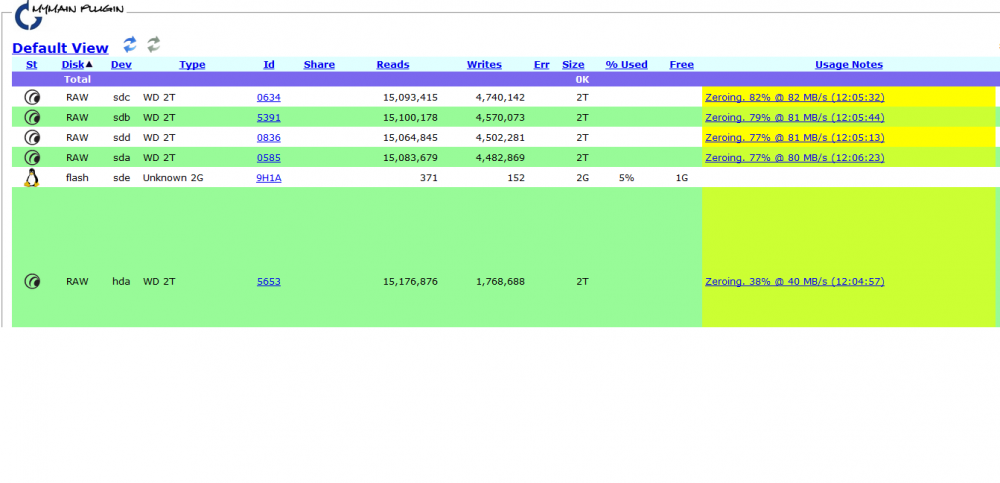
I am running preclear on 5 hard drives, they are all the same, and all plugged into sata ports on the motherboard. 4 of them are sda-sdd but the fifth one is hda and when running the preclear is going about half the speed. Does anyone know why?
-
I figure nothing to worry about but figured I would ask the experts. I got these off ebay used and real cheap. So here are the terminal outputs from four drives. Attached are the Smart Reports. Thank you guys ** Changed attributes in files: /tmp/smart_start_sdc /tmp/smart_finish_sdc ATTRIBUTE NEW_VAL OLD_VAL FAILURE_THRESHOLD STATUS RAW_VALUE Spin_Retry_Count = 100 100 97 near_thresh 0 Airflow_Temperature_Cel = 68 72 45 near_thresh 32 Temperature_Celsius = 32 28 0 ok 32 Hardware_ECC_Recovered = 87 99 0 ok 242522401 No SMART attributes are FAILING_NOW 0 sectors were pending re-allocation before the start of the preclear. 0 sectors are pending re-allocation at the end of the preclear, the number of sectors pending re-allocation did not change. 0 sectors had been re-allocated before the start of the preclear. 0 sectors are re-allocated at the end of the preclear, the number of sectors re-allocated did not change. ** Changed attributes in files: /tmp/smart_start_hda /tmp/smart_finish_hda ATTRIBUTE NEW_VAL OLD_VAL FAILURE_THRESHOLD STATUS RAW_VALUE Seek_Error_Rate = 75 74 30 ok 29469679 Spin_Retry_Count = 100 100 97 near_thresh 0 Airflow_Temperature_Cel = 70 73 45 near_thresh 30 Temperature_Celsius = 30 27 0 ok 30 Hardware_ECC_Recovered = 87 83 0 ok 33006651 No SMART attributes are FAILING_NOW 0 sectors were pending re-allocation before the start of the preclear. 0 sectors are pending re-allocation at the end of the preclear, the number of sectors pending re-allocation did not change. 0 sectors had been re-allocated before the start of the preclear. 0 sectors are re-allocated at the end of the preclear, the number of sectors re-allocated did not change. ** Changed attributes in files: /tmp/smart_start_sdd /tmp/smart_finish_sdd ATTRIBUTE NEW_VAL OLD_VAL FAILURE_THRESHOLD STATUS RAW_VALUE Airflow_Temperature_Cel = 71 71 45 In_the_past 29 No SMART attributes are FAILING_NOW 0 sectors were pending re-allocation before the start of the preclear. 0 sectors are pending re-allocation at the end of the preclear, the number of sectors pending re-allocation did not change. 0 sectors had been re-allocated before the start of the preclear. 0 sectors are re-allocated at the end of the preclear, the number of sectors re-allocated did not change. ** Changed attributes in files: /tmp/smart_start_sdb /tmp/smart_finish_sdb ATTRIBUTE NEW_VAL OLD_VAL FAILURE_THRESHOLD STATUS RAW_VALUE Airflow_Temperature_Cel = 68 71 45 In_the_past 32 Temperature_Celsius = 115 118 0 ok 32 No SMART attributes are FAILING_NOW 0 sectors were pending re-allocation before the start of the preclear. 0 sectors are pending re-allocation at the end of the preclear, the number of sectors pending re-allocation did not change. 0 sectors had been re-allocated before the start of the preclear. 0 sectors are re-allocated at the end of the preclear, the number of sectors re-allocated did not change. smart_finish_hda.txt smart_finish_sdb.txt smart_finish_sdc.txt smart_finish_sdd.txt
-
I am looking for a replacement for the COOLER MASTER Centurion 590 Case. It seems to have been removed from Newegg, and is no longer on Amazon. I love this case (besides those metal tabs) and would hate it if I cant find it. I have found these: Thermaltake V6 BlacX Edition Gaming Chassis Mid Tower Steel Computer Case BlacX Top Mounted HDD Docking Station VM100M1W2Z http://www.newegg.com/Product/Product.aspx?Item=N82E16811133180 Thermaltake V5 Black Edition Mid-Tower Gaming Chassis With Embedded Handle VL70001W2Z http://www.newegg.com/Product/Product.aspx?Item=N82E16811133099 but was wondering if anyone has found a good 9 spot case that can hold 3 5-bay hot swaps
-
Just finished me very long preclear of a 2tb Green EADS WD. I did 3 others befor this and they only took half the time, so I think something is up. Disk Temperature: 33C, Elapsed Time: 54:49:44 ============================================================================ == == Disk /dev/sdc1 has been successfully precleared == ============================================================================ S.M.A.R.T. error count differences detected after pre-clear note, some 'raw' values may change, but not be an indication of a problem 54c54 < 1 Raw_Read_Error_Rate 0x002f 169 162 051 Pre-fail Always - 113260 --- > 1 Raw_Read_Error_Rate 0x002f 142 136 051 Pre-fail Always - 246824 58c58 < 7 Seek_Error_Rate 0x002e 200 200 000 Old_age Always - 0 --- > 7 Seek_Error_Rate 0x002e 100 253 000 Old_age Always - 0 65c65 < 197 Current_Pending_Sector 0x0032 200 196 000 Old_age Always - 161 --- > 197 Current_Pending_Sector 0x0032 200 196 000 Old_age Always - 15 ============================================================================
-
I am in the process of preclearing 5 disks, 3 2tb WD Greens, 1 2tb WD Black, and one 1tb old WD. 4 of them have fished but one of the Greens is still running the first read. Here are the results from the clears. == Disk /dev/sdb has been successfully precleared == ============================================================================ S.M.A.R.T. error count differences detected after pre-clear note, some 'raw' values may change, but not be an indication of a problem 63c63 < 193 Load_Cycle_Count 0x0032 200 200 000 Old_age Always - 2767 --- > 193 Load_Cycle_Count 0x0032 200 200 000 Old_age Always - 2768 ============================================================================ ============================================================================ == == Disk /dev/sdd has been successfully precleared == ============================================================================ S.M.A.R.T. error count differences detected after pre-clear note, some 'raw' values may change, but not be an indication of a problem 54c54 < 1 Raw_Read_Error_Rate 0x002f 200 200 051 Pre-fail Always - 1 --- > 1 Raw_Read_Error_Rate 0x002f 200 200 051 Pre-fail Always - 2 63c63 < 193 Load_Cycle_Count 0x0032 200 200 000 Old_age Always - 989 --- > 193 Load_Cycle_Count 0x0032 200 200 000 Old_age Always - 990 ============================================================================ ============================================================================ == == Disk /dev/sde has been successfully precleared == ============================================================================ ============================================================================ == == Disk /dev/hdb has been successfully precleared == ============================================================================ S.M.A.R.T. error count differences detected after pre-clear note, some 'raw' values may change, but not be an indication of a problem 63c63 < 193 Load_Cycle_Count 0x0032 199 199 000 Old_age Always - 5703 --- > 193 Load_Cycle_Count 0x0032 199 199 000 Old_age Always - 5705 ============================================================================ and the one that is still running, =========================================================================== = unRAID server Pre-Clear disk /dev/sdc = cycle 1 of 1 = Disk Pre-Read in progress: 75% complete = ( 1,513,606,348,800 bytes of 2,000,398,934,016 read ) 11.2 MB/s = = = = = = = = = = Disk Temperature: 33C, Elapsed Time: 39:22:36 should I be worried about that?
