





wsume99
Members
-
Joined
-
Last visited
-
Yeah, I'm replacing ancient hardware with old hardware. I have been running the updated hardware in a test server and it's significantly more responsive than my existing server. Heck, a N150 would probably blow away my current hardware. I have the Xeon sitting around so figured I'd give it a try before buying anything new.
-
I've been using unraid since 2010. Currently have a 32TB array (5x8TB with single parity) that is used for media and personal photo/video storage. I also have a 500GB appdrive outside the array. I'm running it on an old supermicro MB with an E5500 Pentium CPU. I'm currently running but it's 6.8.3. I am planning to migrate the array to some newer hardware (Xeon E3-1226 v3 w/16GB of RAM) and upgrade to unraid 7.2. I have some questions about how to configure my drives now that ZFS pools are available. I really have two objectives. First, I want a storage location that is both fault tolerant and also protected against bit rot. This would be used for personal photos/videos. The other objective is a storage location for media that is protected against drive failure and easily expandable as my media collection grows. Here's what I am thinking for my setup- Unraid array - Single 8TB parity with some other random 2 & 3TB disks (these disks are all sitting idle now in a different test server) ZFS pool - 4x8TB in RAID-z2. This would give me 16TB of useable space which is twice what I have allocated now to my photos/videos. Appdrive - single NVME ~500G Cache/downloads drive - single NVME >1TB The combination of an unraid array for media with the RAID-z2 for my important stuff makes sense to me. I would use the UD plugin and external drives to backup the RAID-z2 content. No plan to backup the unraid array. I'd just have to rebuild my collection if I had multiple simultaneous drive failures on the unraid array. I don't run any VMs but do use Docker containers so I'd backup my appdrive to the unraid array. If the appdrive fails I replace it and restore it from backups on the array. If the cache drive fails I'd just have to replace whatever data was on it that hadn't moved to the array, not a big deal. The one downside to using the ZFS pool is I don't get the benefit of faster writes to a cache drive but I think I can live with that. I don't have a cache drive in my current setup so all my writes are not fast (30-35MB/s max IIRC). Looking for feedback on this plan. Is there a better way to accomplish what I want? Specifically looking for feedback on if RAID-z2 is overkill and I should just go for RAID-z instead since I will have an offline backup and the chance of two simultaneous drive failures is relatively low. What kind of write performance can I expect from RAID-z2? Obviously it's hardware dependent but is it easy to at least match an unraid array or would it require beefier HW than I am planning?
-
I did a fresh install of 7.2.2 on a flash drive that is registered to an original Pro key. After I got the server booted I exported the boot drive and copied the key file into the config folder. After rebooting the server I'm now getting a License Key Mismatch error. I followed the prompts to recover my key via my unraid.net account but recovery fails. The server appears to be operating normally besides the initial error prompt I get about the key mismatch. I see the license structure and key management changed in 2024. Do I need to register my old keys or just ignore this error? Background - I have two original Pro licenses purchased in 2013. One is running in my primary server with no issues. The second key was activated in 2018 but has been sitting dormant for about 6 years in a second server. I resurrected that server today because I'm beginning a major hardware refresh and wanted to run some tests on the new server before I transfer all my data over.
-
I looked around this morning trying to solve the issue. I ran pwmconfig and the array fan can be controlled but there are no devices in sys/class/hwmon/hwmon1/device/. It appears something has changed in the new version and I can't figure it out yet. I reverted back to 6.8.3 and everything works correctly. More research is in my future.
-
Today I upgraded to the latest unraid release (6.9.2). I also added a password to the root user account. Now the user script that I have controlling the array fan stopped working. I copied the output from the script below when it runs. Any recommendations on where to start? Script location: /tmp/user.scripts/tmpScripts/Fan Speed/script Note that closing this window will abort the execution of this script Disk /dev/sdc current temp is 0 Disk /dev/sdd current temp is 0 Disk /dev/sde current temp is 0 Disk /dev/sdf current temp is 0 Disk /dev/sdg current temp is 0 Disk /dev/sdh current temp is 27 /tmp/user.scripts/tmpScripts/Fan Speed/script: line 93: /sys/class/hwmon/hwmon1/device/pwm2_enable: Permission denied cat: /sys/class/hwmon/hwmon1/device/pwm2: No such file or directory cat: /sys/class/hwmon/hwmon1/device/fan2_input: No such file or directory /tmp/user.scripts/tmpScripts/Fan Speed/script: line 99: *100: syntax error: operand expected (error token is "*100") /tmp/user.scripts/tmpScripts/Fan Speed/script: line 104: [: : integer expression expected /tmp/user.scripts/tmpScripts/Fan Speed/script: line 106: [: : integer expression expected /tmp/user.scripts/tmpScripts/Fan Speed/script: line 128: [: : integer expression expected DONE
-
Thanks for the reply. The script was working just fine all I needed was to get it running in cron. I was clicking Run In Background instead of Apply. Once I used Apply it was loaded into Cron and persistent across a reboot. Everything is working just like I need now. Thank you
-
I have a working script that I'm now trying to run every 2 minutes via cron. I selected the Custom option from the scheduled drop down menu and enter */2 * * * * as the Custom Cron Schedule value and then click on Run In Background. A pop-up window opens telling me the script is running in the background which I then close. I have modified my script temporarily to write entries into the log file every time it runs. I know the script runs once because I see the output in the log file but it but does not run again. My settings do not remain after reboot or even if I navigate away from the User Scripts management page and then come back. I'm not sure how to fix this issue. What am I doing wrong here??
-
Just upgraded to 6.8.1 and for whatever reason the code in my go file that loaded my custom array fan speed script into cron is now broken. Searching for cron help lead me to User Scripts, which I already had installed but was not using as a way to schedule my fan speed script. I'm trying to run a script on a custom cron schedule to have the script run every 2 minutes. I want this script to run automatically whenever the server is powered up and regardless of array state. A quick search of the forums didn't catch any posts on how to enter a custom cron schedule for a script. Do I select Custom from the schedule menu then enter "2 * * * *" into the Custom Cron Schedule box and then select either Run Script or Run Script in Background?
-
My original post: And the original reply: Resurrecting this problem. I've been fighting issues with some new hardware and after a lot of work I'm back to my old MB/CPU to try this again. I have tried both remedies (rsync -rltgoDv and rsync -av --no-perms) and neither prevent the errors I outlined above. Any more suggestions?
-
I am using UD to mount and share a 4TB external drive on my server. I am trying to rsync files from my array to the drive. Here is the command to initiate the transfer: rsync -av /mnt/user/Photography/2005/ /mnt/disks/EasyStore_4/2005/ When the rsync finishes it displays the following message: rsync error: some files/attrs were not transferred (see previous errors) (code 23) at main.c(1189) [sender=3.1.3] The all are of the following type: rsync: chown "/mnt/disks/EasyStore_4/2005/12-25-2005/.12-25-05(2).JPG.nkTWa8" failed: Operation not permitted (1) I compared the source and destination paths after the operation and it looks like all the files were transferred - the count of files and folders along with total size are all equal. I searched and found a post where the discussion was about how the volume being written to was mounted and the root user wouldn't have permission to set ownership on a that volume. The suggested remedy was to run rsync -rltgoDv instead of the -a option. Would this correct my issue or is there a better way to correct this so I can run rsync without any errors. Having any error at the end of an rsync is not what I'd prefer to have.
-
Wait a second, I just read thru the logfile and it's having trouble connecting to the news server. I recently got a new CC and I bet that is the problem. 🤦♂️
-
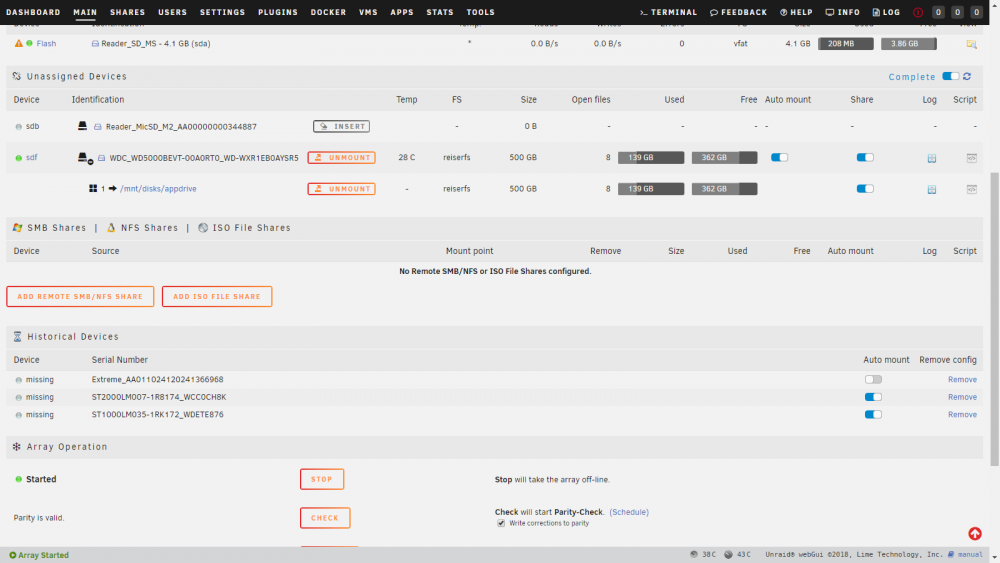
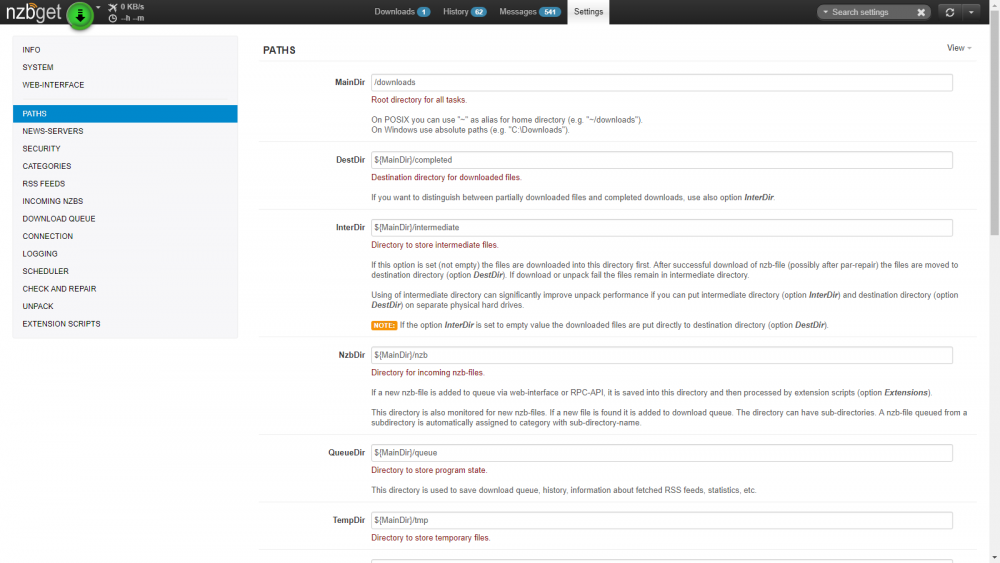
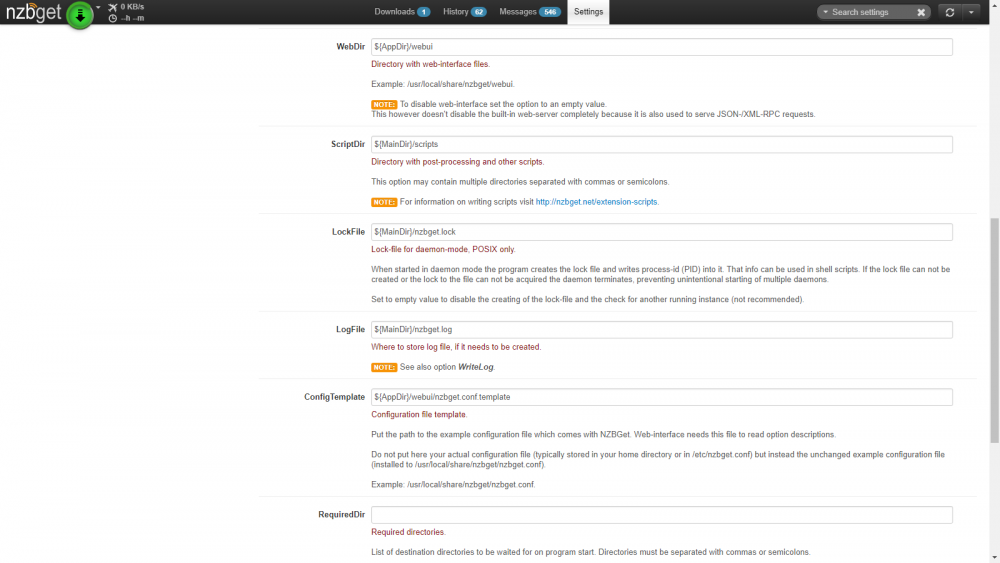
UD Mount: First half of paths: Second half of paths:
-
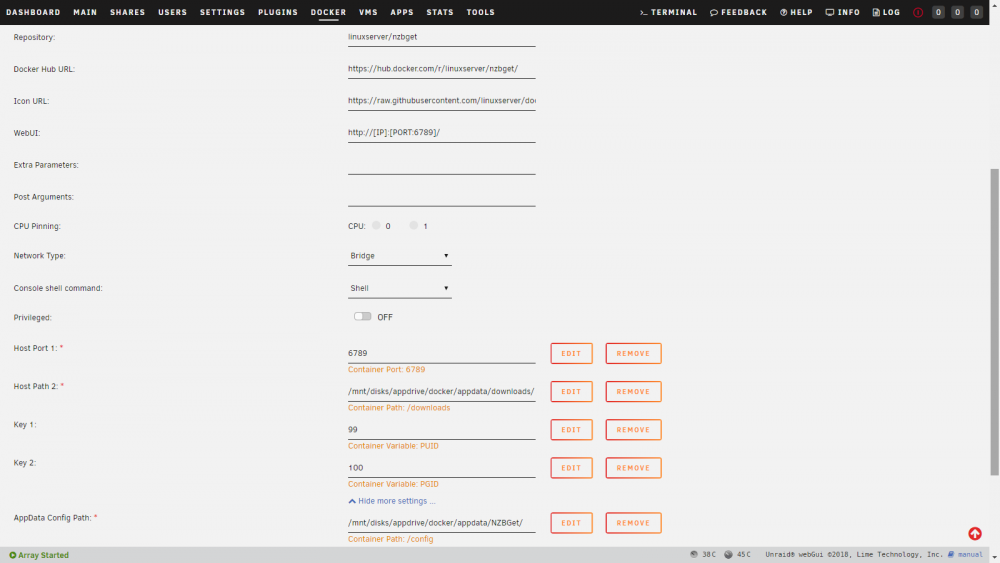
I'm at a loss with NZBGet and need some guidance. I've done quite a bit of searching/reading but can't seem to figure out what my problem is. I found a few things along the way but none of them fixed my issue. Background: I recently deleted my flash drive by accident and had to re-setup my server. I'm now running 6.6.5. I have all my docker containers installed on a non-array drive. I used to mount this drive via some code in my go script but as part of the rebuild process I switched to the UD plugin. I am reusing the container I had previously so the NZBGet config file has not changed. All that has changed is the docker path mappings because the path has changed since I moved to UD. I did adjust to RW/slave settings for the folders that are on the drive mounted by UD as specified in the UD thread. My problem: NZBGet is running and I can connect to the webgui. There is a nzb in the queue that says it is downloading but no progress is being made and the download speed is listed as "0 KB/s". I deleted the nzb and then re-added it to the queue and no change. I added a second nzb to the queue and tried to download it and same behavior. I've checked all the container mappings a ton of times and I cannot find anything out of order. I'm not sure where to look. I've included some screenshots of my docker mappings. I had a NZBGet working just fine and all I (think) that I've done is just change the name of the drive and the mounting process for the drive containing the docker image. This leads me to believe I have something messed up in the configuration of the docker container but I could certainly be wrong. Hopefully someone can help me get this sorted out.
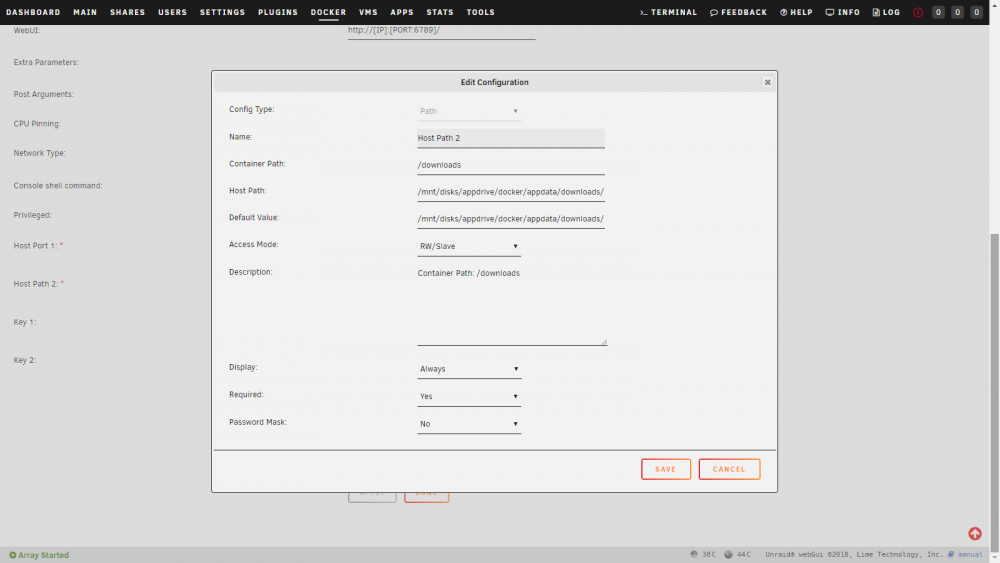
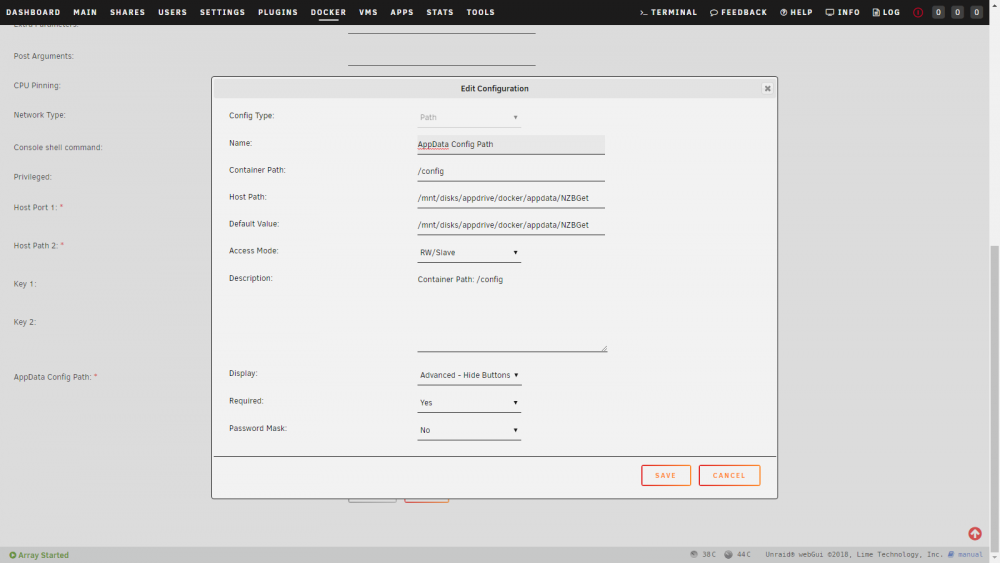
-
I just updated the plugin to the 9.23 version and I still get the same error Sep 23 08:26:51 Tower emhttp: cmd: /usr/local/emhttp/plugins/dynamix.plugin.manager/scripts/plugin update preclear.disk.plg Sep 23 08:26:51 Tower root: plugin: creating: /boot/config/plugins/preclear.disk/preclear.disk-2017.09.23.txz - downloading from URL https://raw.githubusercontent.com/gfjardim/unRAID-plugins/master/archive/preclear.disk-2017.09.23.txz Sep 23 08:26:51 Tower root: plugin: creating: /boot/config/plugins/preclear.disk/preclear.disk-2017.09.23.md5 - downloading from URL https://raw.githubusercontent.com/gfjardim/unRAID-plugins/master/archive/preclear.disk-2017.09.23.md5 Sep 23 08:26:51 Tower root: plugin: skipping: /boot/readvz already exists Sep 23 08:26:51 Tower root: plugin: setting: /boot/readvz - mode to 755 Sep 23 08:26:51 Tower root: plugin: running: anonymous Sep 23 08:26:55 Tower root: plugin: running: anonymous Sep 23 08:26:55 Tower rc.diskinfo[14054]: killing daemon with PID [10972] Sep 23 08:26:56 Tower rc.diskinfo[14070]: process started. To terminate it, type: rc.diskinfo --quit Sep 23 08:26:56 Tower rc.diskinfo[14073]: PHP Warning: strpos(): Empty needle in /etc/rc.d/rc.diskinfo on line 341 Sep 23 08:26:56 Tower rc.diskinfo[14073]: PHP Warning: strpos(): Empty needle in /etc/rc.d/rc.diskinfo on line 341 Sep 23 08:26:56 Tower rc.diskinfo[14073]: PHP Warning: strpos(): Empty needle in /etc/rc.d/rc.diskinfo on line 341 If I uninstall the plugin the entries go away
-
I will preface everything by saying I am not running the latest version of the plugin. I thought I updated it but before I started my latest preclear but I didn't. I am running the 2017.03.31 version. I have 2 8TB WD Reds (WD80EFAX) that I shucked from external enclosures. They are both connected to a 2 port pci-e SATA expansion card. I launched a 3 cycle preclear on both drives within about 1 minute of each other. I checked them today and the preclear status messages are frozen (see image below) on sdg. The read and write operations are both still increasing at about the same pace. Is it safe to assume that the preclear operation is still proceeding as normal on sdg and the status updates are just frozen? Everything on sdh appears to be going as it normally would. I am wondering if I should kill the preclears and update the script or just keep going? Update: the status updates have now frozen for sdh but it continues to accumulate reads. Is the preclear still running and the status updates are just frozen?



