





daver
Members
-
Joined
-
Last visited
-
Hi, Think i figured it out - thanks. Shell seems to make the /sbin/init work and i can add --rm as an extra parm. Cool Regards Dave
-
Hi, Many thanks to Unraid for making life a bit more sane. I am trying to build my own docker (90% of the way there) - how can i fill in the unraid docker config gui so my docker run command has "--rm" and "sbin/init" (vs bash)? I had a look around and could not figure it out. Regards Dave
-
Hi, Anychance to get sshpass and tcpretrans included please? Regards Dave
-
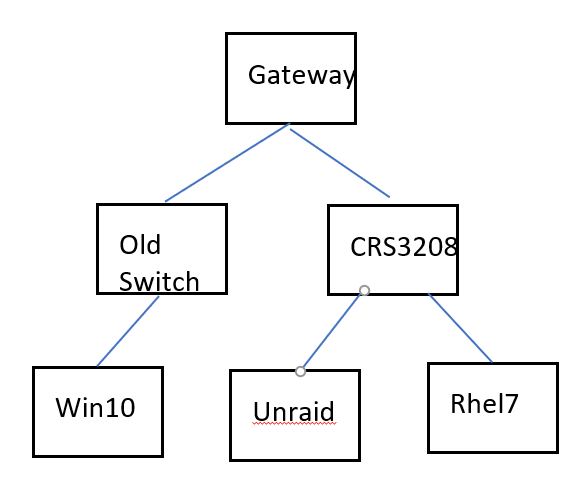
Hi, I am stumped on this one. I have unraid 6.9.2 running on amd 5800x, rhel 7 5900x talking to new 10gb switch - mikrotik crs309 (in SWOS) via 10gb spf+ mellanox connectx3 cards. Everything else is old 1gb nics and cat5e. The crs309 talks to my home gateway via 1gb. On the other side i have a switch with old 1gb cable to win10 pc. Mikrotik and Connectx3 cards are at latest firmware update level. My problem is plex on unraid is really low network speed to win10 so i have to view movies in 720p. Iperf3 says the same thing. Iperf3 from win10 to rhel7 or unraid box is ok. Iperf3 from rhel7 to win10 box is ok (avg 5 mbits/sec) Iperf3 from win10 to unraid or rhel7 is ok. Iperf3 from rhel7 to unraid is fine as is the other way round. But iperf3 from unraid to win10 sucks. root@Tower:~# iperf3 -c 10.2.1.12 Connecting to host 10.2.1.12, port 5201 [ 5] local 10.2.1.57 port 58770 connected to 10.2.1.12 port 5201 [ ID] Interval Transfer Bitrate Retr Cwnd [ 5] 0.00-1.00 sec 421 KBytes 3.45 Mbits/sec 23 28.5 KBytes [ 5] 1.00-2.00 sec 0.00 Bytes 0.00 bits/sec 12 15.7 KBytes [ 5] 2.00-3.00 sec 188 KBytes 1.54 Mbits/sec 2 59.9 KBytes [ 5] 3.00-4.00 sec 0.00 Bytes 0.00 bits/sec 0 59.9 KBytes [ 5] 4.00-5.00 sec 0.00 Bytes 0.00 bits/sec 13 17.1 KBytes [ 5] 5.00-6.00 sec 0.00 Bytes 0.00 bits/sec 0 17.1 KBytes [ 5] 6.00-7.00 sec 0.00 Bytes 0.00 bits/sec 0 17.1 KBytes [ 5] 7.00-8.00 sec 0.00 Bytes 0.00 bits/sec 14 18.5 KBytes [ 5] 8.00-9.00 sec 0.00 Bytes 0.00 bits/sec 0 18.5 KBytes [ 5] 9.00-10.00 sec 0.00 Bytes 0.00 bits/sec 0 18.5 KBytes - - - - - - - - - - - - - - - - - - - - - - - - - [ ID] Interval Transfer Bitrate Retr [ 5] 0.00-10.00 sec 609 KBytes 499 Kbits/sec 64 sender [ 5] 0.00-10.00 sec 113 KBytes 92.3 Kbits/sec receiver iperf Done. So thats what Plex is complaining about i believe. I swapped slots in mikrotik switch to see if the slot was crook and nothing changed. I swapped spf3 cables from unraid to rhel7 to see if a cable was crook and nothing changed. I tried tips and tweeks options with out any joy.
-
I am using the autofan plugin and hoping to use it to monitor temps of unassigned disks, but they don't come up in the list of disks to exclude. I'm running 6.8.3. Did i do something wrong?
