





jbrodriguez
Community Developer
-
Joined
-
Last visited
Everything posted by jbrodriguez
-
glad to know it worked (sort of?), where are you getting the missing CSRF token message, which log ? i think it's ok-ish to log that (think ive seen it before), cant remember for sure though
-
haven't heard this behavior before, are you using https ? what method are you using to add the server ?
-
yes, this is the word i was looking for :)
-
with dynamic i meant being able to add disks to the vdev, which is not possible at the moment, vs an unraid array where you can keep adding disks protected by parity
-
thanks a lot, will read a bit more right, a zfs z1 setup does have parity (similar to unraid), but vdevs are static, i remember reading they were working on dynamic vdevs (adding disks to the pool), but im not sure that has been merged yet (i can be mistaken)
-
i recently discovered jellyfin and started thinking about consolidating a cpl of servers into unraid i have an existing license for my main unraid server, but i think ill start from scratch on a new machine, with bigger hard drives (12tb, only 1 + parity at the beggining) i will need to import some encrypted zfs pools that live on 2 mirrored drives and will run jellyfin and other various dockers on the machine i have a couple of questions how to transfer the usb, this is prob covered in the docs, will look for it, if anyone has some pointers, will appreciate them is there an equivalent to docker compose ? ive only seen maintenance through the gui (installing, updating, etc), not a big deal, im just more cli oriented about the encrypted zfs pool, i remember reading very recently that importing zfs pools from other systems is supported now (not zfs import i understand, more like connecting the drive and running zfs/zpool commands on it), just don't know if encryption is supported, i dont mind entering the encryption key on each start (planning to leave the server 24/7) on a side note, i dont fully understand why some ppl runs unraid with pools only, no parity protected array, parity is unraid's distinctive feature in my opinion, otherwise why not use some linux distro ? any suggestion/comment will be appreciated
-
probably not a bad idea, would need some sort of depth setting too
-
published 6.11.0 nothing really newsworthy atm, it does have a lot of internal upgrades looking to work with the new api, pool support and some other changes
-
published 6.11.0 nothing really newsworthy atm, it does have a lot of internal upgrades looking to work with the new api, pool support and some other changes
-
hi, no, i removed this functionality, as Unraid didn't provide permissions at this level have to look if the new api supports some permissions
-
hi, yea, current logic doesn't fully support pools. i want to migrate to use unraid api which should support pools (just looking into it right now)
-
mm that's odd, when did it change for you ? should work normally it works for me, although i use wireguard directly, tailscale should be the same since it uses wireguard internally as well
-
it depends and is up to you, the plugin defers the decision, since it requires manual intervention, the user may have the best context in the matter if it was a no space left issue, i wouldnt delete the source
-
added some logging in 2025.02.22, if the crash happens again, pls go to view > developer > console (in chrome), to check the error and potentially figure out what's causing it
-
hi, the plugin doesn't delete the source until the target has been moved, so you can try again, select a smaller set of files perhaps ?
-
pushed a fix for the issue with the docker operations, will be available in 6.9.5 (whenever apple & google complete their review process)
-
pushed a fix for the issue with the docker operations, will be available in 6.9.5 (whenever apple & google complete their review process)
-
will take a look
-
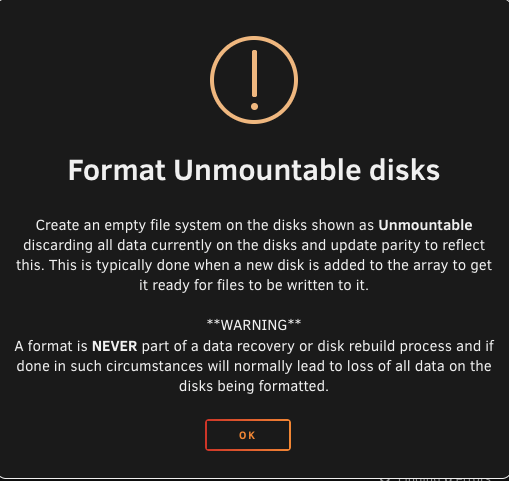
thanks @bmartino1! im still a bit confused though, i don't remember cache drives being part of parity (also mentioned in the docs, https://docs.unraid.net/legacy/FAQ/cache-disk/#overview) i know pools are different in Unraid 7, just not sure how to move forward also, i dont remember this happening when i added a cache drive on a 6.x system a while back maybe the dialog isn't picking up that i want to format a cache drive, not an array drive ? the wording "Create an empty file system on the disks shown as Unmountable discarding all data currently on the disks and update parity to reflect this" is what makes me doubt
-
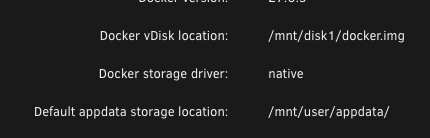
hey, i just installed an nvme in order to use it for jellyfin (docker), it's set as a pool device, only now that i try to format it, it's telling me it will update parity i dont really want it to affect parity, what should i do ? also, i have a docker setup pointing to hard drives docker is it ok to just point it to the cache drive once working (ony one docker there which i can delete without issues)

-
fixed the issue with the icon to open docker's web ui in 6.9.4
-
fixed an issue with the icon to open docker's web ui in 6.9.4
-
hmm, strange that it seems to have surfaced only now, hopefully by this weekend i have my dev environment set up again, will probably add some logging, although unbalanced doesn't have any error telemetry, so will need to wait for the app update, wait for the error to happen again and post logs 🤷♂️ 😀
-
im looking into the issue of the webui link, need to restore my dev env
-
hi, did you recently upgrade to Unraid 7 ? i wonder if something changed in the latest betas (i tested up to the rc's)



