





SimonHampel
Members
-
Joined
-
Last visited
-
I wish I had seen this earlier. Been putting off buying new drives until closer to the end of financial year - just went and looked at my local supplier and they are out of stock of almost every WD model and prices have also skyrocketed.
-
I've never used a Meshify 2 but my understanding is that while the Meshify does allow better cooling - it does so at the cost of noise. The more enclosed nature of the Define cases do a lot do dampen noise from the drives and fans. I don't find cooling in the Define cases is problematic at all - provided you mount enough fans at the front and rear of the case. My servers are in my office close to my desk, so noise management is important to me - which is why I chose the Define. If you were building a gaming machine where cooling performance is critical and weren't so fussy about noise, then the Meshify might be a better choice? For Unraid, my choice would be Define. I have a Define 7XL as one of my Unraid servers. I have a Define 7 as my Workstation PC. They're almost identical in general layout, but obviously the 7XL is larger in every dimension and so has more of everything inside. If the number of drive bays is important, then obviously the 7XL is the better choice - but it is a very big case! Also very very heavy when full of drives. There's nothing wrong with using a Define 7 for an Unraid server, provided you're happy with the limitations on drive capacity. Specs for the Define 7 say "up to 14 HDDs" ... and looking at the instruction manual, I believe that is would be: 9x in the "storage" bays using the Type-B trays 2x in the HDD cage at the bottom using Type-B trays 3x mounted on multi-brackets (Type-A) in top and bottom fan slots The Define 7XL can take up to 18 HDDs: 12x in the storage bays using Type-B trays 4x in 2x HDD cages at the bottom using Type-B trays 3x mounted on multi-brackets (Type-A) in top and bottom fan slots In my experience - while you can certainly shoe-horn those extra 3x drives using the multi-brackets - I moved away from that when I found that the mounting compromised airflow, cable management and just generally made the case crowded and difficult to work with. There was no direct cooling available for those extra mounted drives, so unless you rig some extra cooling up yourself, I would recommend against going that far. To my mind - the maximum useable capacity (taking drive temperatures into account) would be: Define 7: 11x 3.5" drives Define 7XL: 16x 3.5" drives (this is what I have in my Unraid machine) Note that I'm guessing on fitting 11 drives in the Define 7 based on what I can tell from the diagrams in the manual - I've not tried it and can't be bothered unmounting my Define 7 case to take a look, because it is currently fixed in a PC holder attached to my height-adjustable desk. It's definitely a minimum of 10, but if I'm reading the diagrams correctly, I'm pretty sure you can fit 11 easily in standard mounting positions. I run my server off a pair of LSI 9211-8i cards I bought refurbished from The Art of Server eBay store. The mobos I've seen with 8+ SATA ports are really expensive - better to buy a good middle-of-the-road mobo and an external SATA card IMO. I also have an Antec 1200 with four 5-in-3 hot swap enclosures for a total of 20 drives running Unraid as my file server for storing backup images (38TB current capacity with dual parity). It's a noisy machine - not great at cooling - and it's showing its age, but it still runs my bunch of old Samsung 2TB drives which are over 14 years old now and refuse to die. I love the hot-swap capabilities - fitting drives to the Define cases is such a pain. Fortunately I'm at the point now where I rarely need to swap drives around, so it's less of an issue. I'm debating about what I'll do when this Antec 1200 dies. My Define 7XL has 16 drives (14 data + dual parity) for 100TB of storage, and I'm not keen to keep replacing the 8TB drives with 12TB drives just to get an extra 4TB of storage at a time. I might build a second Define 7 or 7XL machine to replace my Antec 1200 - but I haven't decided which yet. Will depend on how many 2TB drives I still have running - as physically old as they are - they were in storage for many years before I built my second Unraid server because I outgrew the 2TB capacity very quickly. Most of them are only at around 6 years of power on age - while one of my 4TB WD Red drives that runs parity for that machine is approaching 12 years of power on!
-
Thanks - I can confirm everything worked as expected.
-
I have two unraid servers. I want to move 6 drives (including the data on them) from one of the servers to the other server. All drives on both machine use XFS as the filesystem. Both servers use dual parity. My understanding is that if I create a new config on the destination server and assign the drives to empty slots, then start the array - it will rebuild parity and the data will just appear - the system won't try to reformat those drives in the new system? I would then do a new config on the origin server and unassign the drives, then start the array to do a parity rebuild without those drives present. I have an existing share on the new server that is different to the share that the 6 drives use - if I just rename the top level folder on each of the drives to match the new share name, will that be sufficient to have the data on those drives appear under the new share? Summary of steps I think I'll need: take screenshots of all existing array assignments just in case shut down both servers and physically move all 6 drives from origin to destination servers start destination server (auto start is disabled) create new config on destination server preserving current assignments, assign new drives to empty slots start array on destination server, which will trigger a party rebuild rename top level folders on all new drives to match share name that will be used on destination server create new config on the origin server preserving current assignments, unassign old drives start array on origin server, which will trigger a parity rebuild Anything I've missed? Thanks!
-
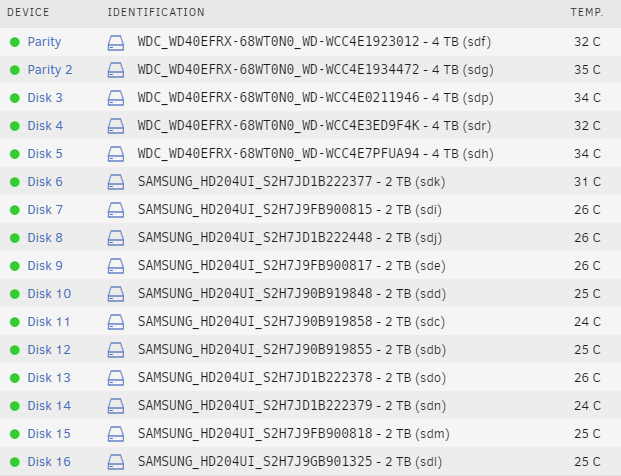
I have a Fractal Design Define 7 XL with 16 drives (including 2 parity) and 3 cache SSDs. Temps in the mid 30's typically for the drives at the top (heat rises!) - I'm in Australia and the ambient is usually quite high. The following screenshot was taken around 1% into a parity check and it's around 24C inside my office. I'm running a pretty low powered machine - AMD Ryzen 3 3200G with onboard graphics (no discrete GPU). I have three 14cm fans mounted at the front of the case and a 12cm fan mounted at the rear. My goal for the build was to minimise noise - this machine sits in my office next to my desk, so I didn't want something that would add to the noise already in the room. I'm very happy with the build. I also have an old Antec 1200 case running a 20 drive array in 4 rows of 5-in-3 hot swap drive bays - cooled only by the 92mm fans mounted on the back of each drive bay and the 120mm on the top. Unsurpsingly, given how densly the drives are packed in - the drive temperatures on this machine are much higher than then Define 7 XL (frequently reaching 46-47C under load). If this older server starts to have hardware issues - I think I'll rebuild it in another Define 7 XL. It will be annoying having to drop down from 20 drives to 16, and it's a lot more work swapping drives in the Define 7 XL than it is with the hot swap drive bays - but the improved cooling, and more importantly, quietness of the Define 7 XL is going to improve things overall I feel.
-
Glad to hear I wasn't being silly by delaying the optional update to 20H2! Right now things are working the way I need them, so I'm not going to push to the latest versions until I actually need to.
-
My new laptop has 1909 - I haven't updated to 20H2 yet. I did a rebuild of my old laptop for use by my son and that didn't have any problems accessing Unraid - it's running 2004 Should I take this to mean that the issue has been fixed in 2004? Or is this just another Windows 10 quirk where some machines have issues while others don't ?
-
Just got a brand new laptop running Windows 10 Pro and I can confirm that this registry change still fixes the issue.

