





jonathanblim
Members
-
Joined
-
Last visited
Everything posted by jonathanblim
-
I got a new drive, copied the files from the old flash to the new and did a hardboot but still no network connectivity and hence no GUI. Any help ?
-
It seems like the USB drive has failed ? Found this at the start of the errors... Nov 28 07:43:00 Candyshoppe kernel: usb 2-1: USB disconnect, device number 2 Nov 28 07:43:00 Candyshoppe kernel: blk_update_request: I/O error, dev sda, sector 1344480 op 0x1:(WRITE) flags 0x0 phys_seg 1 prio class 0 Nov 28 07:43:00 Candyshoppe kernel: blk_update_request: I/O error, dev sda, sector 2049 op 0x1:(WRITE) flags 0x0 phys_seg 1 prio class 0 Nov 28 07:43:00 Candyshoppe kernel: Buffer I/O error on dev sda1, logical block 1, lost async page write Nov 28 07:43:00 Candyshoppe kernel: blk_update_request: I/O error, dev sda, sector 560656 op 0x1:(WRITE) flags 0x0 phys_seg 1 prio class 0 Nov 28 07:43:00 Candyshoppe kernel: Buffer I/O error on dev sda1, logical block 558608, lost async page write Nov 28 07:43:01 Candyshoppe kernel: FAT-fs (sda1): Directory bread(block 30768) failed Nov 28 07:43:01 Candyshoppe kernel: FAT-fs (sda1): Directory bread(block 30769) failed Nov 28 07:43:01 Candyshoppe kernel: FAT-fs (sda1): Directory bread(block 30770) failed Nov 28 07:43:01 Candyshoppe kernel: FAT-fs (sda1): Directory bread(block 30771) failed Nov 28 07:43:01 Candyshoppe kernel: FAT-fs (sda1): Directory bread(block 30772) failed Nov 28 07:43:01 Candyshoppe kernel: FAT-fs (sda1): Directory bread(block 30773) failed Nov 28 07:43:01 Candyshoppe kernel: FAT-fs (sda1): Directory bread(block 30774) failed Nov 28 07:43:01 Candyshoppe kernel: FAT-fs (sda1): Directory bread(block 30775) failed Nov 28 07:43:01 Candyshoppe kernel: FAT-fs (sda1): Directory bread(block 30776) failed Nov 28 07:43:01 Candyshoppe kernel: FAT-fs (sda1): Directory bread(block 30777) failed Recommendations on how to proceed ? I have lost webgui now
-
OK so even with the sleep disabled the problem still presists candyshoppe-syslog-20211129-0105.zip
-
While this is not optimal I will try disabling S3 sleep all together to see if it makes any difference. thanks!
-
OK for some reason it seems the only way to get it uploaded is to zip the file. Attached is the log file, thanks in advance! syslog.7z
-
So apparently I already had the mirror to flash option enabled, but when I try to upload the log file I get following error now ?

-
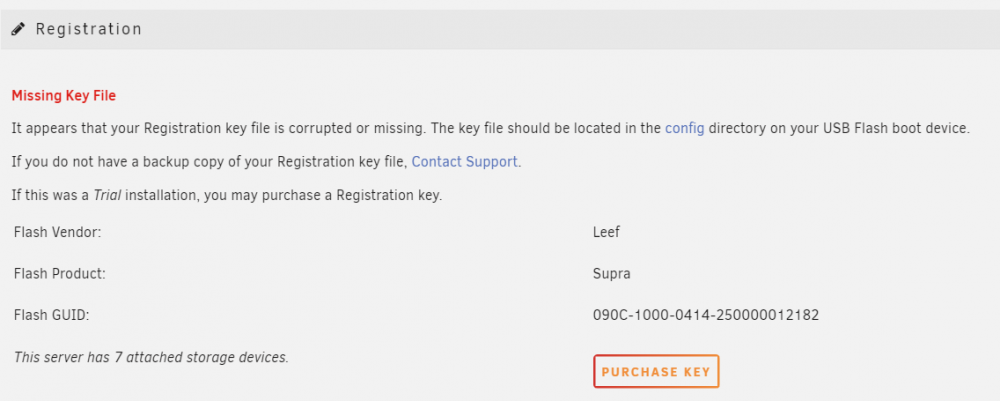
Hello Squid, thanks for the feedback I will enable to mirror to flash function and post the sys log as soon as it happens again. that said I just encountered another issue. this has only been a few hours since I did the hard reboot this morning, but just now when I checked I now get the following error as if I do not have a license but I do ? Could it be my flash drive got killed during the power outage ?
-
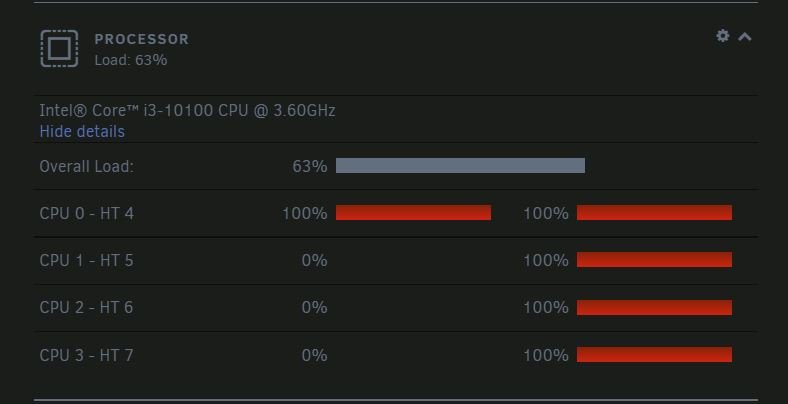
Hello I am running Unraid 6.9.2 Plus and have 6 drives installed, 4 connected directly to the motherboard and 2 connected to a SAS to SATA card. A while back I had an unfortunate power outage when I wasn't home and box was not connected to a UPS. I mention this as this is the only odd event I recall happening, rest of the time everything was smooth with Unraid. Now randomly (sometimes in as little as a day upto 10 days) the server will become unresponsive, I am unable to do a normal shutdown/reboot or take the array offline, the only way is to force a reboot but powering down the machine by holding down the power button. When I look at my dashboard I notice that several cores/threads are stuck at 100% Thanks, Jon
-
Thanks again Pauven. Testing out the new version 2.0 now. The countdown timer in v2 looks slicker than the progression number of version 1. Now I know how long before I need to look at the terminal for the next value to appear
-
Thanks for the info Pauven, makes sense that the numbers would be mostly affected by major hardware changes. What what what?? Down from 1.5x Parity time to only 2.1 hours? For me parity is about 8 hours so with version 2 I'd save about 10 hours... Any loss in samples taken or just a much more efficient routine?
-
Thanks a lot Pauven Really like the idea of this script and very excited to eek every last bit of transfer rate out of the box. Just finished an upgrade to 5RC16 and running the FULLAUTO test now. Getting addicted to checking the terminal for the new biggest number I have sort of a general question, what would cause these values to need to be changed? What I am trying to get at is, with normal use (not major hardware changes), adds, deletes, drive upgrades, additions, replacements, would there be a need to find a new optimal value? Like maybe run this once a every x months? After a hard drive change?

