





jowe
Members
-
Joined
-
Last visited
-
No problem, just glad i could help!
-
I'm not entirely sure what you are trying to do. But unraid dont need to have an IP on that VLAN. If you dont want it to. If unraid needs to talk to CCTV VLAN, it should be done over the firewall. As long as the switch port you are connecting the NVR to are configured on the correct vlan, and the device have the correct IP/mask. It should work. A good start is to ping the firewall and se if you get a block in the pfsense log. Then atleast you have a conection to the firewall.
-
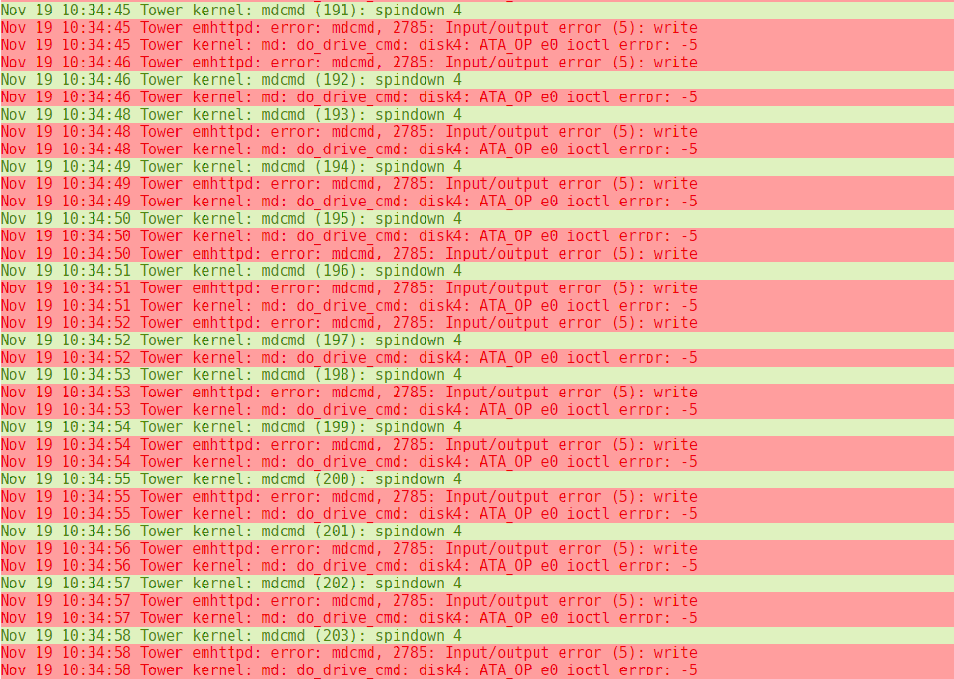
I get the errors instead if i remove the plugin, so its more of an unraid thing, it tries to spin down the drive again and again... Not a problem for me as i have the disks to never spin down now.
-
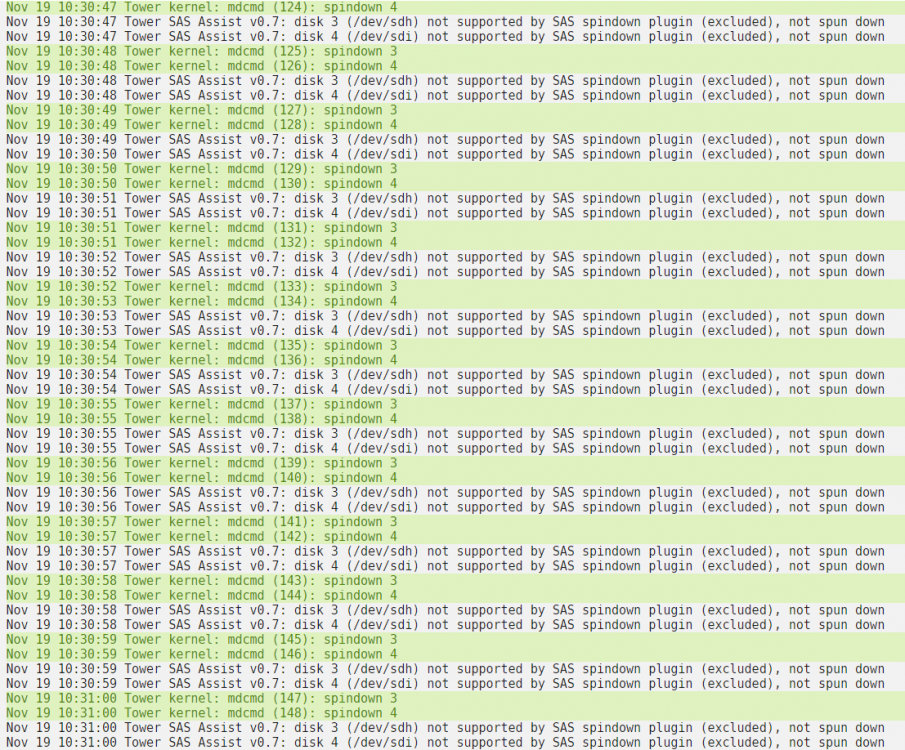
Yes I understand that the message should display, when timer reaches for example 15min. Or hitting spin down button. I did not push the button at all, just waited 15min, and the message loops every second. I could have provided a really long list with same messages. Yes I know, just wanted to give it a go with the latest FW, but unfortunately it didn't work. Nevertheless it's a great project!
-
Really good work @doron! Just tried the commands against my SAS drives after upgrading firmware of the SAS controller. But "sg_start --readonly --pc=3 /dev/sgX" disables the drive, and i need a reboot to get it back. However, the plugin loops the "drive not supported" messages see below. Nov 18 20:13:45 Tower kernel: mdcmd (931): spindown 3 Nov 18 20:13:45 Tower kernel: mdcmd (932): spindown 4 Nov 18 20:13:45 Tower SAS Assist v0.7: disk 3 (/dev/sdh) not supported by SAS spindown plugin (excluded), not spun down Nov 18 20:13:46 Tower SAS Assist v0.7: disk 4 (/dev/sdi) not supported by SAS spindown plugin (excluded), not spun down Nov 18 20:13:46 Tower kernel: mdcmd (933): spindown 3 Nov 18 20:13:46 Tower kernel: mdcmd (934): spindown 4 Nov 18 20:13:47 Tower SAS Assist v0.7: disk 3 (/dev/sdh) not supported by SAS spindown plugin (excluded), not spun down Nov 18 20:13:47 Tower SAS Assist v0.7: disk 4 (/dev/sdi) not supported by SAS spindown plugin (excluded), not spun down Nov 18 20:13:47 Tower kernel: mdcmd (935): spindown 3 Nov 18 20:13:48 Tower kernel: mdcmd (936): spindown 4 Nov 18 20:13:48 Tower SAS Assist v0.7: disk 3 (/dev/sdh) not supported by SAS spindown plugin (excluded), not spun down Nov 18 20:13:48 Tower SAS Assist v0.7: disk 4 (/dev/sdi) not supported by SAS spindown plugin (excluded), not spun down
-
A new version has been posted, ls62 and is working (at least for me) So linuxserver/emby:latest Is the one to use if you want to get the latest updates. @jcato @mbc0
-
With the latest update i cant scan new media. It finds the media, but can't read what kind it is. And it wont play on Shield / Web. Media previously scaned works. I went back to linuxserver/emby:4.5.2.0-ls59 And all is working like before again.
-
Hi, i modified the script, and got it working. It's VERY simplified. And cusom to my setup. I modified 99-spinsasdown.conf to trigger "spindown 3" For my SAS disk 3. :msg,contains,"spindown 3" ^/usr/local/bin/unraid-spinsasdown And in your script unraid-spinsasdown I removed all intelligence and just spin down the correct disk. sg_start --readonly --pc=3 /dev/sg7 Unraid log after spin up / spin down in GUI Oct 21 10:27:41 Tower kernel: mdcmd (99): spinup 3 Oct 21 10:27:41 Tower kernel: md: do_drive_cmd: disk3: ATA_OP e3 ioctl error: -5 Oct 21 10:28:03 Tower kernel: mdcmd (100): spindown 3 Oct 21 10:28:03 Tower emhttpd: error: mdcmd, 2723: Input/output error (5): write Oct 21 10:28:03 Tower kernel: md: do_drive_cmd: disk3: ATA_OP e0 ioctl error: -5 And checking status root@Tower:/# sdparm --command=sense /dev/sdh /dev/sdh: HP MB8000JFECQ HPD7 Additional sense: Standby condition activated by command Edit: Tried again, waited 15 min and got this, and disk not spun down.. Oct 21 10:45:52 Tower kernel: mdcmd (103): spinup 3 Oct 21 10:45:52 Tower kernel: md: do_drive_cmd: disk3: ATA_OP e3 ioctl error: -5 Oct 21 11:00:53 Tower kernel: mdcmd (104): spindown 3 Oct 21 11:00:53 Tower emhttpd: error: mdcmd, 2723: Input/output error (5): write Oct 21 11:00:53 Tower kernel: md: do_drive_cmd: disk3: ATA_OP e0 ioctl error: -5 Oct 21 11:00:54 Tower kernel: mdcmd (105): spindown 3 Oct 21 11:01:10 Tower rsyslogd: program '/usr/local/bin/unraid-spinsasdown' (pid 23020) exited with status 2 [v8.1908.0] Edit 2 If i run /usr/local/bin/unraid-spinsasdown from CLI, the disk spins down root@Tower:/mnt/disk1/media/org.rel# sdparm --command=sense /dev/sdh /dev/sdh: HP MB8000JFECQ HPD7 root@Tower:/mnt/disk1/media/org.rel# /usr/local/bin/unraid-spinsasdown root@Tower:/mnt/disk1/media/org.rel# sdparm --command=sense /dev/sdh /dev/sdh: HP MB8000JFECQ HPD7 Additional sense: Standby condition activated by command
-
How can I check that? I have disabled my hddtemp script, but i do have "cache dirs" running, can disable that for now.
-
Hi, the log is empty as soon as i restart rc.rsyslogd. I used that file for an hour or so yesterday, and didn't get a single line in the log. I also went back to 6.8.3 yesterday due to performance problems. But i have the same issue with the log. And no spindown of SAS. I also have the same problem with 3 WD RED SATA drives. On the same controller i have 4 drives that go to standby as they should. They are actually on different channels. So the 4 drives working are on one, and 4 not working are on another. Maybe something there?! I had the same problem years ago with my WD RED not spinning down, but if i remember correctly i solved it somehow. Dont remember how... I have sent the file.
-
Got some read errors when the disk spun up again, no red X thank god! Nothing in the log unfortunately.

-
Same again, pasted the text below. And restarted rc.rsyslogd. root@Tower:~# /etc/rc.d/rc.rsyslogd restart Starting rsyslogd daemon: /usr/sbin/rsyslogd -i /var/run/rsyslogd.pid Nothing in the log when i manually spin up / down disks. (And probably not when done automatically either). If i put the disk to sleep more than once it's still in standby. But the first time nothing happened. root@Tower:~# sdparm --command=sense /dev/sdh /dev/sdh: HP MB8000JFECQ HPD7 root@Tower:~# sg_start --readonly --pc=3 /dev/sg7 root@Tower:~# sdparm --command=sense /dev/sdh /dev/sdh: HP MB8000JFECQ HPD7 root@Tower:~# sdparm --command=sense /dev/sdh /dev/sdh: HP MB8000JFECQ HPD7 root@Tower:~# sg_start --readonly --pc=3 /dev/sg7 root@Tower:~# sdparm --command=sense /dev/sdh /dev/sdh: HP MB8000JFECQ HPD7 Additional sense: Standby condition activated by command root@Tower:~# sg_start --readonly --pc=3 /dev/sg7 root@Tower:~# sdparm --command=sense /dev/sdh /dev/sdh: HP MB8000JFECQ HPD7 Additional sense: Standby condition activated by command root@Tower:~# sg_start --readonly --pc=3 /dev/sg7 root@Tower:~# sdparm --command=sense /dev/sdh /dev/sdh: HP MB8000JFECQ HPD7 Additional sense: Standby condition activated by command
-
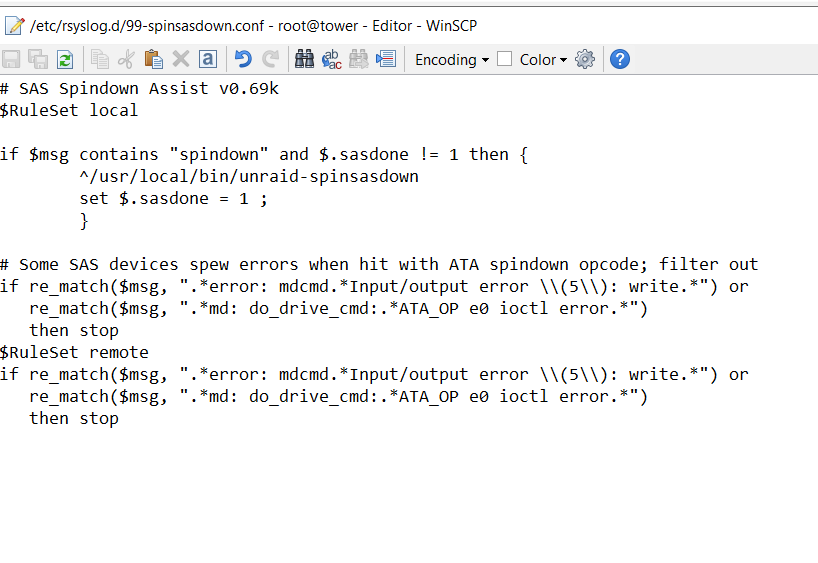
Nothing at all Will try again, i used winscp to edit the file. That should work right? I know, it's not updated all the time, but usually when unraid is spinning down the disks, it will change the status. Oct 19 14:40:56 Tower kernel: mdcmd (398): spinup 3 Oct 19 14:40:56 Tower kernel: md: do_drive_cmd: disk3: ATA_OP e3 ioctl error: -5 Oct 19 15:19:03 Tower kernel: mdcmd (409): spindown 3 Oct 19 15:19:03 Tower emhttpd: error: mdcmd, 2783: Input/output error (5): write Oct 19 15:19:03 Tower kernel: md: do_drive_cmd: disk3: ATA_OP e0 ioctl error: -5 Oct 19 15:19:04 Tower kernel: mdcmd (410): spindown 3 Oct 19 15:19:20 Tower SAS Assist v0.6[11358]: spinning down slot 3, device /dev/sdh (/dev/sg7) Oct 19 15:19:20 Tower SAS Assist v0.6[11412]: spinning down slot 3, device /dev/sdh (/dev/sg7)
-
I have tried it and now i get nothing in the log at all, all disks went down to standby, but the SAS drive. But not a single line in the log. Still showing the "green" button, but no temp. Another thing i saw in the log before changing the 99-spinsasdown.conf file, was that it's trying to spin down disk3 2 times. Maybe that why the 2 lines from the plugin. That might be a problem? I have not changed the rsyslog configuration. Using a LSI SAS 9211-4i Flashed to IT mode.

-
Same again Oct 19 12:17:52 Tower kernel: mdcmd (74): spindown 3 Oct 19 12:17:52 Tower emhttpd: error: mdcmd, 2783: Input/output error (5): write Oct 19 12:17:52 Tower kernel: md: do_drive_cmd: disk3: ATA_OP e0 ioctl error: -5 Oct 19 12:17:53 Tower kernel: mdcmd (75): spindown 3 Oct 19 12:18:09 Tower SAS Assist v0.6[14705]: spinning down slot 3, device /dev/sdh (/dev/sg7) Oct 19 12:18:09 Tower SAS Assist v0.6[14729]: spinning down slot 3, device /dev/sdh (/dev/sg7) root@Tower:~# sdparm --command=sense /dev/sdh /dev/sdh: HP MB8000JFECQ HPD7 I'll try to reinstall the plugin.




