





alexstein
Members
-
Joined
-
Last visited
Everything posted by alexstein
-
Still no change unfortunately. Looks like the card may have a fault i think. Thanks for the assist.
-
Let me try. One sec
-
How do i load these drivers into unraid? Not a linux person here
-
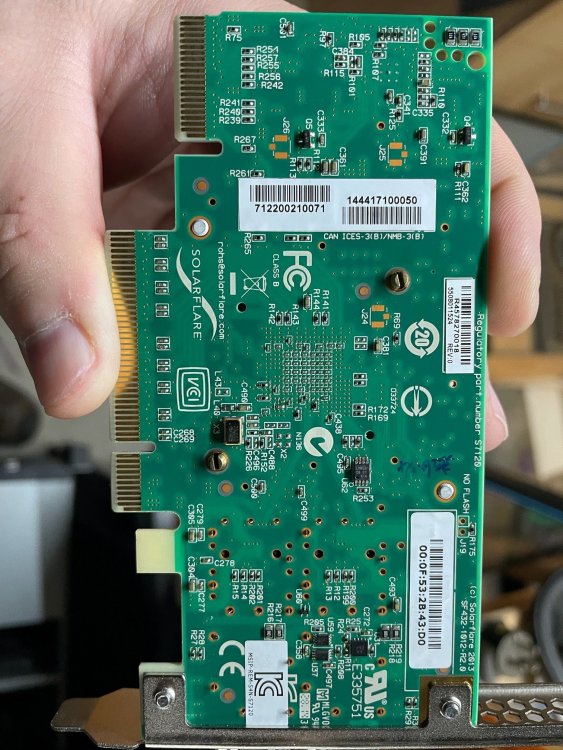
so looks like VID is 1924 / 101404cc which isnt on the driver list on your command.

-
Here is the card. Nothing too obvious on the card from what i can see
-
Here is my output: root@NAS:~# modinfo sfc filename: /lib/modules/5.10.28-Unraid/kernel/drivers/net/ethernet/sfc/sfc.ko.xz license: GPL description: Solarflare network driver author: Solarflare Communications and Michael Brown <[email protected]> alias: pci:v00001924d00001B03sv*sd*bc*sc*i* alias: pci:v00001924d00000B03sv*sd*bc*sc*i* alias: pci:v00001924d00001A03sv*sd*bc*sc*i* alias: pci:v00001924d00000A03sv*sd*bc*sc*i* alias: pci:v00001924d00001923sv*sd*bc*sc*i* alias: pci:v00001924d00000923sv*sd*bc*sc*i* alias: pci:v00001924d00001903sv*sd*bc*sc*i* alias: pci:v00001924d00000903sv*sd*bc*sc*i* alias: pci:v00001924d00000813sv*sd*bc*sc*i* alias: pci:v00001924d00000803sv*sd*bc*sc*i* alias: pci:v000010EEd00001100sv*sd*bc*sc*i* alias: pci:v000010EEd00000100sv*sd*bc*sc*i* depends: mdio retpoline: Y intree: Y name: sfc vermagic: 5.10.28-Unraid SMP mod_unload parm: vf_max_tx_channels:Limit the number of TX channels VFs can use (uint) parm: max_vfs:Reduce the number of VFs initialized by the driver (int) parm: mcdi_logging_default:Enable MCDI logging on newly-probed functions (bool) parm: rx_refill_threshold:RX descriptor ring refill threshold (%) (uint) parm: irq_adapt_low_thresh:Threshold score for reducing IRQ moderation (uint) parm: irq_adapt_high_thresh:Threshold score for increasing IRQ moderation (uint) parm: interrupt_mode:Interrupt mode (0=>MSIX 1=>MSI 2=>legacy) (uint) parm: rss_cpus:Number of CPUs to use for Receive-Side Scaling (uint) parm: efx_separate_tx_channels:Use separate channels for TX and RX (bool) parm: phy_flash_cfg:Set PHYs into reflash mode initially (bool) parm: debug:Bitmapped debugging message enable value (uint) I am just going to check the Vendor ID's on the card vs what is in the driver support listing. back in 5
-
Hi Simon, Do i literally run the command you gave?
-
I only have a windows machine available and based on what i can find the NIC is only compatible with Linux. https://lenovopress.com/tips1156-solarflare-sfn7122f Surely if there is no driver then there is no way to load the nic into the OS so that it is visible?
-
Hi Jorge. Do we know if the NIC is supported / has driver support? Slot wise ive tried it in another port with no luck. Ill have to dig out another machine shortly and see how it goes.
-
Evening all, Ive been having some issues on my current rig (x99 xeon / 2008sas (with hp expander) + gtx1650Super. I was previously running a Mellenox connectx-2 10gb nic and was maxing out my cache drive upload at around 600MB/s (evo970 Pro) to try and resolve this I took advice from another Unraid user on Facebook who suggested getting a Solaflare sfn7122f which apparently works fine on Unraid. I am running the latest build I have today taken delivery of the card however i am finding that the hardware is lighting up however Unraid is not listing the NIC to be configurable. The card is in a x16 slot and can be seen without issue by my 10gb switch Any thoughts or assistance would be highly appreciated. nas-diagnostics-20210830-2122.zip


