





Japes
Members
-
Joined
-
Last visited
Everything posted by Japes
-
calling this one good. 7.5 hours in and still looking good. Thanks Jorge.
-
It's been three hours which is double the longest up time I had yesterday and it's still running. Looks like this may have been the issue. I'll check back in later to confirm after a bit more time.
-
Food that setting and it was set to “Auto”. Changed to “typical current idle”. Let’s see if this works. I don’t have anything overclocked so that’s ok. if this doesn’t work I’ll disable C-States globally since I saw that
-
Earlier today my server went unresponsive. I Rebooted it and it was fine for a couple hours and then the same thing. I've been using Unraid for a long time now but recently upgraded to 6.10.1 maybe a few months ago. I think I uploaded everything here I need to but I don't know what much of this means. Any help would be great. tower-syslog-20220826-0242.zip tower-diagnostics-20220825-2212.zip
-
oh, for sure. Photos are stored on an external hard drive that is backed up to the unraid server. It was more a comment of that seeming weird since I haven't added photos to the server in over a week and Mover is supposed to have been run nightly so the Cache drive must have been having issues for at least a week. So, the Docker weirdness I was experiencing last week kind of makes sense now.
-
Everything seems to be going ok so far. Only one of the dockers so far needed to be re set up like new.
-
I figured so that's what I was in the process of doing so I'' report back when that's done. Starting with all the family photos since it looks like the mover hasn't moved those in quite awhile
-
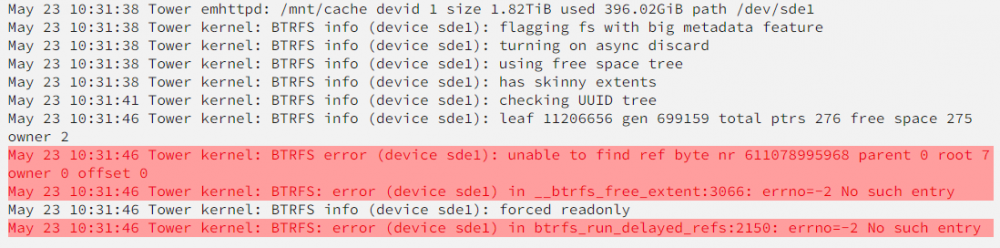
I'm guessing this is the issue but don't know how to proceed
-
tower-diagnostics-20220523-1109.zip
-
I did not make a new Unraid install I just uploaded through GUI to 6.10 and then upgraded again today when the pop up came up. I was upgrading an old 2TB drive with a new 6TB drive and I coppied all the data from old drive to a current drive. I then removed the old drive in the config and rebuilt parity with one less drive. all checked out. I then precleared the new drive and added it to the array and formatted it as normal. All checked out. noticed none of my dockers were showing in the dashboard (don't know if that was before or after but they were all on when I went to bed last night as the new drive was finishing Post Read. Remembered last time this happened a few years ago about the rebuilding docker.img. So I did that. but when I went to previous apps location it only had two plugins listed and dockers was greyed out. Unfortunately my flash back up is way out of date. Brain fart and I didn't backup before upgrade. I hadn't upgraded in awhile. I think I was on 6.5 still. But anyway on the app page after deleting and re enabling docker image in settings page I get this at the top. EDIT: found this but here is my cache info



-
What do you do if you deleted the docker.img file and rebuilt and then went to previously installed apps and find that none of the docker are there. WIll I have to manually reinstall all of these dockers or is there a way to recreate these with all my old settings? I upgraded to 6.10 this past week and installed a new precleared drive and woke up to none of the dockers working. So I did the Docker rebuild first...
-
Geez...now I feel like an idiot. Thanks a ton. I didn't realize there were two grabbers listed for Schedules Direct and I activated the first one I saw. I changed that and the log is showing that it's running now. EDIT: Just posting to follow up and say I'm back up and running. Thanks again.
-
SchedulesDirect issues. I've had to rebuild my server after some water issues with flooding in my house and it's been a few years since I set up TvHeadend so I'm not sure what I've done wrong here but I can't get the epg to work. I've SSH in and ran the config script I checked my apdata folder and it created a file and this is the contents username and password have been edited for posting. I then went back into TvHeadend EPG Grabber Module and enabled "internal: XMLTV.....Schedules Direct JSON.... I then re-run internal epg grabbers and I get this every time. what did I miss here?
-
Oops, that one was all me. The guide data was still present from the Mythtv scan so I thought I had done that already in TVheadend. Thanks for pointing me to my mistake.
-
I think I have it mostly worked out. I added the following to my AdvanceSettings in my Kodi install... <network> <buffermode>2</buffermode> <cachemembuffersize>41943040</cachemembuffersize> <readbufferfactor>5</readbufferfactor> </network> <pvr> <minvideocachelevel>30</minvideocachelevel> <minaudiocachelevel>30</minaudiocachelevel> </pvr> I adjusted the Cache level until I got a satisfactory balance between buffering and channel change times. Seems to be mostly ok except the three channels on the PBS stream. However I did run into a different issue now...my EPG is now blank. I manually ran the grabber and it appears to run but I get nothing. Loglevel debug: enabled 2016-09-11 20:00:25.378 xmltv: /usr/bin/tv_grab_na_dd: grab /usr/bin/tv_grab_na_dd 2016-09-11 20:00:25.380 spawn: Executing "/usr/bin/tv_grab_na_dd" 2016-09-11 20:00:26.094 spawn: using config filename /config/.xmltv/tv_grab_na_dd.conf 2016-09-11 20:00:29.812 spawn: Fetching from Schedules Direct Fetched 5059 k/bytes in 3 seconds 2016-09-11 20:00:54.216 spawn: loading data: ################################################## 2016-09-11 20:00:54.216 spawn: NOTE: Your subscription will expire: 2017-09-02T15:12:47Z 2016-09-11 20:01:14.844 spawn: Writing schedule: ################################################# 2016-09-11 20:01:14.844 spawn: Downloaded 7798 programs in 48 seconds 2016-09-11 20:01:15.190 xmltv: /usr/bin/tv_grab_na_dd: grab took 50 seconds 2016-09-11 20:01:15.287 xmltv: /usr/bin/tv_grab_na_dd: parse took 0 seconds 2016-09-11 20:01:15.287 xmltv: /usr/bin/tv_grab_na_dd: channels tot= 38 new= 0 mod= 0 2016-09-11 20:01:15.287 xmltv: /usr/bin/tv_grab_na_dd: brands tot= 0 new= 0 mod= 0 2016-09-11 20:01:15.287 xmltv: /usr/bin/tv_grab_na_dd: seasons tot= 0 new= 0 mod= 0 2016-09-11 20:01:15.287 xmltv: /usr/bin/tv_grab_na_dd: episodes tot= 0 new= 0 mod= 0 2016-09-11 20:01:15.287 xmltv: /usr/bin/tv_grab_na_dd: broadcasts tot= 0 new= 0 mod= 0 If there is a different location where more logs would be please let me know. I enabled debug log output prior to running it this last time but I can't find where a log would be output to.
-
I'm not encoding. It is worse when I'm watching one channel and something else is recording, but it also happens when I'm not recording. I'm concentrating on just the PC right now. I do have the Mpeg licenses on the Pi and that fixed all issues with livetv with Myth but decided one at a time would be best. I did notice that certain channels were consistently worse and thought it could be my antenna but noticed that the signal strength was still saying 98% as the lowest. I do have Kodi-headless and mariaDb dockers running as well. It didn't seem to make a difference before.
-
Figured I needed to give them both a fair shot. A week with Mythtv and now a week with TVH. TVH was easier to set up. Now I'm just tweaking it. I'm getting buffering for liveTV on not only my Pi but also my windows kodi machine. Once I figure that out I'll more than likely be sticking with TVH. everything else about it seems to be smoother for my Kodi setups and management.
-
Thanks for such a quick response. That worked.
-
Very Excited to see this. I've been experimenting with Mythtv but TVHeadend seems to be better supported with Kodi. So I installed through the Community Applications and then went to setup everything. Started the Wizard but there were no options when it got to TV Adapter and Networks. I have a HDHomerun Connect that was working with MythTV. I did see a note "Tuners already in use will not appear below" and I figured MythTV was "using" it even though I had stopped it. I tried removing the MythTV Docker but nothing changed. I then removed TVHeadend, rebooted again and started over with just TVHeadend. Still nothing. I've searched but can't find a solution. Now I'm stressed because I killed a semi working MythTV setup with schedulesdirect going (mostly) and now I'm stuck. I'm sure I'm missing something simple but can't for the life of me figure out what. I read about older versions of TVHeadend needing a HDHomerun driver installed but I thought this version (listed as 4.1 in the about tab) was suppose to be set up for HDHomerun out of the box.
-
it's any version you want it to be from 14 to 16 (jarvis beta4) by setting the VERSION variable. and you only have to keep the same major version across a mysql setup, point releases are immaterial because the mysql d/bases don't change. Where can I find the variable to change this to 16? Nevermind...found it. my-kodi-headless.xml in case anyone else missed it.
-
This was helpful thanks. When I login I only see the last three items in your screen shot so I think I must have set up Mariadb wrong. Any suggestions from here. Should I just start over and re install Mariadb? No need to be drastic and starting over again, did you test the login you create for kodi? I personally believe you just need to make sure you have created the user correctly and it should work. I went back into manage users and changed the password, updated both advancedsettings.xml and it looks like it's working. Scanning in everything now. The only error is with the musicdb but I haven't added any yet so I'll worry about that later. After its finished scanning I need to advancedsettings and sources.xml to my next computer and if I understand this it should just start up with the full library from now on? Thanks for your patients and help. Not sure what happened with the login but it appears changing the password worked. I originally had login/pass as kodi/kodi and changed it to kodi/xbmc so not sure if having the same for both was an issue or if I just had a typo.
-
This was helpful thanks. When I login I only see the last three items in your screen shot so I think I must have set up Mariadb wrong. Any suggestions from here. Should I just start over and re install Mariadb?
-
First make sure the kodi clients are connecting to the sql server (assuming the sql server currently has no databases in it) as once a client connects, it will try to find the videos/music dbs and if they don't exist they will get created If you look at the log file I attached I believe that's my issue I just don't know why it can't create the database. I went into the docker tab and installed kodi headless I did the same for Mariadb I downloaded Heidisql tool and created a user kodi password kodi and set to everywhere. I checked the dashboard and both were running. I edited the advancedsettings.xml to point to the correct ip with kodi/kodi login info. I installed latest kodi on my computer and copied the advancedsettings from server to the portabledata/userdata folder and set up sources and tried to scan But nothing gets scanned in. I can go into video/files and play a file but nothing is in the library and the log says it could not connect.
-
Now I'm frustrated... I believe I have done everything here including reinstalling kodi on the client side. However when I go into the client side kodi to do initial scan I add the source and it asked if I wanted to scan I said yes and then nothing... log file...the AS.xml is in there as well. kodi.log.txt
-
The tutorial in your signature is what I used a few years ago when I first dabbled into this idea of linking my kodi. But I wasn't sure how to link this with that. "2. Log in to your server using something like HeidiSQL to access your databases. Create a user/pass combo which you will use in your advancedsettings.xml file." I think that is what I was missing out on so hopefully this will do it. I'll let you know. Thanks.



