





meestark
Members
-
Joined
-
Last visited
Everything posted by meestark
-
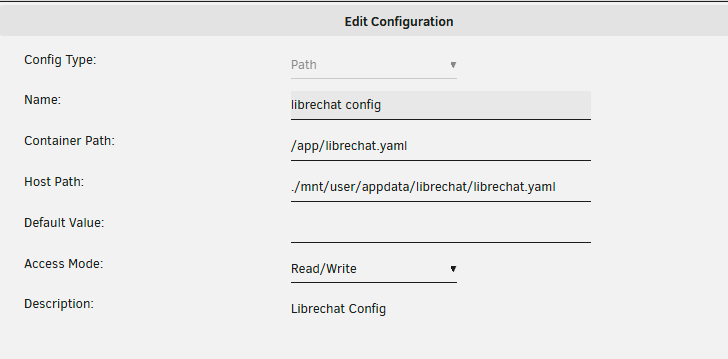
What I did was create my own appdata folder /mnt/user/appdata/librechat, and inside that, I created librechat.yaml Within the current docker config in Unraid, I then mapped the file as per this method - note the . infront of the file path so that it doesn't try to use a directory:
-
Thank you for this! I just made the changes (omitting port 1900 as apparently python2 is bound to that...) and my server is up and running!
-
Yeah you can go ahead and remove that with "docker network rm br0" - that's what you currently have bound to your gateway. Then try again with docker network create \ -o parent=br1 \ --driver macvlan \ --subnet 192.168.1.0/24 \ --ip-range 192.168.1.64/28 \ --gateway 192.168.1.1 \ localnetwork I literally just set this up with your pihole docker template yesterday
-
and "docker network inspect br0"? I'm guessing that's an old one you may have created during your troubleshooting that is already bound to 192.168.1.1 as the gateway. Assuming that's the case, and you don't have any running dockers currently using br0, then you can remove it with docker network rm br0
-
@spants What's the output of "docker network ls"?
-
I've been trying to get this working but for some reason, once the docker is created it does not have any internet access, nor can I ping it. My server has two NICs, so I assigned the docker network to eth1. I've gone through this thread several times now, and I haven't run into any of the issues others had in terms of getting the docker started/interfaces in use - everything SEEMS like it should be working...but nada. Relevant Info: Unraid IP: 192.168.1.5 Subnet: 192.168.1.0/24 Router: EdgerouterX @ 192.168.1.1 Things I've tried: Turned bridging on and tried using br1 Tried a completely different docker container Assigned a static IP lease of 192.168.1.224 to the MAC address I found in docker inspect pihole Any ideas would be appreciated! Further information about my system and setup below. EDIT: Problem solved. Make sure the other NIC is plugged in. Ugh. Settings for docker1 root@DS9:/mnt/user/apps/pihole# docker network inspect docker1 [ { "Name": "docker1", "Id": "4f279733e1460cf0d3754766b833965ebaef8674b15c09d1ae9b3494eaa33f17", "Scope": "local", "Driver": "macvlan", "EnableIPv6": false, "IPAM": { "Driver": "default", "Options": {}, "Config": [ { "Subnet": "192.168.1.0/24", "IPRange": "192.168.1.224/27", "Gateway": "192.168.1.1" } ] }, "Internal": false, "Containers": { "a2d3a49ff4999963d0ca84bda755533d3afc9c2d9e2e241eed07b97ae7122045": { "Name": "pihole", "EndpointID": "aac23b2a278e396e80fc1cb60025244c36f5cca0f9f9d6289ab573d3d3ecb737", "MacAddress": "02:42:c0:a8:01:e0", "IPv4Address": "192.168.1.224/24", "IPv6Address": "" } }, "Options": { "parent": "eth1" }, "Labels": {} IP Address of the running docker root@DS9:/mnt/user/apps/pihole# docker inspect pihole | grep IPAddress "SecondaryIPAddresses": null, "IPAddress": "", "IPAddress": "192.168.1.224", ip addr root@DS9:/mnt/user/apps/pihole# ip addr 1: lo: <LOOPBACK,UP,LOWER_UP> mtu 65536 qdisc noqueue state UNKNOWN group default qlen 1 link/loopback 00:00:00:00:00:00 brd 00:00:00:00:00:00 inet 127.0.0.1/32 scope host lo valid_lft forever preferred_lft forever inet 127.0.0.1/8 scope host lo valid_lft forever preferred_lft forever 2: tunl0@NONE: <NOARP> mtu 1480 qdisc noop state DOWN group default qlen 1 link/ipip 0.0.0.0 brd 0.0.0.0 3: gre0@NONE: <NOARP> mtu 1476 qdisc noop state DOWN group default qlen 1 link/gre 0.0.0.0 brd 0.0.0.0 4: gretap0@NONE: <BROADCAST,MULTICAST> mtu 1462 qdisc noop state DOWN group default qlen 1000 link/ether 00:00:00:00:00:00 brd ff:ff:ff:ff:ff:ff 5: ip_vti0@NONE: <NOARP> mtu 1364 qdisc noop state DOWN group default qlen 1 link/ipip 0.0.0.0 brd 0.0.0.0 8: eth0: <BROADCAST,MULTICAST,PROMISC,UP,LOWER_UP> mtu 1500 qdisc mq master br0 state UP group default qlen 1000 link/ether bc:5f:f4:ea:66:9f brd ff:ff:ff:ff:ff:ff 9: eth1: <NO-CARRIER,BROADCAST,MULTICAST,UP> mtu 1500 qdisc pfifo_fast state DOWN group default qlen 1000 link/ether bc:5f:f4:ea:66:9e brd ff:ff:ff:ff:ff:ff 78: br0: <BROADCAST,MULTICAST,UP,LOWER_UP> mtu 1500 qdisc noqueue state UP group default qlen 1000 link/ether bc:5f:f4:ea:66:9f brd ff:ff:ff:ff:ff:ff inet 192.168.1.5/24 scope global br0 valid_lft forever preferred_lft forever 94: docker0: <BROADCAST,MULTICAST,UP,LOWER_UP> mtu 1500 qdisc noqueue state UP group default link/ether 02:42:84:e5:a6:e8 brd ff:ff:ff:ff:ff:ff inet 172.17.0.1/16 scope global docker0 valid_lft forever preferred_lft forever 96: vethe10b5c3@if95: <BROADCAST,MULTICAST,UP,LOWER_UP> mtu 1500 qdisc noqueue master docker0 state UP group default link/ether 2e:9c:70:84:08:21 brd ff:ff:ff:ff:ff:ff link-netnsid 0 98: veth05776bd@if97: <BROADCAST,MULTICAST,UP,LOWER_UP> mtu 1500 qdisc noqueue master docker0 state UP group default link/ether fa:89:84:d1:cb:6b brd ff:ff:ff:ff:ff:ff link-netnsid 1 100: vethdc33a7a@if99: <BROADCAST,MULTICAST,UP,LOWER_UP> mtu 1500 qdisc noqueue master docker0 state UP group default link/ether e6:4c:5f:93:7c:19 brd ff:ff:ff:ff:ff:ff link-netnsid 2 102: vethbc6d1f6@if101: <BROADCAST,MULTICAST,UP,LOWER_UP> mtu 1500 qdisc noqueue master docker0 state UP group default link/ether e6:bf:6b:f6:bc:8f brd ff:ff:ff:ff:ff:ff link-netnsid 3 104: veth0eafc2d@if103: <BROADCAST,MULTICAST,UP,LOWER_UP> mtu 1500 qdisc noqueue master docker0 state UP group default link/ether f2:96:e5:de:df:c9 brd ff:ff:ff:ff:ff:ff link-netnsid 4 106: veth4309524@if105: <BROADCAST,MULTICAST,UP,LOWER_UP> mtu 1500 qdisc noqueue master docker0 state UP group default link/ether c2:23:3b:f5:b3:4b brd ff:ff:ff:ff:ff:ff link-netnsid 5 ip link root@DS9:/mnt/user/apps/pihole# ip link 1: lo: <LOOPBACK,UP,LOWER_UP> mtu 65536 qdisc noqueue state UNKNOWN mode DEFAULT group default qlen 1 link/loopback 00:00:00:00:00:00 brd 00:00:00:00:00:00 2: tunl0@NONE: <NOARP> mtu 1480 qdisc noop state DOWN mode DEFAULT group default qlen 1 link/ipip 0.0.0.0 brd 0.0.0.0 3: gre0@NONE: <NOARP> mtu 1476 qdisc noop state DOWN mode DEFAULT group default qlen 1 link/gre 0.0.0.0 brd 0.0.0.0 4: gretap0@NONE: <BROADCAST,MULTICAST> mtu 1462 qdisc noop state DOWN mode DEFAULT group default qlen 1000 link/ether 00:00:00:00:00:00 brd ff:ff:ff:ff:ff:ff 5: ip_vti0@NONE: <NOARP> mtu 1364 qdisc noop state DOWN mode DEFAULT group default qlen 1 link/ipip 0.0.0.0 brd 0.0.0.0 8: eth0: <BROADCAST,MULTICAST,PROMISC,UP,LOWER_UP> mtu 1500 qdisc mq master br0 state UP mode DEFAULT group default qlen 1000 link/ether bc:5f:f4:ea:66:9f brd ff:ff:ff:ff:ff:ff 9: eth1: <NO-CARRIER,BROADCAST,MULTICAST,UP> mtu 1500 qdisc pfifo_fast state DOWN mode DEFAULT group default qlen 1000 link/ether bc:5f:f4:ea:66:9e brd ff:ff:ff:ff:ff:ff 78: br0: <BROADCAST,MULTICAST,UP,LOWER_UP> mtu 1500 qdisc noqueue state UP mode DEFAULT group default qlen 1000 link/ether bc:5f:f4:ea:66:9f brd ff:ff:ff:ff:ff:ff 94: docker0: <BROADCAST,MULTICAST,UP,LOWER_UP> mtu 1500 qdisc noqueue state UP mode DEFAULT group default link/ether 02:42:84:e5:a6:e8 brd ff:ff:ff:ff:ff:ff 96: vethe10b5c3@if95: <BROADCAST,MULTICAST,UP,LOWER_UP> mtu 1500 qdisc noqueue master docker0 state UP mode DEFAULT group default link/ether 2e:9c:70:84:08:21 brd ff:ff:ff:ff:ff:ff link-netnsid 0 98: veth05776bd@if97: <BROADCAST,MULTICAST,UP,LOWER_UP> mtu 1500 qdisc noqueue master docker0 state UP mode DEFAULT group default link/ether fa:89:84:d1:cb:6b brd ff:ff:ff:ff:ff:ff link-netnsid 1 100: vethdc33a7a@if99: <BROADCAST,MULTICAST,UP,LOWER_UP> mtu 1500 qdisc noqueue master docker0 state UP mode DEFAULT group default link/ether e6:4c:5f:93:7c:19 brd ff:ff:ff:ff:ff:ff link-netnsid 2 102: vethbc6d1f6@if101: <BROADCAST,MULTICAST,UP,LOWER_UP> mtu 1500 qdisc noqueue master docker0 state UP mode DEFAULT group default link/ether e6:bf:6b:f6:bc:8f brd ff:ff:ff:ff:ff:ff link-netnsid 3 104: veth0eafc2d@if103: <BROADCAST,MULTICAST,UP,LOWER_UP> mtu 1500 qdisc noqueue master docker0 state UP mode DEFAULT group default link/ether f2:96:e5:de:df:c9 brd ff:ff:ff:ff:ff:ff link-netnsid 4 106: veth4309524@if105: <BROADCAST,MULTICAST,UP,LOWER_UP> mtu 1500 qdisc noqueue master docker0 state UP mode DEFAULT group default link/ether c2:23:3b:f5:b3:4b brd ff:ff:ff:ff:ff:ff link-netnsid 5 /boot/config/network.config reading network.cfg # Generated settings: IFNAME[0]="br0" BRNAME[0]="br0" BRSTP[0]="no" BRFD[0]="0" BRNICS[0]="eth0" DESCRIPTION[0]="" USE_DHCP[0]="no" IPADDR[0]="192.168.1.5" NETMASK[0]="255.255.255.0" GATEWAY="192.168.1.1" DHCP_KEEPRESOLV="yes" DNS_SERVER1="192.168.1.1" DNS_SERVER2="8.8.8.8" DNS_SERVER3="" MTU[0]="" IFNAME[1]="eth1" DESCRIPTION[1]="" USE_DHCP[1]="" MTU[1]="" SYSNICS="2" ~
