





ColonelRhodes
Members
-
Joined
-
Last visited
Everything posted by ColonelRhodes
-
I have a VIDBOX video to USB capture device that I use to convert VHS tapes to digital files and use Plex to stream them to family devices. In the past, I have just used the macOS app to capture the video into a file and then transfer that to my Media Share on Unraid, but I'd like to streamline this a bit more and try to use my Unraid box to perform the entire workflow from capturing. Is there a Docker container anyone can recommend that would possibly work to do this? Thanks!
-
Yep, all are in place for cache performance benefits with those shares
-
Thank you for the help. Got everything moved over safely and the new drive is working as expected as my cache pool.
-
Ok, I think I'm all set. Here is the latest diagnostics, but SSH'ing in and looking at my /mnt/cache I see no data on there. I think I'm ok to remove the Cache and add the new one now? tower-diagnostics-20260131-1724.zip
-
I did some cleanup before doing all of this. The only share I have that exists only on the cache only is the apps share (which is for all of my Docker files, sometimes called appdata). What exactly do you want a screenshot of? All of that data will fit on the new SSD cache drive no problem.
-
It’s just some knock off brand I bought on Amazon. I have a Samsung one I’d like to put in there now instead for sense of reliability. I’m within the return period with Amazon so I’m trying to swap them.
-
Cache pool is xfs tower-diagnostics-20260130-1600.zip
-
I want to essentially clone my current Cache Drive to a new SSD. I've done this in the past with Clonezilla, but my current Cache drive is showing up as 1.02 TB and the new SSD is 1.0 TB so Clonezilla will not clone due to the smaller target size. What is the best way about doing this process so that I can insert the new SSD into my unraid system and it be like there was no difference? I'm only using about 200GB on the Cache so definitely not full.
-
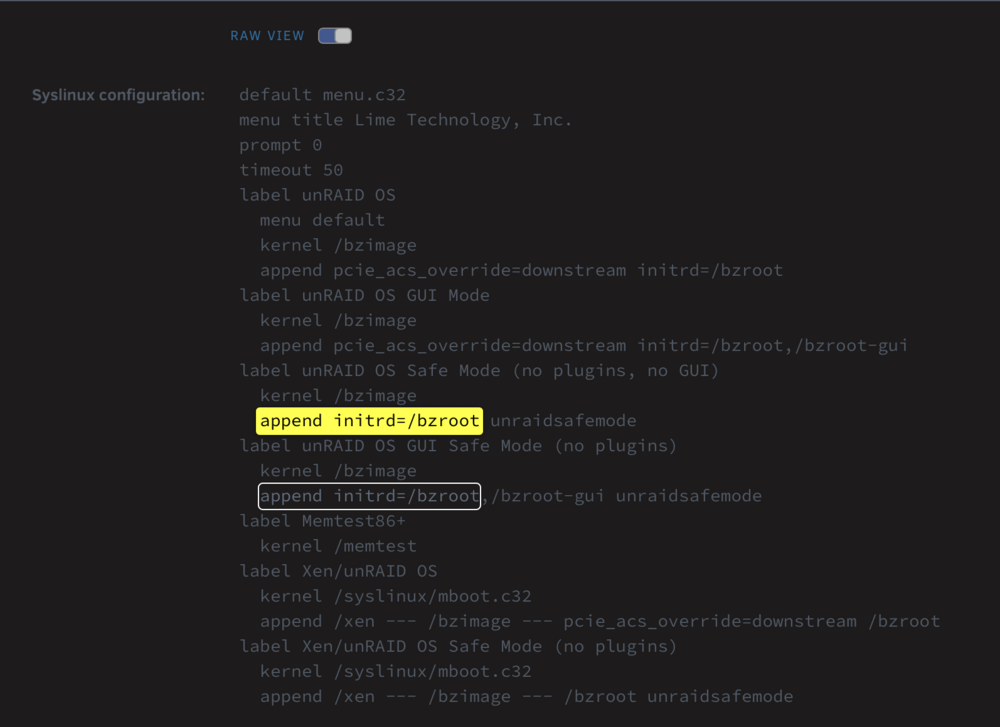
I have two areas where there is "append initrd=/bzroot" Where do I append that nvme line to? Yea. This is the USB connection for the front IO of my case. I just unplugged it from the motherboard since I do not need it.
-
I'm still hitting this every few days with only one stick of memory installed. I removed that one stick and replaced it with another stick in the same slot, but after rebooting the server I'm seeing these errors in the syslog-previous around the same time the system is going down... Jan 24 17:42:52 tower kernel: usb 1-1: device not accepting address 81, error -71 Jan 24 21:04:12 tower kernel: nvme0n1: I/O Cmd(0x2) @ LBA 570701952, 32 blocks, I/O Error (sct 0x3 / sc 0x71) Jan 24 21:04:12 tower kernel: I/O error, dev nvme0n1, sector 570701952 op 0x0:(READ) flags 0x80700 phys_seg 4 prio class 2 Jan 24 21:04:12 tower kernel: nvme0n1: I/O Cmd(0x2) @ LBA 514370016, 32 blocks, I/O Error (sct 0x3 / sc 0x71) Jan 24 21:04:12 tower kernel: I/O error, dev nvme0n1, sector 514370016 op 0x0:(READ) flags 0x80700 phys_seg 4 prio class 2 Jan 24 21:04:12 tower kernel: nvme0n1: I/O Cmd(0x2) @ LBA 592434896, 40 blocks, I/O Error (sct 0x3 / sc 0x71) Jan 24 21:04:12 tower kernel: I/O error, dev nvme0n1, sector 592434896 op 0x0:(READ) flags 0x80700 phys_seg 5 prio class 2 Jan 24 21:04:12 tower kernel: nvme0n1: I/O Cmd(0x2) @ LBA 514332032, 8 blocks, I/O Error (sct 0x3 / sc 0x71) Jan 24 21:04:12 tower kernel: I/O error, dev nvme0n1, sector 514332032 op 0x0:(READ) flags 0x80700 phys_seg 1 prio class 2 Jan 24 21:04:12 tower kernel: nvme0n1: I/O Cmd(0x2) @ LBA 514332048, 16 blocks, I/O Error (sct 0x3 / sc 0x71) Jan 24 21:04:12 tower kernel: I/O error, dev nvme0n1, sector 514332048 op 0x0:(READ) flags 0x80700 phys_seg 2 prio class 2 Jan 24 21:04:12 tower kernel: nvme0n1: I/O Cmd(0x2) @ LBA 575500816, 32 blocks, I/O Error (sct 0x3 / sc 0x71) Jan 24 21:04:12 tower kernel: I/O error, dev nvme0n1, sector 575500816 op 0x0:(READ) flags 0x80700 phys_seg 4 prio class 2 Jan 24 21:04:12 tower kernel: nvme0n1: I/O Cmd(0x2) @ LBA 256711008, 8 blocks, I/O Error (sct 0x3 / sc 0x71) Jan 24 21:04:12 tower kernel: I/O error, dev nvme0n1, sector 256711008 op 0x0:(READ) flags 0x80700 phys_seg 1 prio class 2 Jan 24 21:04:12 tower kernel: nvme0n1: I/O Cmd(0x2) @ LBA 495931624, 32 blocks, I/O Error (sct 0x3 / sc 0x71) Jan 24 21:04:12 tower kernel: I/O error, dev nvme0n1, sector 495931624 op 0x0:(READ) flags 0x80700 phys_seg 4 prio class 2 Jan 24 21:04:12 tower kernel: nvme0n1: I/O Cmd(0x2) @ LBA 871552688, 8 blocks, I/O Error (sct 0x3 / sc 0x71) Jan 24 21:04:12 tower kernel: I/O error, dev nvme0n1, sector 871552688 op 0x0:(READ) flags 0x80700 phys_seg 1 prio class 2 Jan 24 21:04:12 tower kernel: nvme0n1: I/O Cmd(0x2) @ LBA 357120, 8 blocks, I/O Error (sct 0x3 / sc 0x71) Jan 24 21:04:12 tower kernel: I/O error, dev nvme0n1, sector 357120 op 0x0:(READ) flags 0x81700 phys_seg 1 prio class 2I'm assuming nvme0n1 is my cache drive ssd? I'm attaching a diagnostics here for any help with this. tower-diagnostics-20260125-0834.zip
-
Because I was in the return window of the CPU, I returned it and swapped with a 12th generation Intel CPU. I still hit this issue about a week after swapping the CPU out, so my next thing to check is running with one stick of memory instead of 2.
-
Thanks! The more I look into it the more I don't believe I have that issue since I updated the BIOS and applied the "Intel Default Settings" on my ASUS motherboard almost immediately after installing everything. I think there is an Intel tool I can run to confirm, but would need to boot into Windows to confirm that. I have two DIMMS in the system, so I'm going to try just one of those to rule out memory.
-
The memory is from my old motherboard/CPU setup and never gave me issues, but definitely not ruling that out. I think I updated the BIOS before I got everything up and running but I will double-check that. What is the Intel 13/14 issue?
-
I just recently upgraded the CPU, motherboard, and NVME Cache Drive in my Unraid server. About once a week, I will find my server completely unresponsive...cannot ssh, connect a monitor, get any response. Out of caution, because I've been using the same USB Flash Boot drive for 12+ years on this system, I decided to replace that hoping it would resolve the issue, but it did not. I recently enabled the "mirror syslog to flash" on shutdown feature hoping to catch the true cause of this. It happened again last night, 12/20/25 sometime in-between 9pm and 1am server time. I'm attaching the last few lines of the syslog-previous and a diagnostics I captured this morning in hopes that someone can spot an issue that may be causing it. Dec 20 14:41:50 tower emhttpd: spinning down /dev/sdf Dec 20 14:43:00 tower kernel: mdcmd (58): set md_write_method 0 Dec 20 14:43:00 tower kernel: Dec 20 21:00:31 tower kernel: nvme nvme0: I/O tag 0 (5000) opcode 0x9 (I/O Cmd) QID 3 timeout, aborting req_op:DISCARD(3) size:250016256 Dec 20 21:00:31 tower kernel: nvme nvme0: I/O tag 1 (9001) opcode 0x9 (I/O Cmd) QID 3 timeout, aborting req_op:DISCARD(3) size:4240388096 Dec 20 21:00:31 tower kernel: nvme nvme0: I/O tag 2 (f002) opcode 0x9 (I/O Cmd) QID 3 timeout, aborting req_op:DISCARD(3) size:3388657664 Dec 20 21:01:01 tower kernel: nvme nvme0: I/O tag 0 (5000) opcode 0x9 (I/O Cmd) QID 3 timeout, reset controller Dec 20 21:04:13 tower kernel: nvme nvme0: Device not ready; aborting reset, CSTS=0x1 Dec 20 21:04:13 tower kernel: nvme nvme0: Abort status: 0x371 Dec 20 21:04:13 tower kernel: nvme nvme0: Abort status: 0x371 Dec 20 21:04:13 tower kernel: nvme nvme0: Abort status: 0x371 Dec 20 21:06:21 tower kernel: nvme nvme0: Device not ready; aborting reset, CSTS=0x1 Dec 20 21:06:29 tower kernel: r8169 0000:06:00.0 eth0: NETDEV WATCHDOG: CPU: 16: transmit queue 0 timed out 5370 ms Dec 20 21:06:29 tower kernel: r8169 0000:06:00.0: can't disable ASPM; OS doesn't have ASPM control Dec 20 21:06:34 tower kernel: r8169 0000:06:00.0 eth0: NETDEV WATCHDOG: CPU: 16: transmit queue 0 timed out 5002 ms It's obvious this is related to the new hardware I recently upgraded with, but wonder if there is a smoking gun here, maybe like the nvme errors reported above? Thanks for the help in advance! tower-diagnostics-20251221-0850.zip
-
That did the trick. Thanks. I left Pro.key alone and renamed Plus.key to Plus.key.old probably ok to delete that Plus key now that it's working?
-
There is a Pro.key and Plus.key there on the new drive in the config folder. I should have a Pro plan, but I think I used to have Plus before upgrading (this was sometime within the last year)
-
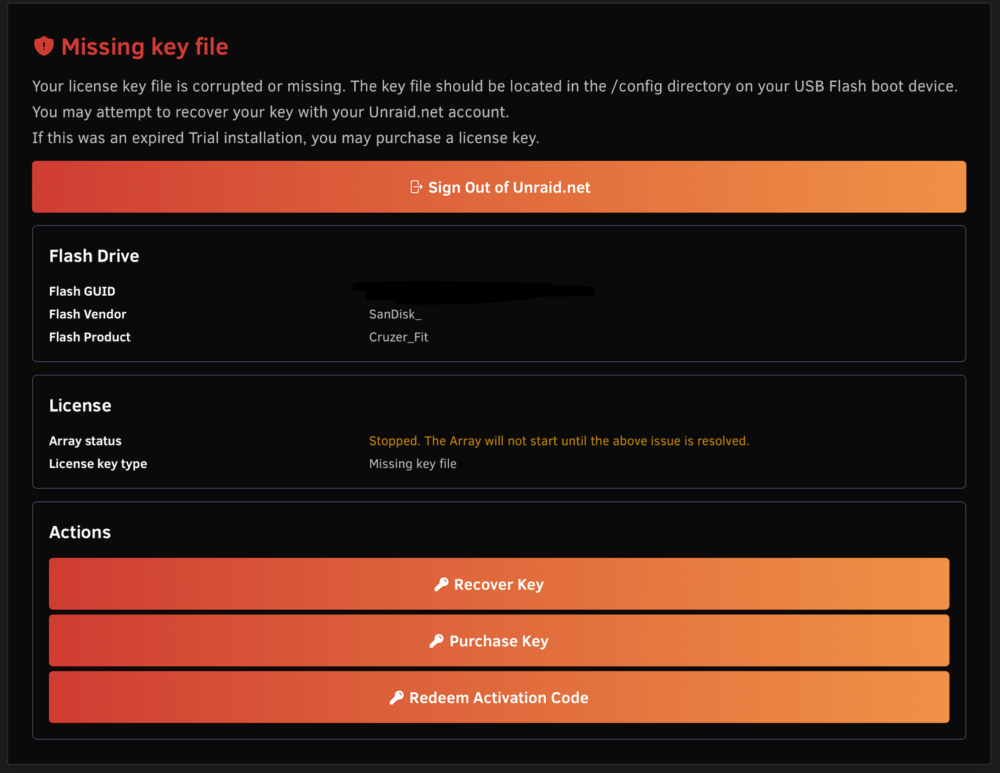
I followed this guide to replace my USB boot drive: https://docs.unraid.net/unraid-os/system-administration/maintain-and-update/changing-the-flash-device/?utm_source=google&utm_medium=cpc&utm_campaign=p-max-targeted-us-can&utm_content=&utm_term=&gad_source=1&gad_campaignid=21440886943&gbraid=0AAAAAC26wCJE7QFL1drUWshqnPdx4lAwm&gclid=Cj0KCQiAo4TKBhDRARIsAGW29be-_jTHJcXsvkVKNUFTluTbB6iViGkyhrla0M3xVB_LvNccc6_IazAaAhcfEALw_wcB I created a Zip archive of my existing USB boot drive, used the tool to format/copy to the new drive, removed the existing drive, installed the new one, and then booted up Unraid. I'm stuck now with the warning screen Missing key file and when I click "Recover Key" there is no option to Replace Key like the documentation states. What am I missing here?
-
That worked out nicely. Thanks for the help!
-
Here they are tower-diagnostics-20251204-0743.zip
-
I upgraded my CPU and Motherboard and realized my older M.2 SATA Cache drive would no longer work in my new motherboard which only supports NVME M.2 SSDs. Instead of doing this they way I saw mentioned several times in forum posts (Using mover to move the old cache drive contents on the array, install the new drive, and move everything back....) I decided to just clone the old Cache Drive (500GB) onto the new NVME Cache Drive (1TB) -- hindsight I used Clonezilla and actually the process went great and my new cache drive is recognized in Unraid (after some configuration changes) with all of the data there and Docker working off it like nothing changed. The only issue I have now is the Cache drive only reports it as a 500GB drive. I think this was an option in Clonezilla I missed and it cloned the exact space from the old drive. Is there a good solution from within Unraid (GUI or CLI) to "extend" the cache drive partition and recover that free unused space on the 1TB drive without reformatting it?
-
@JorgeB I followed the tape guide in https://forums.unraid.net/topic/73717-solutions-shucked-wd-8tb-easystore-33v-pin-issue/ and it resolved my issue for this WD drive being in my case. I have no idea why this only started happening now as that drive was perfect fine before, but adding the tape fixed it for good.
-
I'm not aware of the 3.3v issue, but it definitely seems power related. I think all of my recent problems are power related. I'm using a now 10-year old 500W PSU. I think it's time to upgrade regardless....but I'm hoping this will help.
-
Had this most recent issue figured out: https://forums.unraid.net/topic/192054-array-disk-failing-while-parity-sync-in-progress/ but while re-checking parity, disk7 went offline. I checked the disk internally and all connections seem ok. I removed the disk and made sure it can mount in an external sled via USB. It shows up and mounts just fine via unassigned devices, but for some reason I cannot get it to show up when connected to internal SATA. I removed sata cables from a working known-good drive inside the case and connected it and still not detected. I'm at a loss for what might be happening here....any ideas on things to check first? The attached diagnostics are from connecting the drive internally to a known good set of SATA connections (from disk2 TOSHIBA_HDWF180_X8R3K07FFB6G) which is why that disk is missing here, but disk7 is the main missing culprit tower-diagnostics-20250717-1648.zip
-
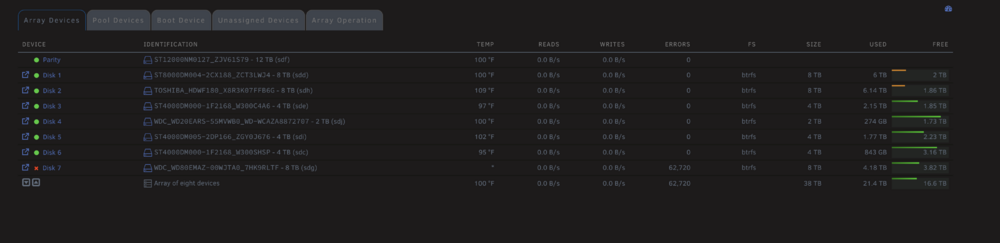
I just got an alert during parity check that disk7 now has errors (seems similar to what happened on disk3) tower-diagnostics-20250717-1421.zip
-
Thank you for all the help! Seems like I'm back up and running. Doing the correcting parity check now!



