





Jonanddad
Members
-
Joined
-
Last visited
-
I did restart the server as I assumed it was just a weird error. But it is still showing up as Unmountable: Wrong or No File System for Disk #1 and Disk #3. Any ideas about what may be wrong or how to fix this? the-vault-diagnostics-20230502-1306.zip

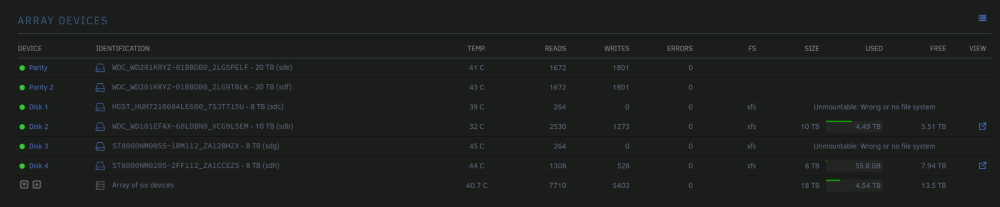
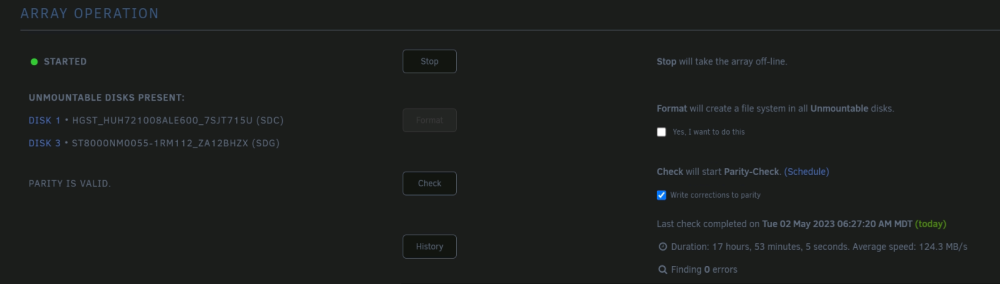
-
I tried more stuff for some reason clearing the flash drive again and not copying over the key and just using the url worked... It changed the DNS servers to really weird numbers but it seems to be working now.
-
I am not using a VPN
-
I am still having these issues after changing my DNS to 8.8.8.8 and 8.8.4.4. Any other thoughts? I even got a clean copy of UNRAID and tried to install it from there no dice. plugin: installing: /boot/config/plugins/community.applications.plg plugin: downloading: https://raw.github.com/Squidly271/community.applications/master/archive/community.applications-2016.01.02.txz ... done plugin: bad file MD5: /boot/config/plugins/community.applications/community.applications-2016.01.02.txz and plugin: installing: https://raw.githubusercontent.com/Squidly271/community.applications/master/plugins/community.applications.plg plugin: downloading https://raw.githubusercontent.com/Squidly271/community.applications/master/plugins/community.applications.plg plugin: downloading: https://raw.githubusercontent.com/Squidly271/community.applications/master/plugins/community.applications.plg ... done Warning: simplexml_load_file(): /tmp/plugins/community.applications.plg:1: parser error : Document is empty in /usr/local/emhttp/plugins/dynamix.plugin.manager/scripts/plugin on line 193 Warning: simplexml_load_file(): in /usr/local/emhttp/plugins/dynamix.plugin.manager/scripts/plugin on line 193 Warning: simplexml_load_file(): ^ in /usr/local/emhttp/plugins/dynamix.plugin.manager/scripts/plugin on line 193 Warning: simplexml_load_file(): /tmp/plugins/community.applications.plg:1: parser error : Start tag expected, '<' not found in /usr/local/emhttp/plugins/dynamix.plugin.manager/scripts/plugin on line 193 Warning: simplexml_load_file(): in /usr/local/emhttp/plugins/dynamix.plugin.manager/scripts/plugin on line 193 Warning: simplexml_load_file(): ^ in /usr/local/emhttp/plugins/dynamix.plugin.manager/scripts/plugin on line 193 plugin: xml parse error
-
I just tried to install this via the web and on the physical server with the pgl I got these errors. plugin: installing: /boot/config/plugins/community.applications.plg plugin: downloading: https://raw.github.com/Squidly271/community.applications/master/archive/community.applications-2016.01.02.txz ... done plugin: bad file MD5: /boot/config/plugins/community.applications/community.applications-2016.01.02.txz and plugin: installing: https://raw.githubusercontent.com/Squidly271/community.applications/master/plugins/community.applications.plg plugin: downloading https://raw.githubusercontent.com/Squidly271/community.applications/master/plugins/community.applications.plg plugin: downloading: https://raw.githubusercontent.com/Squidly271/community.applications/master/plugins/community.applications.plg ... done Warning: simplexml_load_file(): /tmp/plugins/community.applications.plg:1: parser error : Document is empty in /usr/local/emhttp/plugins/dynamix.plugin.manager/scripts/plugin on line 193 Warning: simplexml_load_file(): in /usr/local/emhttp/plugins/dynamix.plugin.manager/scripts/plugin on line 193 Warning: simplexml_load_file(): ^ in /usr/local/emhttp/plugins/dynamix.plugin.manager/scripts/plugin on line 193 Warning: simplexml_load_file(): /tmp/plugins/community.applications.plg:1: parser error : Start tag expected, '<' not found in /usr/local/emhttp/plugins/dynamix.plugin.manager/scripts/plugin on line 193 Warning: simplexml_load_file(): in /usr/local/emhttp/plugins/dynamix.plugin.manager/scripts/plugin on line 193 Warning: simplexml_load_file(): ^ in /usr/local/emhttp/plugins/dynamix.plugin.manager/scripts/plugin on line 193 plugin: xml parse error


