





natecook
Members
-
Joined
-
Last visited
-
Thank you all for your help. I don't know what keeps happening, but within a couple hours of Gluetun being connected (even with no other containers attached) my entire UniFi LAN slows to a point where nothing connects, LAN or WAN. Stopping Gluetun and rebooting the UniFi hardware resolves the issue. I was unable to grab Unraid diags before removing Gluetun. I'm not in a hurry to sort this out because it's such a pain to take the server offline, and I don't know where to start unless someone else has an idea. For what it's worth, I believe the issue with Gluetun not grabbing a port-forwarding-capable WireGuard server is solved by adding the variable VPN_PORT_FORWARDING_PROVIDER with the value protonvpn. (It was near-impossible to find this recommendation online.)
-
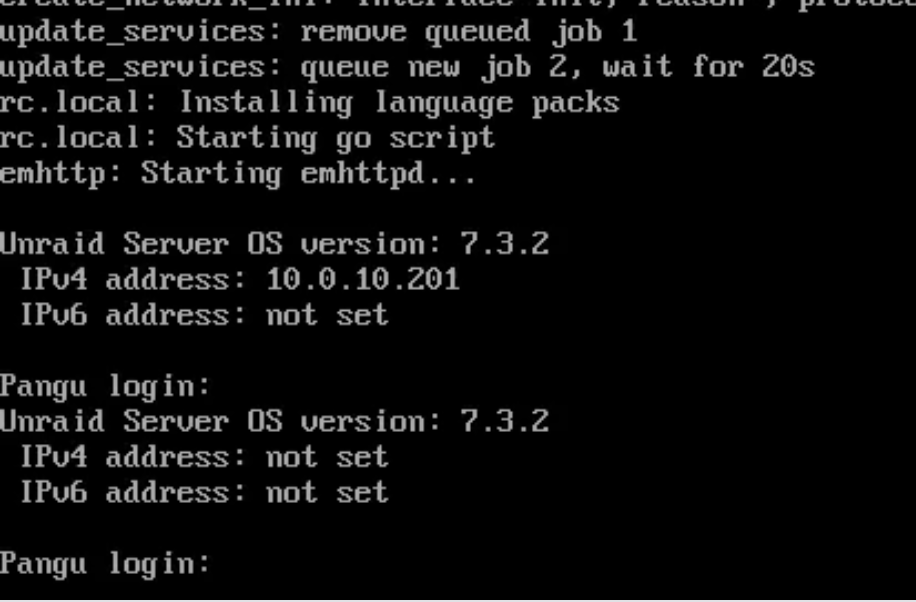
Thank you for all this detail. I am accessing over LAN and the actual ethernet interruption was almost certainly me moving cables. Other than general frustration with this issue, the main factors prompting a factory reset were that my Docker containers couldn't be edited and I wanted to clean out older unused or deleted container data and templates, but those were easy fixes. Things seemed stable after this and rebooting the network equipment. I still see "not set" for the IP addresses in the console (screenshot in OP), but functionally, everything seems to be working as expected. As of now, I do not have Gluetun or qBittorrent installed or running. If everything looks clean in these diagnostics, I'll proceed with setting those things back up, taking backups as I go. pangu-diagnostics-20260927-1049.zip
-
Thank you, this is really helpful. I spent a lot of time searching and never came up with this. Unfortunately it's way over my head. Do you know anywhere with an example in Unraid? As far as the network issue, I'm going to try a Dynamix Factory Reset.
-
Version 7.3.2 TL;DR: Unraid drops IP address but webUI is accessible. Containers in Bridge mode not connecting, apps page not loading. Unraid drops the IP address a few minutes after boot, with or without the array started (see screenshot). *While accessing the web UI*, it displays the alert “Interface - Ethernet Port 1 is down. Check cable!”, and Plex (host connection) is working as normal. So obviously the ethernet port is not down. Background: I've been trying to configure GluetunVPN with ProtonVPN on wireguard with port forwarding. For whatever reason, even though the wireguard certificate from Proton has VPN enabled and the container variable VPN_PORT_FORWARDING is on, it keeps getting servers that are not capable of port forwarding. Yesterday I decided to try deleting the GluetunVPN docker container and reinstalling it from scratch. I did this a couple times, switching apps because I wasn’t sure if my issue was something in the container variables. FWIW, I have done zero tinkering in the Unraid network settings, so that’s all still default. DHCP reservation is on the UniFi router, and nothing looks abnormal there. I have tried deleting the network items in the boot config directory and rebooting, but no changes. pangu-diagnostics-20260926-0622.zip
-
Thank you! That took care of it for me.
-
Any updates on this? As someone with dual parity, 28 data disks, and tons more cache than used on any given day, this is exactly what I want. Parity checks stretch over multiple days but cache wouldn’t be half full even on a heavy week. I currently use the pause parity during mover option, but I would really prefer the reverse.
-
Set your repository to linuxserver/transmission:121 (https://hub.docker.com/r/linuxserver/transmission/tags/) Without specifying the version tag, it will pull the latest version. 121 is the most recent Linuxserver version with 2.93.
-
BTW, I am still having this issue with settings/preferences not saving. I have three separate instances of the Transmission Docker, two old and one brand new. The older two have saved settings from back when I could adjust and they'd save, and the newly created docker just reverts to the default settings.
-
Do you have an SSD for cache? Is your Downloads share set to use cache? It might just be your array write speed being slowed by calculating parity.
-
I'm having a very similar issue with my USB sound card. Will try adding the MSI interrupt to my GPU in the morning and report back.
