





johnny.ink
Members
-
Joined
-
Last visited
-
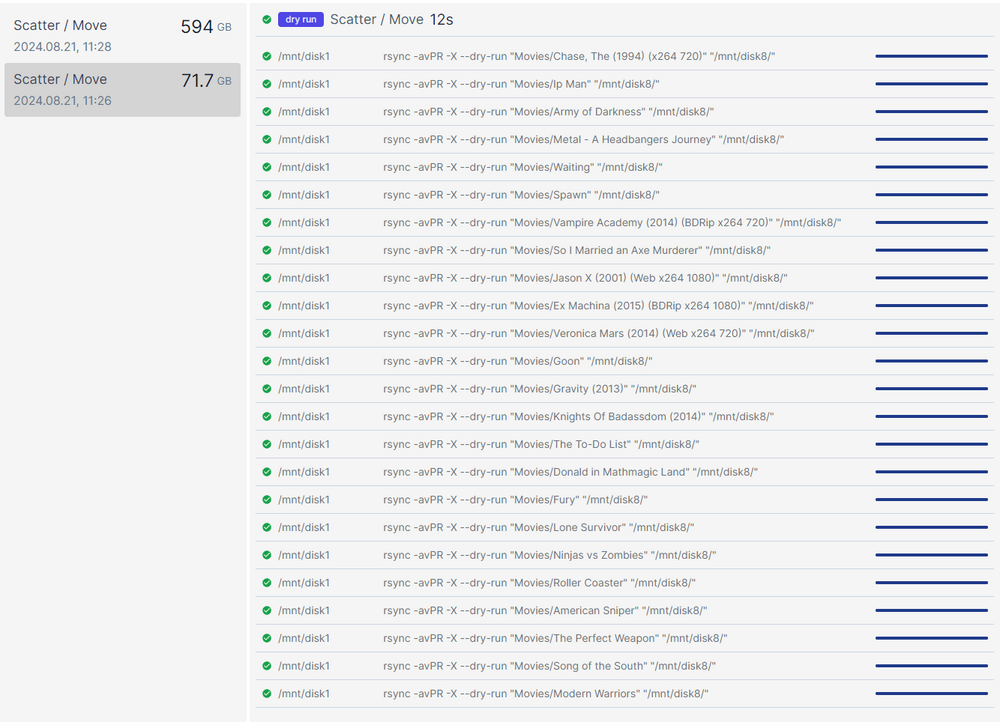
I believe I found the fact that the "dry run" button was checked, it would appear that the historical jobs can't be rerun from the history tab to do actual move correct?
-
I found the updated version from this year and installed and removed the old version. The issue I have is I have tried 2 scatters whilst mover is not going and dockers are all shut down. I did a scatter from disk1 for movies and videos and told unblanaced to move them to disk8. According to the logs it looks like it was successful but it appears nothing has moved to disk 8 2024/08/21 11:28:23 disk(/mnt/disk5):fs(xfs):size(9998694297600):free(5354610081792):blocksTotal(2441087475):blocksFree(1307277852) 2024/08/21 11:28:23 disk(/mnt/disk6):fs(xfs):size(9998694297600):free(6613137870848):blocksTotal(2441087475):blocksFree(1614535613) 2024/08/21 11:28:23 disk(/mnt/disk7):fs(xfs):size(9998694297600):free(9838385901568):blocksTotal(2441087475):blocksFree(2401949683) 2024/08/21 11:28:23 disk(/mnt/disk8):fs(xfs):size(4998844026880):free(4963957579776):blocksTotal(1220420905):blocksFree(1211903706) 2024/08/21 11:28:23 disk(/mnt/cache):fs(xfs):size(499863638016):free(269321502720):blocksTotal(122037021):blocksFree(65752320) 2024/08/21 11:28:23 scanning:disk(/mnt/disk1):folder(Videos) 2024/08/21 11:28:24 issues:owner(98):group(0):folder(0):file(64) 2024/08/21 11:28:24 items:count(3):size(594.01 GB) 2024/08/21 11:28:24 scatterPlan:items(3) 2024/08/21 11:28:24 scatterPlan:found(/mnt/disk1/Videos/_Misc):size(583586594028) 2024/08/21 11:28:24 scatterPlan:found(/mnt/disk1/Videos/XMAS Specials):size(7630432909) 2024/08/21 11:28:24 scatterPlan:found(/mnt/disk1/Videos/Music Videos):size(2797862717) 2024/08/21 11:28:24 scatterPlan:issues:owner(98),group(0),folder(0),file(64) 2024/08/21 11:28:24 scatterPlan:Trying to allocate items to disk8 ... 2024/08/21 11:28:24 scatterPlan:ItemsLeft(3):ReservedSpace(1073741824) 2024/08/21 11:28:24 0s 2024/08/21 11:28:24 scatterPlan:3 items will be transferred. 2024/08/21 11:28:24 scatterPlan:willBeTransferred(Videos/_Misc) 2024/08/21 11:28:24 scatterPlan:willBeTransferred(Videos/XMAS Specials) 2024/08/21 11:28:24 scatterPlan:willBeTransferred(Videos/Music Videos) 2024/08/21 11:28:24 scatterPlan:ItemsLeft(0) 2024/08/21 11:28:24 scatterPlan:Listing (9) disks ... 2024/08/21 11:28:24 ========================================================= 2024/08/21 11:28:24 disk(/mnt/disk1):no-items:currentFree(241.37 MB) 2024/08/21 11:28:24 --------------------------------------------------------- 2024/08/21 11:28:24 --------------------------------------------------------- 2024/08/21 11:28:24 2024/08/21 11:28:24 ========================================================= 2024/08/21 11:28:24 disk(/mnt/disk2):no-items:currentFree(283.43 GB) 2024/08/21 11:28:24 --------------------------------------------------------- 2024/08/21 11:28:24 --------------------------------------------------------- 2024/08/21 11:28:24 2024/08/21 11:28:24 ========================================================= 2024/08/21 11:28:24 disk(/mnt/disk3):no-items:currentFree(181.85 GB) 2024/08/21 11:28:24 --------------------------------------------------------- 2024/08/21 11:28:24 --------------------------------------------------------- 2024/08/21 11:28:24 2024/08/21 11:28:24 ========================================================= 2024/08/21 11:28:24 disk(/mnt/disk4):no-items:currentFree(460.79 GB) 2024/08/21 11:28:24 --------------------------------------------------------- 2024/08/21 11:28:24 --------------------------------------------------------- 2024/08/21 11:28:24 2024/08/21 11:28:24 ========================================================= 2024/08/21 11:28:24 disk(/mnt/disk5):no-items:currentFree(5.35 TB) 2024/08/21 11:28:24 --------------------------------------------------------- 2024/08/21 11:28:24 --------------------------------------------------------- 2024/08/21 11:28:24 2024/08/21 11:28:24 ========================================================= 2024/08/21 11:28:24 disk(/mnt/disk6):no-items:currentFree(6.61 TB) 2024/08/21 11:28:24 --------------------------------------------------------- 2024/08/21 11:28:24 --------------------------------------------------------- 2024/08/21 11:28:24 2024/08/21 11:28:24 ========================================================= 2024/08/21 11:28:24 disk(/mnt/disk7):no-items:currentFree(9.84 TB) 2024/08/21 11:28:24 --------------------------------------------------------- 2024/08/21 11:28:24 --------------------------------------------------------- 2024/08/21 11:28:24 2024/08/21 11:28:24 ========================================================= 2024/08/21 11:28:24 disk(/mnt/disk8):items(3)-(594.01 GB):currentFree(4.96 TB)-plannedFree(4.37 TB) 2024/08/21 11:28:24 --------------------------------------------------------- 2024/08/21 11:28:24 [583.59 GB] /mnt/disk1/Videos/./_Misc 2024/08/21 11:28:24 [7.63 GB] /mnt/disk1/Videos/./XMAS Specials 2024/08/21 11:28:24 [2.80 GB] /mnt/disk1/Videos/./Music Videos 2024/08/21 11:28:24 --------------------------------------------------------- 2024/08/21 11:28:24 2024/08/21 11:28:24 ========================================================= 2024/08/21 11:28:24 disk(/mnt/cache):no-items:currentFree(269.32 GB) 2024/08/21 11:28:24 --------------------------------------------------------- 2024/08/21 11:28:24 --------------------------------------------------------- 2024/08/21 11:28:24 2024/08/21 11:28:24 ========================================================= 2024/08/21 11:28:24 Bytes To Transfer: 594.01 GB 2024/08/21 11:28:24 --------------------------------------------------------- 2024/08/21 11:28:36 packet {ID: Topic:scatter:move Payload:map[bytesToTransfer:5.94014889654e+11 chosenFolders:[Videos] ended:2024-08-21T11:28:24.577388756-04:00 fileIssue:64 folderIssue:0 groupIssue:0 ownerIssue:98 started:2024-08-21T11:28:23.197378394-04:00 target: vdisks:map[/mnt/cache:map[bin:<nil> currentFree:2.6932150272e+11 dst:false path:/mnt/cache plannedFree:2.6932150272e+11 src:false] /mnt/disk1:map[bin:<nil> currentFree:2.41373184e+08 dst:false path:/mnt/disk1 plannedFree:5.94256262838e+11 src:true] /mnt/disk2:map[bin:<nil> currentFree:2.834269184e+11 dst:false path:/mnt/disk2 plannedFree:2.834269184e+11 src:false] /mnt/disk3:map[bin:<nil> currentFree:1.81853413376e+11 dst:false path:/mnt/disk3 plannedFree:1.81853413376e+11 src:false] /mnt/disk4:map[bin:<nil> currentFree:4.60792672256e+11 dst:false path:/mnt/disk4 plannedFree:4.60792672256e+11 src:false] /mnt/disk5:map[bin:<nil> currentFree:5.354610081792e+12 dst:false path:/mnt/disk5 plannedFree:5.354610081792e+12 src:false] /mnt/disk6:map[bin:<nil> currentFree:6.613137870848e+12 dst:false path:/mnt/disk6 plannedFree:6.613137870848e+12 src:false] /mnt/disk7:map[bin:<nil> currentFree:9.838385901568e+12 dst:false path:/mnt/disk7 plannedFree:9.838385901568e+12 src:false] /mnt/disk8:map[bin:map[blocksUsed:1.45023167e+08 items:[map[blocksUsed:1.42477196e+08 location:/mnt/disk1 name:/mnt/disk1/Videos/./_Misc path:Videos/_Misc size:5.83586594028e+11] map[blocksUsed:1.862899e+06 location:/mnt/disk1 name:/mnt/disk1/Videos/./XMAS Specials path:Videos/XMAS Specials size:7.630432909e+09] map[blocksUsed:683072 location:/mnt/disk1 name:/mnt/disk1/Videos/./Music Videos path:Videos/Music Videos size:2.797862717e+09]] size:5.94014889654e+11] currentFree:4.963957579776e+12 dst:true path:/mnt/disk8 plannedFree:4.369942690122e+12 src:false]]]} 2024/08/21 11:28:36 {Started:2024-08-21 11:28:23.197378394 -0400 EDT Ended:2024-08-21 11:28:24.577388756 -0400 EDT ChosenFolders:[Videos] OwnerIssue:98 GroupIssue:0 FolderIssue:0 FileIssue:64 VDisks:map[/mnt/cache:0xc0004b5f20 /mnt/disk1:0xc0004b5f50 /mnt/disk2:0xc000198090 /mnt/disk3:0xc0001980f0 /mnt/disk4:0xc000198150 /mnt/disk5:0xc000198db0 /mnt/disk6:0xc000198f30 /mnt/disk7:0xc000198fc0 /mnt/disk8:0xc000199050] Target: BytesToTransfer:594014889654} 2024/08/21 11:28:36 running Move operation ... 2024/08/21 11:28:36 command started: (src: /mnt/disk1) rsync -avPR -X --dry-run "Videos/_Misc" "/mnt/disk8/" 2024/08/21 11:28:37 command:retcode(0):exitcode(0) 2024/08/21 11:28:37 Command Finished 2024/08/21 11:28:37 Current progress: 98.24% done ~ 0s left (0.00 MB/s) 2024/08/21 11:28:37 command started: (src: /mnt/disk1) rsync -avPR -X --dry-run "Videos/XMAS Specials" "/mnt/disk8/" 2024/08/21 11:28:37 command:retcode(0):exitcode(0) 2024/08/21 11:28:37 Command Finished 2024/08/21 11:28:37 Current progress: 99.53% done ~ 0s left (0.00 MB/s) 2024/08/21 11:28:37 command started: (src: /mnt/disk1) rsync -avPR -X --dry-run "Videos/Music Videos" "/mnt/disk8/" 2024/08/21 11:28:38 command:retcode(0):exitcode(0) 2024/08/21 11:28:38 Command Finished 2024/08/21 11:28:38 Current progress: 100.00% done ~ 0s left (0.00 MB/s) 2024/08/21 11:28:38 unbalanced - MOVE operation completed Started: Aug 21, 2024 11:28:36 Ended: Aug 21, 2024 11:28:38 Elapsed: 1.504s Move operation has finished Transferred 594.01 GB at ~ 0.00 MB/s --------------- I'm sure I am being stupid but any help is appreciated.
-
Thank you so much Itimpi! That was the solution, I obviously forgot about the whole shucked HD needed special power. Thank you! I was going through horror stories in my head about losing all the data and other bullshit, so many thanks! Now to do the parity swap, or since I am doing dual parity, is it easier to just add 1 18 GB HD as second parity drive and then when that is done, go and swap 10 GB parity for 18?
-
and just some extra info this is a HD shucked from an inclosure a couple years back, so I don't know if the hard drive could be "asleep" and need to be woken back up which would explain why I can see it in hard drive sentinal but not BIOS hopefully.
-
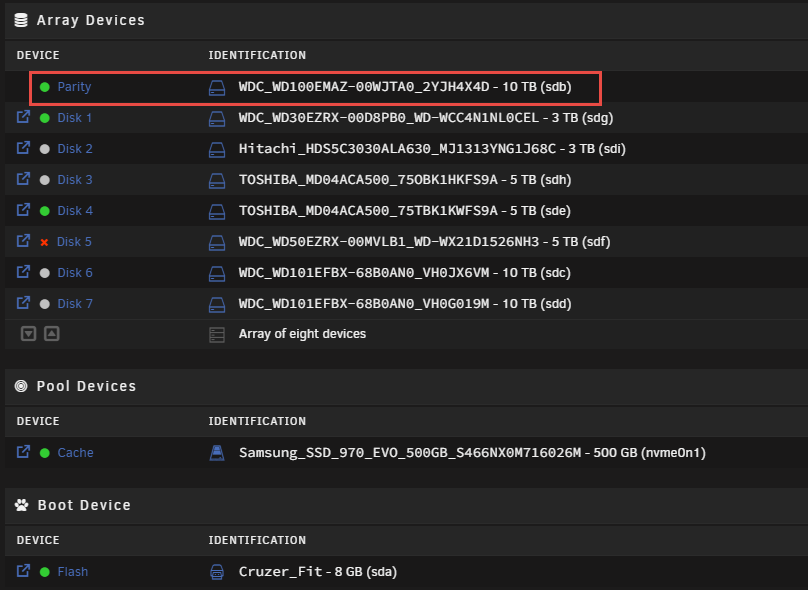
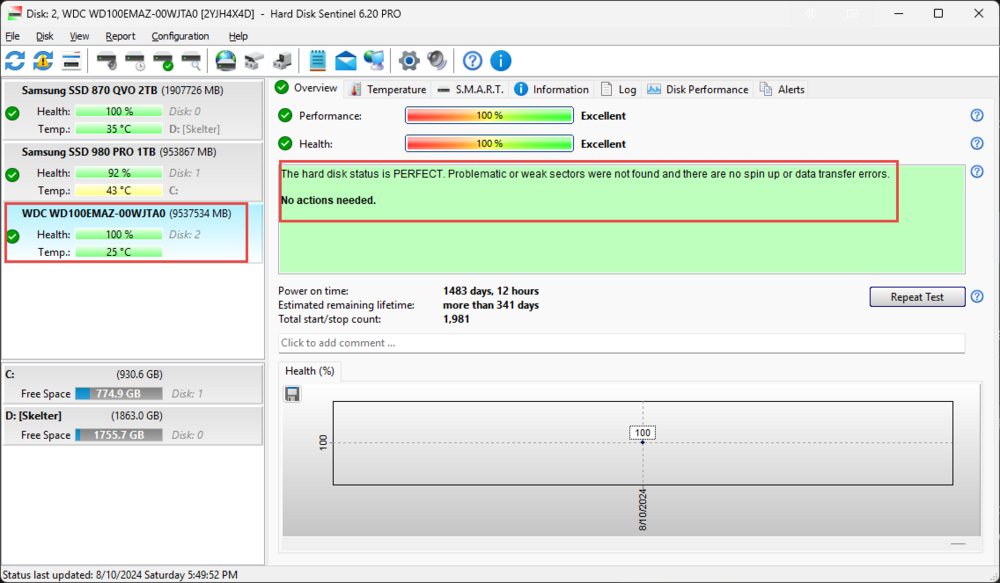
Hello everyone - some background. I have an unRAID server now for about 10 years, and it has grown to the point where I wanted to get into a new enclosure and go dual parity drive. I had 1 disk drive get disabled about 1 month ago but my 10 GB parity drive covered it and I limped along until I could get everything I needed to build a new server. So I bought the new Fractal Design Meshify 2 XL case, 2 Exo's 18 GB drives to add as dual parity, and an ASUS mainboard B650M-A AX II with CPU and RAM, the whole smear. I brought up the mainboard and CPU and RAM first in the case - testing the 750w Corsair PSU (tested with PS tested) and ran MemTest+ for about 1 week with no issues. I shut down my unRAID server via console, and the parity drive was fine as shown in Fig 1. The 5 TB WD drive was disabled, but I was able to test it via Hard Drive Sentinel- as I took the drives out and installed them into caddies, etc. - doing an Extended self-test which is non-data destructive per their FAQ. This drive came back clean (this bit of info could be important). Now I have a new case, with mainboard RAM and CPU and this has all been tested. I move all drives that are active in unRAID over along with the 2 18 TB drives and the HBA card. Boot it up and I see 8 hard drives (should see 9 with the 2 new 18's), but notice I do not see 1 of the 3 10 TB drives. I get unRAID working with UEFI and do not start the array but boot it up and see parity drive is the one missing. I shut down the server, find that drive (labeled all drives as part of the project with a labeler I bought) I now start testing this drive in the HBA card, in different ports on the mainboard, and I never see this drive. Hell, I even got the old server up and plugged it into this mainboard which it was seen and worked on just yesterday morning, and still don't see it in the BIOS. Now this is where I am confused, I plug it into my USB doc, and can see it fine in Hard Drive sentinel and SMART status says it is fine (figure 2). I obviously can not start my array with 1 missing drive and a missing parity and have a happy ending. But can Disk 5 be brought back up and tell the array it is happy and make 1 of the new 18's a parity disk or will unRAID not even allow me to bring up the variety without parity? Is there a way to get this array up and not lose data and end up with the dual parity? Any help is appreciated as I am at my wits end, I assumed the drive would be seen in the old mainboard and even if I had to plug all the drives in on that old system, and do the parity swap, just do that and then plug the drives in. Please help ❤️
-
Thank you Jorge. I suspected it was the mainboard, but having someone who can read the logs better then I is helpful. Thank you sir.
-
JorgeB - I had the server going yesterday and it stayed up and active and I can verify it was up and active until between 2 am and 8:30 am. I woke up and saw it down. I think the mainboard as 5 of the drives (including the ones listed above) are connected to onboard SATA and 3 drives are on the dell controller is the culprit. Here are the diags - I assume it's the mainboard but if the logs show anything that would be super helpful in limiting the variables. Thanks in advance sir! unraid-diagnostics-20240716-0939.zip
-
if it happens during the day while I work I'll document approximate time frame and diagnostics
-
No, it seems to be random. It happened after I went to bed, 1 am EDT...
-
I installed an Intel NIC this Saturday and all appeared fine, and I also disabled the onboard Braodcom NIC on the mainboard via BIOS, but it appears the issue is still there. At this point I assume the mainboard, but do the logs show anything specific? I looked but couldn't really decipher, so any help is appreciated. yesterday unRAID stayed up for over 24 hours, and I was able to stream from Plex off of it, but I woke up to the unraid GUI being not available and the IP not responding... unraid-diagnostics-20240715-0858.zip
-
Thanks, moderator. I was trying to find a URL for the hw recommendations. I350 Intel chipset, but I'd love some recommendations. I assume the disk disablement is because of this, and I have to do a rebuild once I get the new NIC?
-
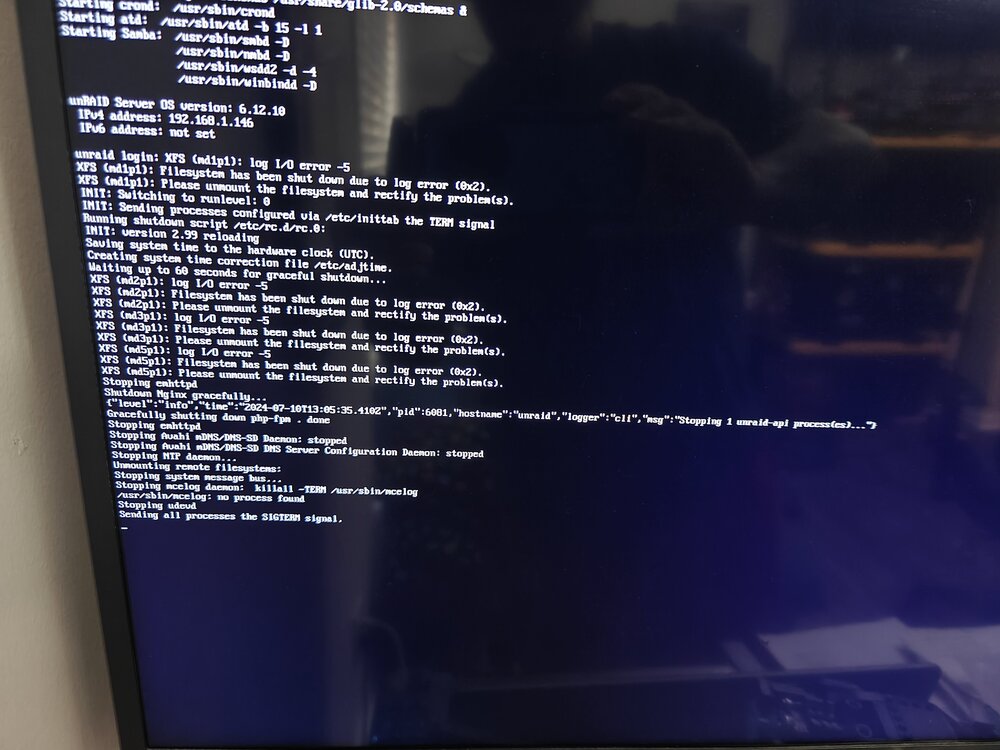
This maybe happened 1 time every 3 or 4 months, and now seems to be happening nightly even after a clean shutdown and coming back up. My NIC appears to just stop responding to pings etc, even though I can see a link light on the NIC and the switch port as well as activity on the NIC side. I can't ping it. As troubleshooting one of the times during this "fugue" state I power cycled my cable modem and wifi router, then my switch to no avail. I then gracefully power cycle the server and it seemingly comes back up without issue. This last time yesterday a disk came up stating 1 disk was "disabled and currently being emulated" (disk 5) even though SMART says it is good etc. This morning I looked and the server is seemingly locked up, not responding to keyboard inputs but still powered etc (he server is on a UPS and connected via USB) . I've had this server for approximately 10+ years without issue, and this is a fresh mainboard CPU etc from about 4 years ago... Any help is appreciated. Upon boot up this morning I noticed something odd in the screen logs (unraid.4.jpg) - any help is appreciated. unraid-diagnostics-20240710-0911.zip unraid-diagnostics-20240709-1538.zip
-
Just looking through the thread - shall I assume there isn't another plugin that does the same as Server Layout but still active? Still is working for me, but figured I'd check and see if a newer, still in development one exists. Did a search in Community Apps, but nothing jumped out at me. Thanks all!




