






IwishIcanFLighT
Members
-
Joined
-
I understand that NerdTools had to be deprecated for security/stability reasons. I mostly use it for installing maintenance packages like vim, iotop and btop. This way if the WebUI is unreachable or the OS is unstable for some reason, I can ssh into my tower and do the required maintenance from there. It's also quite handy to have the borgbackup package on hand just to mount/check my backups are working as intended every few months (my tower is a target borg repo). I fully agree that for actually creating backups to remote targets, using a borgmatic container is the way for sure. However, I'd argue that creating & using a custom docker container just for running these command is far from perfect: Overall, this seems a bit overkill to create a custom docker container just to open vim. I can bear with it, but it remains unnecessarily tedious If for some reason Docker is unstable, I'm out of reach for these packages In the case of btop, it only shows the process running within the docker container, not the tower, which makes it basically useless. Again, I fully agree that Unraid OS should remain pristine at all time to avoid any stability/security issues, but I still need these rather small packages which are really useful to do maintenance once in a while.
-
That's awesome! Looking forward to this feature in future versions!
-
I just installed the replacement battery and the alert went away at reboot. Thanks for your help! One thing that I would add though: I would prefer to receive an email/push notification for such an important alert (low battery voltage)rather than discovering it after an unclean shutdown. The current alert message is easy to miss in the Unraid dashboard, and I don't even connect to the dashboard every day. Is there a way to configure this as an email/push alert?
-
Yeah, this is what I suspected after reading on other forums about the average 3 years lifespan of UPS batteries. I thought it was more like 5 years... Anyway, I ordered a new battery and will report back to confirm if that fixes my issue. Thanks!
-
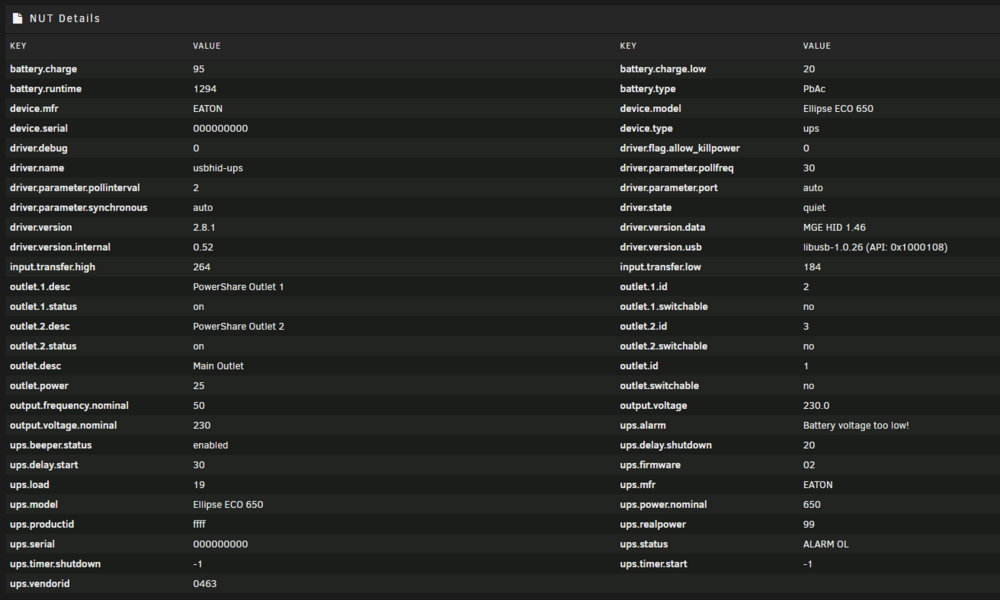
Hey there, During a power outage today, my tower did an unclean shutdown despite running behind an Eaton Ellipse ECO 650. After booting back up (outage was less than 2 minutes), the battery was barely discharged and the NUT plugin is saying that the UPS's battery voltage is too low, but the UPS is not beeping though. Shutdown Mode is set to Time on Battery, with 10 minutes left before triggering a clean shutdown. I was logged on in ssh when the outage occurred and got the shutdown alert message almost instantly when the power was gone. Is this a sign that the battery is dying? It is a bit old at this point (bought in January 2021, running 24/7 since then).

-
This is obviously super late to the party but I came across the exact same issue (locked out of my own TS server admin group after formatting my PC and no way to find the ServerQuery password). Recreating the entire server configuration and channels was not an option, so I found a solution on my own and thought I'd share it here in case someone needs it later. a) How to reset the ServerQuery password From your unraid SSH terminal, enter your running teamspeak container: docker exec -it <teamspeak container ID> bash Open with a text editor the file ~/start.sh . I use nano as it's available in this container: nano ~/start.sh Find the "# run teamspeak server" line, it was at the bottom of mine and looked like this: cd "${install_path}/sql/" && /usr/bin/ts3server logpath=/config/ dbsqlpath=/usr/share/teamspeak3-server/sql/ licensepath=/config/ license_accepted=1 Modify the line by adding "serveradmin_password=YourNewPassword". It should look like this: cd "${install_path}/sql/" && /usr/bin/ts3server logpath=/config/ dbsqlpath=/usr/share/teamspeak3-server/sql/ licensepath=/config/ license_accepted=1 serveradmin_password=<New serveradmin Password Here> Save the file, exit the container and restart it from the Unraid Dashboard. Save your new serveradmin password somewhere safe (e.g. password manager) for future usage, skipping this step. b) How to create a new privilege key via ServerQuery Connect to your TS server with a regular client. Go to Permissions > Servergroups. Memorize the number in parentheses behind the server group you want to recover. Usually Server Admin is ID 6. Connect via telnet to the ServerQuery. I use Kitty but you can use Putty or anything else: IP: your Unraid Server IP Port: 10011 Upon connecting, you should see the following text. If not, you probably used the wrong port: TS3 Welcome to the TeamSpeak 3 ServerQuery interface, type "help" for a list of commands and "help <command>" for information on a specific command. Type login serveradmin <New serveradmin Password Here> and press Enter. The server should respond error id=0 msg=ok Type use port=<The port you used to connect using the TS3 Client, usually 9987> and press Enter. The server should respond error id=0 msg=ok Type privilegekeyadd tokentype=0 tokenid1=<The Number you memorized in step 1> tokenid2=0 and press Enter. The server should respond: token=YourNewTokenReadyToBeUSed error id=0 msg=ok Return to your TS client, Go to Permissions > Use Privilege Key and paste the token in the input box. Go back to the ~/start.sh file modified in step a) and remove the serveradmin_password=<New serveradmin Password Here> argument as it's not needed anymore. Note that the new serveradmin password will still work, the argument resets it at each restart of the server. Done. 😉 c) Optional but recommended: remove your old TS credentials If you completely lost your previous credentials, there's no need to keep them on your server. You can remove them: Go to Permissions > Server Groups Select the admin group On the right side of the window there's a list of all the users in that group. Find your old account and remove it. If the username are similar, you can temporally change your current username and refresh the list to distinguish them.
-
IwishIcanFLighT changed their profile photo
-
That did the trick! However the pull seemed to timeout from the Dashboard so I had to manually pull from the terminal then trigger the update from the Dashboard. Thanks a lot!
-
Hi! I was updating my Teamspeak image from 3.11.1 to 3.12.1 today. However, the update says it when fine pulling latest but it actually didn't update the server at all. I managed to force update to 3.12.1 by forcing the repository address to "binhex/arch-teamspeak:3.12.1-1-01", but as soon as I replace it to "binhex/arch-teamspeak" it rolls back to pulling "latest" 3.11.1. And while I could leave the force 3.12 address repository, it's not ideal because the check for update won't find future versions. Any help is welcomed, thanks!
-
Hum that's unfortunate. I guess I'll stick to the older version of the docker image. At least until my vpn subscription is over. Then I'll probably move on. Thanks for your help anyway! I really appreciate.
-
Alright I had to remove --deamon from the args in order to have the logs. We seems to have a fatal error indeed. I might be wrong but it looks like there's an issue with tun0. See attached log file. outputlog.txt
-
Oh yeah that's correct I renamed the file when I installed the latest working version. But its content remains the same.
-
Here's the output: Disabling script-security and redirect-gateway didn't help by the way.
-
Okay so this morning I deleted everything and started from scratch. Pulled the latest version but I'm still unable to connect. However, I deleted everything once more and force pulled an older version of your repo, v1.3.13-31. And voila, deluge is back up with the exact same ovpn and template configurations. For now I'm good if I don't update, but I don't like the idea of not updating my server services, especially when it comes to security stuff like a VPN. I'm gonna dig into redirect-gateway and script-security later today, but I'm starting to wonder if the changes you made since 1.3.13-32 might crumple a bit my VPN provider. Do you remember if one of your modifications over the last updates could lead into client/server disagreement? Thanks
-
Yeah I'm using Notepad++ and just double checked: the file is Unix (LF). I also tried to save it with vim via a ssh. Here's the ovpn file by the way:
-
I already did that and just tried once more. I'm still unable to access deluge UI. Don't know if that's related, but when I download the ovpn file from my provider, I have to comment these lines: Otherwise I get this error: But this modification was working prior to today's update, so I don't think that's the issue.



