






anthony0030
Members
-
Joined
-
Last visited
-
@djtodd I see that transcoding that h264 file is not working on your GTX 1050. Possibly that file format is not supported on your GPU. Take a look at the compatibility list here https://developer.nvidia.com/video-encode-decode-support-matrix Your GPU can’t do all the versions. Try playing something else maby?
-
Upgraded to 7.3.0-beta.2 it’s working now!
-
@jeffreywhunter Did you get it working on 7.3.0-beta.2? What GPU do you have?
-
@hubleyku I have the same problem on unraid 7.3.0-beta.2 using a Quatro p2000. All the containers that have --runtime=nvidia give an error. I am using driver version 580.142 and am considering trying to downgrade to 7.3.0-beta.1 I dont know if downgrading would help. docker: Error response from daemon: unknown or invalid runtime name: nvidia Update: downgraded to unraid 7.3.0-beta.1. It is now working again. Same driver version. I don't know if the drivers are specific to the Unraid version or if it is just a bug in beta2 or a setting that needs to be updated.
-
I have the same problem on 7.1.4 and 7.2.0-beta.3.
-
@debit lagos I am running the same version (2023.12.12) on UNRAID 7.0.0-beta.3 on a DELL T420 with no crashes. You should also probably provide the computer/motherboard you have as this plugin gets the info from IPMI. I would also run the plugin "Fix Common Problems" to see if you have any other problem that might be causing this.
-
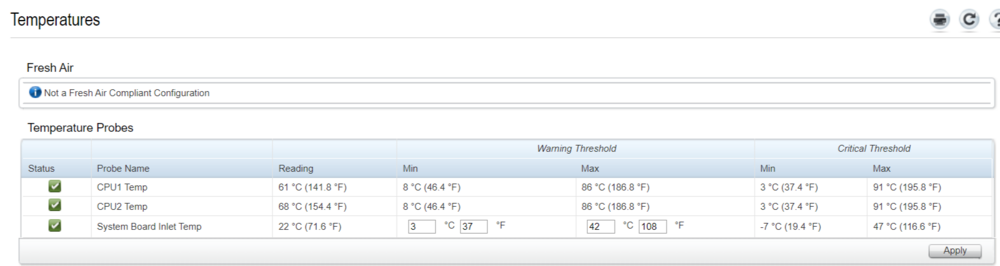
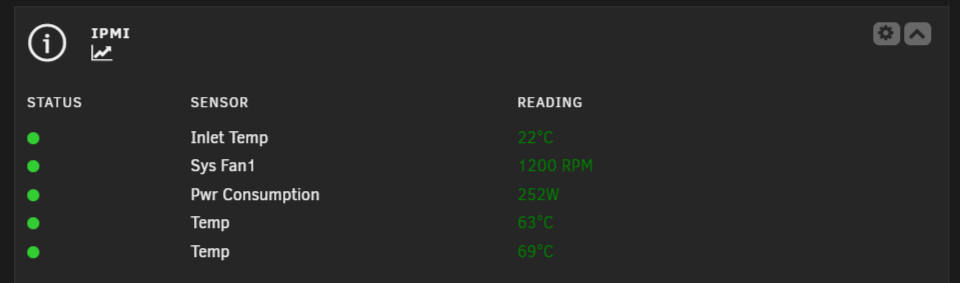
I have a Dell T420 running the latest version of UNRAID and this plugin, I have two CPUs in IDRAC I can see what temp belongs to what CPU but this plugin shows just the label Temp for both. is there a way to put a label like CPU 1 / CPU 2. as far as I can tell this part of the sensor config is responsible Section 115_Temp ## Possible values: Yes/No Enable_All_Event_Messages Yes ## Possible values: Yes/No Enable_Scanning_On_This_Sensor Yes ## Give valid input for sensor type = Temperature; units = degrees C; 'None' to not use hysteresis ## Positive_Going_Threshold_Hysteresis -127.000000 ## Give valid input for sensor type = Temperature; units = degrees C; 'None' to not use hysteresis ## Negative_Going_Threshold_Hysteresis -127.000000 EndSection Section 116_Temp ## Possible values: Yes/No Enable_All_Event_Messages Yes ## Possible values: Yes/No Enable_Scanning_On_This_Sensor Yes ## Give valid input for sensor type = Temperature; units = degrees C; 'None' to not use hysteresis ## Positive_Going_Threshold_Hysteresis -127.000000 ## Give valid input for sensor type = Temperature; units = degrees C; 'None' to not use hysteresis ## Negative_Going_Threshold_Hysteresis -127.000000 EndSection
-
I see that it is marked as testing, so I should wait until I see the update available on the UNRAID WebGUI and not on the UNMS/UISP WebGUI?
-
Hello, I am using the UNMS docker container on UNRAID and trying to update via the UNMS WebGUI but it keeps timing out and failing. New available version: 2.4.143 Your current version: 2.4.93 What can I do?
-
@Presjar are you using the latest version of the script? With the new version, It works for me.Hi @DoINeedATag, I have some sugestions for the script. 1) Add it to a git repo on github (for version controll) 2) Add console loggs before and after the dfrag happens to see fragmentation befor and after.It’s definitely doing something. Disk one is down to 64.13% Update after running it again for 5 hours: It is down to 28,44% One more time and I think it will be fine. Update after running it again for 5 hours: It is down to 9.76%I am running it again because after the run i still get. root@Tower:~# xfs_db -r /dev/md1p1 xfs_db> Frag command Frag not found xfs_db> frag actual 123304, ideal 35055, fragmentation factor 71.57% Note, this number is largely meaningless. Files on this filesystem average 3.52 extents per file xfs_db>Hi @DoINeedATag, xfs_frs is running when the script starts, and my drives look like this: root@Tower:~# blkid | grep xfs /dev/sdf1: UUID="" BLOCK_SIZE="4096" TYPE="xfs" PARTUUID="" /dev/sdd1: UUID="" BLOCK_SIZE="512" TYPE="xfs" PARTUUID="" /dev/md2p1: UUID="" BLOCK_SIZE="512" TYPE="xfs" /dev/md1p1: UUID="" BLOCK_SIZE="4096" TYPE="xfs" /dev/sdg1: UUID="" BLOCK_SIZE="512" TYPE="xfs" PARTUUID="" /dev/sde1: UUID="" BLOCK_SIZE="4096" TYPE="xfs" PARTUUID="" /dev/md3p1: UUID="" BLOCK_SIZE="512" TYPE="xfs" I tried ruinniong the script and it was blocked by the parity, I disabled the setting that waits for parity and now it seems to be doing something. Search for HDDs... Found HDD with id md1p1 (added) Found HDD with id md2p1 (added) Found HDD with id md3p1 (added) Content of /tmp/.xfs_mtab: /dev/md1p1 /mnt/disk1 xfs rw,noatime,nouuid,attr2,inode64,logbufs=8,logbsize=32k,noquota 0 0 /dev/md2p1 /mnt/disk2 xfs rw,noatime,nouuid,attr2,inode64,logbufs=8,logbsize=32k,noquota 0 0 /dev/md3p1 /mnt/disk3 xfs rw,noatime,nouuid,attr2,inode64,logbufs=8,logbsize=32k,noquota 0 0 I am going to check back in 2 hours to see if it did anything. Thanks for your help so far




