levster
Members
-
Joined
-
Last visited
-
I can confirm this issue on two separate Unraid 7.3.2 servers, and it appears directly associated with the Unraid API/Connect service. Main server (“Tower”): Unraid API/Connect 4.37.0 Large numbers of simultaneous rc.nginx reload operations occurred. /etc/nginx/conf.d/servers.conf acquired a complete duplicate set of self-signed HTTPS, HTTP redirect, and CA-signed HTTPS server blocks. nginx -t then failed with duplicate default server. The WebGUI became unreachable. Stopping unraid-api, removing only the complete duplicated blocks, and restarting nginx restored the local WebGUI. Test server (“Tower2”): Upgraded to Unraid API/Connect 4.37.1 (4.37.1+d8801361). It initially appeared stable, with API uptime of approximately 47 hours and zero PM2 restarts. It then developed the identical configuration corruption. The syslog contained 15,412 entries matching rc.nginx. Multiple nginx reload attempts were occurring at the same timestamps. nginx -t failed with: a duplicate default server for [LAN IP]:2443 in /etc/nginx/conf.d/servers.conf:91 servers.conf again contained one complete duplicated set of the same three server blocks. I ran unraid-api stop. The rc.nginx count was 15,412 before waiting and remained exactly 15,412 after 10 seconds, indicating that the reload storm stopped immediately with the API. After preserving the logs and corrupted configuration, I removed only the complete duplicate block. nginx -t succeeded, and the local WebGUI worked again without restarting nginx. This has now reproduced with both 4.37.0 and 4.37.1 on two different Unraid 7.3.2 servers. Version 4.37.1 therefore does not appear to fix it. I have preserved the following from both incidents: Full syslogs Corrupted and repaired servers.conf nginx validation output Process listings /var/log/graphql-api.log /var/log/unraid-api/ I have not included certificates, API keys, account tokens, or other credentials. I can provide appropriately sanitized diagnostic files if an Unraid developer or moderator would like them. The behavior looks consistent with concurrent API-triggered nginx reload/configuration-generation operations writing or appending the same server blocks more than once.
-
After installing the latest version of the API no further issues have been noticed.
-
Both servers would lose their GUI after a few hours. I actually did not time them. But now, having removed the unraid connect, everything is fine.
-
So, looks like uninstalling Unraid Connect fixed the GUI crashing issue on both servers.
-
I am running 7.3.2 servers and both have GUI go down after some random time. Rebooting fixes the issue, but only temporarily. I tried to troubleshoot with ChatGPT to no avail. Here is the latest syslog and the chatbots recommendations: I reviewed the syslog. It confirms an extreme nginx reload storm—not a network failure. From approximately 4:40 AM until the reboot: rc.nginx repeatedly launched overlapping reloads, sometimes 2–6 simultaneously. There are about 68,976 nginx entries and 5,240 rc.nginx entries. Concurrent reloads corrupted the generated servers.conf, producing duplicated server blocks. The storm consumed nearly the entire syslog, obscuring the original triggering process. This also likely explains why diagnostics stalled. Now that Tower2 has rebooted, please check whether the storm has resumed: date tail -n 50 /var/log/syslog grep -c 'rc.nginx' /var/log/syslog grep 'rc.nginx' /var/log/syslog | tail -n 20Also check for a scheduled script invoking nginx: crontab -l grep -RniE 'rc\.nginx|nginx.*reload|nginx.*restart' /etc/cron* /boot/config/plugins 2>/dev/nullIf the count stays low and no new reloads appear, the reboot cleared the condition. I would then upgrade Unraid before touching Unraid Connect. If reloads are already accumulating again, we need to disable the responsible plugin or scheduled task before the GUI fails a second time.tower2-syslog-20260718.txt
-
Looks like the database got corrupted and I had to rebuild it. Now, all is back.
-
I just updated the docker to the latest and am now unable to connect to my Plex. I am seeing a lot of same errors in the plex docker logs: 2026-03-15 00:26:00,026 DEBG 'start-script' stdout output: Error: Unable to set up server: sqlite3_statement_backend::loadOne: database disk image is malformed (N4soci10soci_errorE) 2026-03-15 00:26:00,084 DEBG fd 9 closed, stopped monitoring <POutputDispatcher at 23230706597968 for <Subprocess at 23230706484560 with name start-script in state STARTING> (stdout)> 2026-03-15 00:26:00,085 DEBG fd 11 closed, stopped monitoring <POutputDispatcher at 23230706602048 for <Subprocess at 23230706484560 with name start-script in state STARTING> (stderr)> 2026-03-15 00:26:00,085 WARN exited: start-script (exit status 255; not expected) 2026-03-15 00:26:00,085 DEBG received SIGCHLD indicating a child quit 2026-03-15 00:26:03,089 INFO spawned: 'start-script' with pid 131 2026-03-15 00:26:03,094 DEBG 'start-script' stdout output: [info] Env var 'PLEX_CLAIM' value not set and/or 'CLAIM_SERVER' not set to 'yes', skipping edit of Preferences.xml for claim process. 2026-03-15 00:26:03,300 DEBG 'start-script' stdout output: Error: Unable to set up server: sqlite3_statement_backend::loadOne: database disk image is malformed (N4soci10soci_errorE) 2026-03-15 00:26:03,364 DEBG fd 9 closed, stopped monitoring <POutputDispatcher at 23230707984208 for <Subprocess at 23230706484560 with name start-script in state STARTING> (stdout)> 2026-03-15 00:26:03,364 DEBG fd 11 closed, stopped monitoring <POutputDispatcher at 23230707987792 for <Subprocess at 23230706484560 with name start-script in state STARTING> (stderr)> 2026-03-15 00:26:03,364 WARN exited: start-script (exit status 255; not expected) 2026-03-15 00:26:03,364 DEBG received SIGCHLD indicating a child quit 2026-03-15 00:26:04,365 INFO gave up: start-script entered FATAL state, too many start retries too quickly Does any one else see similar errors?
-
I was able to roll back a snapshot and got back in to it. However, I am still not sure what happened. Thank you. Lev
-
Today I lost access to my Nextcloud despite no changes to the server in quiet some time. Can someone take a look at the logs and try to help out? I am seeing this when trying to log in: Internal Server Error The server encountered an internal error and was unable to complete your request. Please contact the server administrator if this error reappears multiple times, please include the technical details below in your report. More details can be found in the server log. I ran the logs before and after rebooting the server. Both attached. Thanks, Lev tower-diagnostics-20260130-1657.zip tower-diagnostics-20260130-1645_Before.zip ext Doctrine\DBAL\Driver\PDO\Exception: SQLSTATE[42S02]: Base table or view not found: 1146 Table 'nextcloud.oc_appconfig' doesn't exist in /app/www/public/3rdparty/doctrine/dbal/src/Driver/PDO/Exception.php:24 Stack trace: #0 /app/www/public/3rdparty/doctrine/dbal/src/Driver/PDO/Statement.php(132): Doctrine\DBAL\Driver\PDO\Exception::new() #1 /app/www/public/3rdparty/doctrine/dbal/src/Connection.php(1104): Doctrine\DBAL\Driver\PDO\Statement->execute() #2 /app/www/public/lib/private/DB/Connection.php(420): Doctrine\DBAL\Connection->executeQuery() #3 /app/www/public/lib/private/DB/ConnectionAdapter.php(50): OC\DB\Connection->executeQuery() #4 /app/www/public/lib/private/DB/QueryBuilder/QueryBuilder.php(291): OC\DB\ConnectionAdapter->executeQuery() #5 /app/www/public/lib/private/AppConfig.php(1360): OC\DB\QueryBuilder\QueryBuilder->executeQuery() #6 /app/www/public/lib/private/AppConfig.php(284): OC\AppConfig->loadConfig() #7 /app/www/public/lib/private/AppConfig.php(1832): OC\AppConfig->searchValues() #8 /app/www/public/lib/private/Memcache/Factory.php(121): OC\AppConfig->getAppInstalledVersions() #9 /app/www/public/lib/private/Memcache/Factory.php(160): OC\Memcache\Factory->getGlobalPrefix() #10 /app/www/public/lib/private/Server.php(936): OC\Memcache\Factory->createLocking() #11 /app/www/public/lib/private/AppFramework/Utility/SimpleContainer.php(169): OC\Server->{closure:OC\Server::__construct():929}() #12 /app/www/public/3rdparty/pimple/pimple/src/Pimple/Container.php(122): OC\AppFramework\Utility\SimpleContainer->{closure:OC\AppFramework\Utility\SimpleContainer::registerService():168}() #13 /app/www/public/lib/private/AppFramework/Utility/SimpleContainer.php(136): Pimple\Container->offsetGet() #14 /app/www/public/lib/private/ServerContainer.php(154): OC\AppFramework\Utility\SimpleContainer->query() #15 /app/www/public/lib/private/AppFramework/Utility/SimpleContainer.php(45): OC\ServerContainer->query() #16 /app/www/public/lib/private/Files/View.php(76): OC\AppFramework\Utility\SimpleContainer->get() #17 /app/www/public/lib/private/Server.php(423): OC\Files\View->__construct() #18 /app/www/public/lib/private/AppFramework/Utility/SimpleContainer.php(169): OC\Server->{closure:OC\Server::__construct():420}() #19 /app/www/public/3rdparty/pimple/pimple/src/Pimple/Container.php(122): OC\AppFramework\Utility\SimpleContainer->{closure:OC\AppFramework\Utility\SimpleContainer::registerService():168}() #20 /app/www/public/lib/private/AppFramework/Utility/SimpleContainer.php(136): Pimple\Container->offsetGet() #21 /app/www/public/lib/private/ServerContainer.php(154): OC\AppFramework\Utility\SimpleContainer->query() #22 /app/www/public/lib/private/AppFramework/Utility/SimpleContainer.php(45): OC\ServerContainer->query() #23 /app/www/public/lib/private/Server.php(1272): OC\AppFramework\Utility\SimpleContainer->get() #24 /app/www/public/lib/base.php(635): OC\Server->boot() #25 /app/www/public/lib/base.php(1192): OC::init() #26 /app/www/public/cron.php(29): require_once('...') #27 {main} Next Doctrine\DBAL\Exception\TableNotFoundException: An exception occurred while executing a query: SQLSTATE[42S02]: Base table or view not found: 1146 Table 'nextcloud.oc_appconfig' doesn't exist in /app/www/public/3rdparty/doctrine/dbal/src/Driver/API/MySQL/ExceptionConverter.php:51 Stack trace: #0 /app/www/public/3rdparty/doctrine/dbal/src/Connection.php(1976): Doctrine\DBAL\Driver\API\MySQL\ExceptionConverter->convert() #1 /app/www/public/3rdparty/doctrine/dbal/src/Connection.php(1918): Doctrine\DBAL\Connection->handleDriverException() #2 /app/www/public/3rdparty/doctrine/dbal/src/Connection.php(1111): Doctrine\DBAL\Connection->convertExceptionDuringQuery() #3 /app/www/public/lib/private/DB/Connection.php(420): Doctrine\DBAL\Connection->executeQuery() #4 /app/www/public/lib/private/DB/ConnectionAdapter.php(50): OC\DB\Connection->executeQuery() #5 /app/www/public/lib/private/DB/QueryBuilder/QueryBuilder.php(291): OC\DB\ConnectionAdapter->executeQuery() #6 /app/www/public/lib/private/AppConfig.php(1360): OC\DB\QueryBuilder\QueryBuilder->executeQuery() #7 /app/www/public/lib/private/AppConfig.php(284): OC\AppConfig->loadConfig() #8 /app/www/public/lib/private/AppConfig.php(1832): OC\AppConfig->searchValues() #9 /app/www/public/lib/private/Memcache/Factory.php(121): OC\AppConfig->getAppInstalledVersions() #10 /app/www/public/lib/private/Memcache/Factory.php(160): OC\Memcache\Factory->getGlobalPrefix() #11 /app/www/public/lib/private/Server.php(936): OC\Memcache\Factory->createLocking() #12 /app/www/public/lib/private/AppFramework/Utility/SimpleContainer.php(169): OC\Server->{closure:OC\Server::__construct():929}() #13 /app/www/public/3rdparty/pimple/pimple/src/Pimple/Container.php(122): OC\AppFramework\Utility\SimpleContainer->{closure:OC\AppFramework\Utility\SimpleContainer::registerService():168}() #14 /app/www/public/lib/private/AppFramework/Utility/SimpleContainer.php(136): Pimple\Container->offsetGet() #15 /app/www/public/lib/private/ServerContainer.php(154): OC\AppFramework\Utility\SimpleContainer->query() #16 /app/www/public/lib/private/AppFramework/Utility/SimpleContainer.php(45): OC\ServerContainer->query() #17 /app/www/public/lib/private/Files/View.php(76): OC\AppFramework\Utility\SimpleContainer->get() #18 /app/www/public/lib/private/Server.php(423): OC\Files\View->__construct() #19 /app/www/public/lib/private/AppFramework/Utility/SimpleContainer.php(169): OC\Server->{closure:OC\Server::__construct():420}() #20 /app/www/public/3rdparty/pimple/pimple/src/Pimple/Container.php(122): OC\AppFramework\Utility\SimpleContainer->{closure:OC\AppFramework\Utility\SimpleContainer::registerService():168}() #21 /app/www/public/lib/private/AppFramework/Utility/SimpleContainer.php(136): Pimple\Container->offsetGet() #22 /app/www/public/lib/private/ServerContainer.php(154): OC\AppFramework\Utility\SimpleContainer->query() #23 /app/www/public/lib/private/AppFramework/Utility/SimpleContainer.php(45): OC\ServerContainer->query() #24 /app/www/public/lib/private/Server.php(1272): OC\AppFramework\Utility\SimpleContainer->get() #25 /app/www/public/lib/base.php(635): OC\Server->boot() #26 /app/www/public/lib/base.php(1192): OC::init() #27 /app/www/public/cron.php(29): require_once('...') #28 {main} Next OC\DB\Exceptions\DbalException: An exception occurred while executing a query: SQLSTATE[42S02]: Base table or view not found: 1146 Table 'nextcloud.oc_appconfig' doesn't exist in /app/www/public/lib/private/DB/Exceptions/DbalException.php:56 Stack trace: #0 /app/www/public/lib/private/DB/ConnectionAdapter.php(53): OC\DB\Exceptions\DbalException::wrap() #1 /app/www/public/lib/private/DB/QueryBuilder/QueryBuilder.php(291): OC\DB\ConnectionAdapter->executeQuery() #2 /app/www/public/lib/private/AppConfig.php(1360): OC\DB\QueryBuilder\QueryBuilder->executeQuery() #3 /app/www/public/lib/private/AppConfig.php(284): OC\AppConfig->loadConfig() #4 /app/www/public/lib/private/AppConfig.php(1832): OC\AppConfig->searchValues() #5 /app/www/public/lib/private/Memcache/Factory.php(121): OC\AppConfig->getAppInstalledVersions() #6 /app/www/public/lib/private/Memcache/Factory.php(160): OC\Memcache\Factory->getGlobalPrefix() #7 /app/www/public/lib/private/Server.php(936): OC\Memcache\Factory->createLocking() #8 /app/www/public/lib/private/AppFramework/Utility/SimpleContainer.php(169): OC\Server->{closure:OC\Server::__construct():929}() #9 /app/www/public/3rdparty/pimple/pimple/src/Pimple/Container.php(122): OC\AppFramework\Utility\SimpleContainer->{closure:OC\AppFramework\Utility\SimpleContainer::registerService():168}() #10 /app/www/public/lib/private/AppFramework/Utility/SimpleContainer.php(136): Pimple\Container->offsetGet() #11 /app/www/public/lib/private/ServerContainer.php(154): OC\AppFramework\Utility\SimpleContainer->query() #12 /app/www/public/lib/private/AppFramework/Utility/SimpleContainer.php(45): OC\ServerContainer->query() #13 /app/www/public/lib/private/Files/View.php(76): OC\AppFramework\Utility\SimpleContainer->get() #14 /app/www/public/lib/private/Server.php(423): OC\Files\View->__construct() #15 /app/www/public/lib/private/AppFramework/Utility/SimpleContainer.php(169): OC\Server->{closure:OC\Server::__construct():420}() #16 /app/www/public/3rdparty/pimple/pimple/src/Pimple/Container.php(122): OC\AppFramework\Utility\SimpleContainer->{closure:OC\AppFramework\Utility\SimpleContainer::registerService():168}() #17 /app/www/public/lib/private/AppFramework/Utility/SimpleContainer.php(136): Pimple\Container->offsetGet() #18 /app/www/public/lib/private/ServerContainer.php(154): OC\AppFramework\Utility\SimpleContainer->query() #19 /app/www/public/lib/private/AppFramework/Utility/SimpleContainer.php(45): OC\ServerContainer->query() #20 /app/www/public/lib/private/Server.php(1272): OC\AppFramework\Utility\SimpleContainer->get() #21 /app/www/public/lib/base.php(635): OC\Server->boot() #22 /app/www/public/lib/base.php(1192): OC::init() #23 /app/www/public/cron.php(29): require_once('...') #24 {main}
-
So, yes. I was finally able to boot into the unRaid. Format the USB in FAT32 and make sure that it is boot enabled. However, I had to abandon the server as it did not want to identify my 2TB SSDs. It did not have problem with smaller SSDs or regular SATA drives. Just not large SSDs. I was using the IT flashed HBA and, because of the backplane, the SSDs were not picked up. My only solution would have been to bypass the backplane, something that I was not going to do. So, I abandoned the Dell as much as I would have loved to stick with it.
-
That's the message I get of I do go through UEFI. Otherwise, I can't even get to this screen.
-
Sorry to bring back this old thread, but I have an old r720xd that I would like to set it up as my second server, but keep getting nowhere quickly. If I keep the BIOS in UEFI I can boot to the unRaid screen, but get stuck at "failed to allocate memory for kernel command" message. Changing to the legacy BIOS instead and the USB is not recognized at boot. What BIOS setting did you have to modify /change to be able to load unRaid on 720? I tried formatting the USB with the old custom way and through the one step app. No go. I disabled the Lifecycle Controller without any change. Did you have to do anything in the PERC itself? Any help would be great! Thanks, Lev
-
Has anyone been able to use this particular server for their setup? No matter what I do in the bios, I cannot get past this screen.
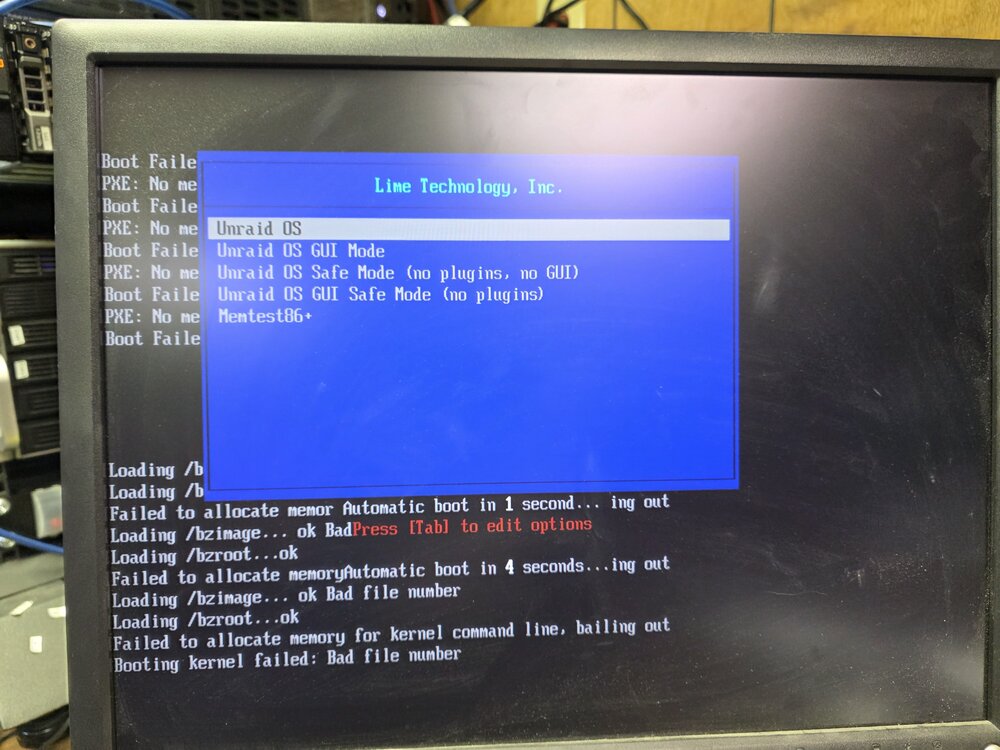
-
I think that I figured it out. I checked the net use on my local PC and removed all active connections. Then I connected to unRaid with the correct credentials and this time it accepted it. Now smbstatus shows correct user. Thank you! Lev
-
I am logged in as "lev", but how do I make sure that I use the correct credentials, or re-login with the correct user/password combo? How di disconnect as a "nobody" and connect as "lev"?