Siberys
Members
-
Joined
-
Last visited
-
Hello, I have the same issue with my wx7100. Issue as been well described by zosopage1963 on this AMD forum. Any luck on your side ?
-
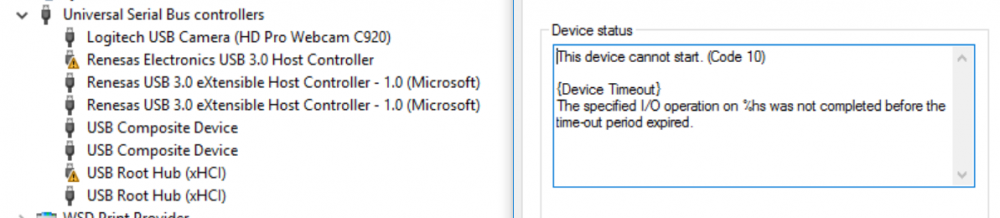
Hello Everybody! I need your help please! So I try the aforementioned solution but it doesn’t seem to “fully” work with my usb card: https://www.startech.com/ca/Cards-Adapters/USB-3.0/Cards/PCI-Express-USB-3-Card-4-Dedicated-Channels-4-Port~PEXUSB3S44V# This card has 4 USB 3.0 with 4 controllers (1 each). I bought it specially for my unRaid VMs ! Indeed, all USB controllers (and PCI bridge - not sure it’s a good thing here) appear in different IOMMU group. I’ve been trying to give 2 of my Windows 10 VM two USB each but while the pass through devices appear in each VM device manager, they do no work: I get a exclamation mark and it says device could not be started/do not operate (I’ve installed the genuine drivers from the card website). I’ve also tried passing the PCI bridge behind the corresponding controller but I get the error in unRAID saying device does not exist. Thanks to lspci and memory addressing I was able to pinpoint which USB stands behind which PCI bridge (letters). 06:00.0 PCI bridge [0604]: Pericom Semiconductor Device [12d8:2608] (Main physical PCI ?) 07:01.0 PCI bridge [0604]: Pericom Semiconductor Device [12d8:2608] (A) 07:02.0 PCI bridge [0604]: Pericom Semiconductor Device [12d8:2608] (B) 07:03.0 PCI bridge [0604]: Pericom Semiconductor Device [12d8:2608] © 07:04.0 PCI bridge [0604]: Pericom Semiconductor Device [12d8:2608] (D) 08:00.0 USB controller [0c03]: Renesas Technology Corp. uPD720202 USB 3.0 Host Controller [1912:0015] (rev 02) (A) 09:00.0 USB controller [0c03]: Renesas Technology Corp. uPD720202 USB 3.0 Host Controller [1912:0015] (rev 02) (B) 0a:00.0 USB controller [0c03]: Renesas Technology Corp. uPD720202 USB 3.0 Host Controller [1912:0015] (rev 02) © 0b:00.0 USB controller [0c03]: Renesas Technology Corp. uPD720202 USB 3.0 Host Controller [1912:0015] (rev 02) (D) /sys/kernel/iommu_groups/37/devices/0000:06:00.0 /sys/kernel/iommu_groups/38/devices/0000:07:01.0 /sys/kernel/iommu_groups/39/devices/0000:07:02.0 /sys/kernel/iommu_groups/40/devices/0000:07:03.0 /sys/kernel/iommu_groups/41/devices/0000:07:04.0 /sys/kernel/iommu_groups/42/devices/0000:08:00.0 /sys/kernel/iommu_groups/43/devices/0000:09:00.0 /sys/kernel/iommu_groups/44/devices/0000:0a:00.0 /sys/kernel/iommu_groups/45/devices/0000:0b:00.0 Hypothesis #1 : should PCI bridge and USB controllers be part of the same iommu group ? Hypothesis #2 : should I stub the card to hide it from UnRaid at boot ? So here goes my headache… all yours now….you have 2 hours !