hairybuffalo
Members
-
Joined
-
Last visited
-
I forgot to mention I did do a mem test. It passed. I’ll check for another bios update, I did one when I built the system but maybe there’s a new one.
-
I replaced hardware in my unraid server a few months ago and over time I have an issue that seems to be getting worse and worse. The server is either crashing, locking up, or at least losing network connectivity so I can't get to it. Anyway it might stay up for a few weeks to a few days before it happens. I've tried most recently to shutdown all docker apps to see if that helped, it didn't. I ran a memtest when this first started and it passed. I enabled the syslog server and see a few things such as: kernel: i915 0000:00:02.0: [drm] ERROR GT0: GUC: Unsuccessful self-config (-ETIMEDOUT) key 0x906 value 0x1123800 kernel: i915 0000:00:02.0: [drm] ERROR GT0: GUC: CT: Failed to register RECV buffer (-ETIMEDOUT) kernel: i915 0000:00:02.0: [drm] ERROR GT0: GUC: CT: Failed to enable CTB (-ETIMEDOUT) kernel: i915 0000:00:02.0: [drm] ERROR GT0: GUC: mmio request 0x508: no reply 508 and also rsyslogd: action 'action-2-builtin:omfwd' resumed (module 'builtin:omfwd') [v8.2102.0 try https://www.rsyslog.com/e/2359 ] rsyslogd: omfwd/udp: socket 2: sendto() error: Network is unreachable [v8.2102.0 try https://www.rsyslog.com/e/2354 ] rsyslogd: omfwd: socket 2: error 101 sending via udp: Network is unreachable [v8.2102.0 try https://www.rsyslog.com/e/2354 ] rsyslogd: action 'action-2-builtin:omfwd' suspended (module 'builtin:omfwd'), retry 0. There should be messages before this one giving the reason for suspension. [v8.2102.0 try https://www.rsyslog.com/e/2007 ] and also kernel: get_swap_device: Bad swap file entry 4003ffff848bc9df This has been driving me crazy so I really appreciate any help. yougotserved-diagnostics-20260720-1138.zip
-
I updated the bios during the initial build so it’s already on the latest version. Does disabling GuC mean I lose the ability to do hardware video transcoding (intel quick sync)?
-
Me test passed. No errors
-
I migrated my unraid into a new chassis with new proc, mobo, and mem over the weekend. Basically the hard drives in the storage array are the only thing that is the same. The system locked up the other day and after rebooting it did a parity check. Upon completion it said there were 6087 errors. I looked at the log and saw a lot of errors that said Unsuccessful self-config (-ETIMEDOUT) key 0x906 value 0x1123800. I'm not sure what this error means, any insight? Am I looking at some bad hardware? diagnostics-20260107-1323.zip
-
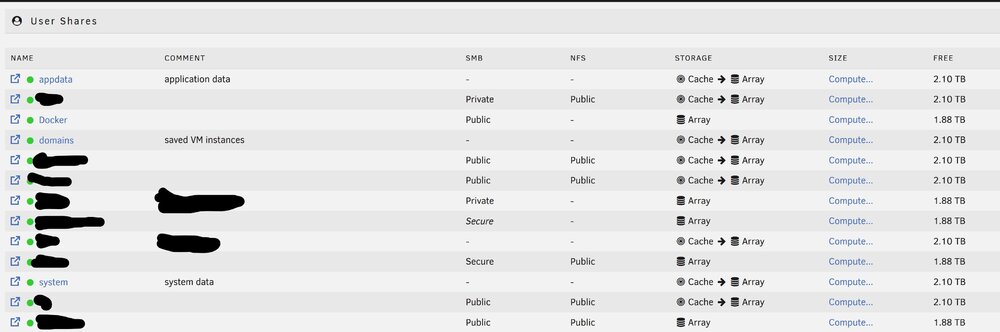
I think I have it all figured out. The steps in the guide are what I had done. The issue I found is that I had mapped most of my docker apps as well as the docker image directly to the cache ie /mnt/cache/docker/appdata/blahblahblah. To fix I set my docker and appdata shares back to cache and ran the mover. Then I modified all of the necessary paths and pointed them through the docker share ie /mnt/user/docker/blahblahblah. I confirmed all of my docker apps were able to run then shut them down again and disabled docker. I then set the docker and appdata share along with all others to move cache->array and ran mover again. Everything moved this time. I removed my cache disk pool and confirmed all the docker apps are still able to run. So now I think I'm ready to move into the new server chassis/hardware then add the new cache disk and do the process in reverse (excluding hard coding paths to the cache of course) to get these items back onto cache. Thank you for the help
-
A few files are on array disks but mostly it says they are on the cache.

-
Unraid 7.2.3 I am preparing to move my unraid into a new server (new proc, mobo, mem, nvme cache drive). The array storage will remain the same, I'll just move them into the new case. My old cache drive is a pool of small m.2 SSDs. They will not be moving to the new server. So I'm trying to ensure everything stored on them is moved off. I had three shares set to store in cache (array->cache) : appdata, system, and domains. I changed those to cache>array and ran the mover. The problem is my docker image and all of the appdata for my docker apps is still sitting on the cache drive. Not just a copy but that appears to be the only location. If I look at the shares it only lists cache for these files and folders. The funny thing is the Docker share was set to array only. I never changed it yet the docker.img is only located on the cache. My plan had been to move items from the cache to the array. Remove the cache drive and confirm everything still works. Move into the new server. Confirm everything works again. Move those items to the new cache drive. How can I get these items to move into the array? Is there a step I'm missing?