MikeAH
Members
-
Joined
-
Last visited
Everything posted by MikeAH
-
Curious if anyone has established which versions of various Binhex containers don't have the affected xz packages. In the meantime I plan to rollback to older versions of docker containers until xz has moved beyond this version or been removed from the affected packages. Edit: I added a few of the binhex docker containers I found that shouldn't be vulnerable with this version of xz. Hope this helps! sabnzbd 4.2.2-1-01 privoxyvpn 3.0.34-1-08 prowlarr 1.13.3.4273-1-01 plexpass 1.40.1.8227-1-01
-
What are the specs of the machine you're running it on and is it consistently choppy or only in the sliced preview? FWIW this is being rendered using only your CPU using the default configuration which will be quite slow when slicing generally. For me, the non-sliced preview is super smooth, but when I slice it's a bit lethargic. Still usable for me though.
-
Disregard there was indeed a bug, thanks for catching it, @windlok1010. It's with how Prusaslicer handles stable/beta versioning on Linux. More specifically, if it's beta it uses .config/PrusaSlicerBeta and on stable it uses .config/PrusaSlicer. The script I used to pull the latest version takes either of them. If there is a strong sentiment to not use the beta versions, let me know and I'll regex beta versions out of the pool. I modified the Docker container to forcefully set the data directory to /configs/.config/PrusaSlicer going forward. I'm pushing to GitHub with the latest changes and I've already made a push as of 2 minutes ago. This means if you were using this container successfully previously, you might need to move .config/PrusaSlicerBeta to .config/PrusaSlicer.
-
That's great to hear! Thanks for confirming that the fix resolved your issue and let me know if you have any feedback or suggestions.
-
I just made another push to Docker and GitHub with a fix to the /configs/.config/ directory not existing for fresh installations. If this was the issue you were hitting, it's since been fixed. I tested on two devices with brand new docker volumes for it with success so 🤞. Appreciate the kind words and support!
-
Just checked both my unraid servers (one I imaged fresh last year and one that I imaged like 6 years ago). They both had macOS Interoperability disabled by default, so hopefully this is the case for most of the default configurations of unraid. Not sure though and it's definitely worth checking if this removes the risk of the known vulnerability.
-
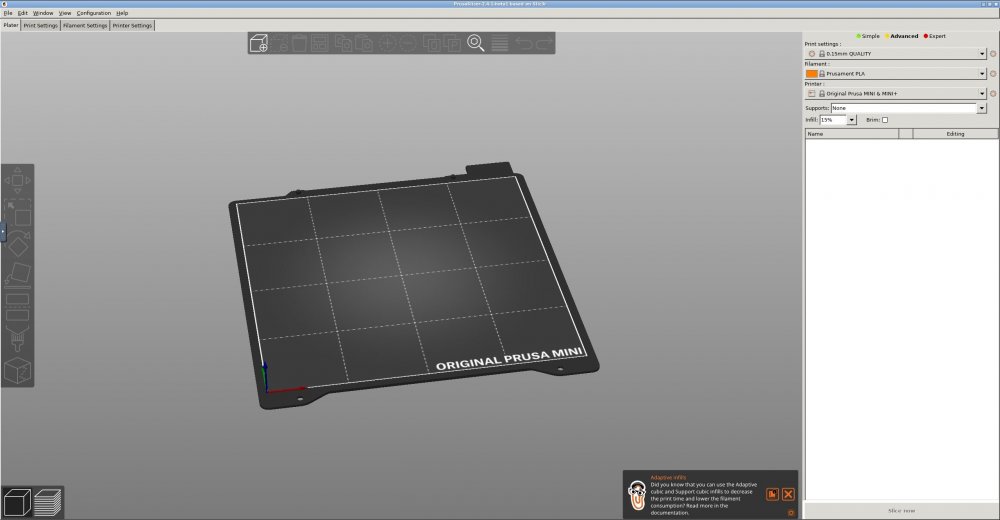
Docker: https://hub.docker.com/r/mikeah/prusaslicer-novnc GitHub: https://github.com/helfrichmichael/prusaslicer-novnc Overview I recently started to become slightly frustrated with my all of my varying devices having various STLs (the model files used for 3D Printing) that I am printing/want to print. I decided why not use unraid to host a share and then serve Prusaslicer via a Docker container? I have 3 printers, so sometimes I want to re-slice a model for another one of my printers or another filament type. I started my search first in the Community Apps plugin and was sad to discover "No results found" when I searched for "prusaslicer", but luckily I landed on a few Docker containers with built-in VNC support. A few of the containers worked well, but I found them to be overly complex for the task at hand. In my approach I simplified the docker container as much as possible and provided some quality of life changes to keep Prusaslicer happy and healthy. I was able to get this template added to the Community Apps plugin and I've also provided manual installation instructions. Feel free to add it and let me know if you run into any issues. From my testing so far, it runs really smooth in the browser and additionally is retaining the configuration properly through image wipes, etc. Thanks and hope you all like it! Installation guide Using Community Apps, search for prusaslicer-novnc and it should return the MikeAH's Repository offering. Manual installation process: Open your Docker page on your unraid instance. Scroll to the bottom and in the Template repositories textarea, add the URL below https://github.com/helfrichmichael/unraid-templates (This will add all of my unraid Docker templates as I add more as an FYI. If you only want to get the prusaslicer template, add /prusaslicer to the URL above and that should work) Then click ADD CONTAINER Select prusaslicer-novnc from the menu You will now set all of the varying environment variables. By default I used my /mnt/cache/appdata/prusaslicer for the /configs/ directory. I also passed in a unraid share for my STL and GCODE files by adding a path for /prints/. Click APPLY or DONE. The docker should hopefully spin up and build successfully. You can now access your Prusaslicer instance at http://UNRAID_IP:6080 (or if you changed the port, use that port -- additionally UNRAID_IP is your unraid host IP). Accessing the web interface Once installed visit http://UNRAID_IP:6080 (UNRAID_IP will be your unraid host IP -- something like 192.168.1.92 for example). Warnings and Best Practices This uses VNC and noVNC to provide access to a Dockerized instance of Prusaslicer. In the default state, there is NO AUTHENTICATION whatsoever. This means any device on your local network will be able to access this Docker unless you've locked the Docker down or provided some network level security. One method for securely accessing this remotely could be using ArgoTunnel (Cloudflare Tunnel) and Cloudflare Teams to provide remote access with an authentication layer. This would also in theory allow you to connect each of your printers in Prusaslicer to your Octoprint instances and seamlessly print from Prusaslicer directly to your printer. Screenshot(s)