





kleptonite
Members
-
Joined
-
Last visited
-
OK I will post a new diagnostic first, before doing anything else. I was wrong to use the word "format" - i think it should have been "clear"; either way you are saying that, eventually, I would insert a raw, uncleared, disk in order for the re-build to take place automatically. Can I do this via the option during the initialise process to run the Main web screen on the console?
-
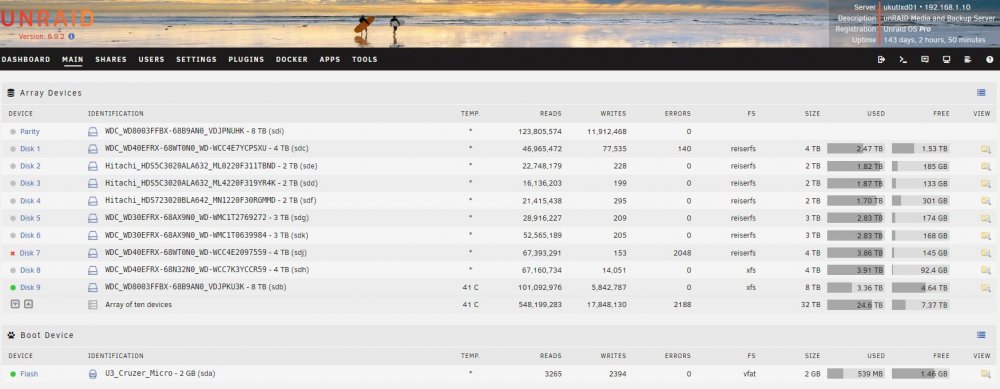
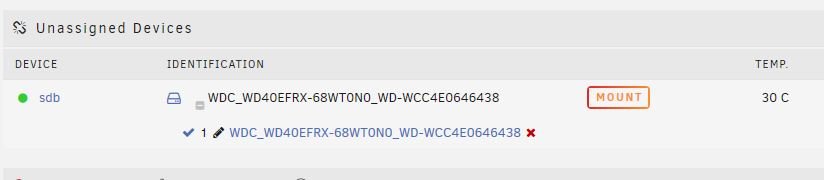
I did as you suggested and it cleared the 140 errors disk, but not the 2048. I do now have a replacement disk. I don't have any spare slots to format the new drive - can I simply replace the faulty with the new, format it and then assume (hope) that unRAID will re-build the replacement?
-
I can't find a link to this topic in General Support nor in the docs. Does anyone know the commands to unmount the drives and shut down the server cleanly via the console command line? I need this because (for reasons unknown) I can't login to the Main page and the fix to reset the password needs the USB drive out of the server. Thank you
-
I have 2 disks with read errors (Disk1-4Tb - 140 read errors and Disk7-4Tb - 2048 read errors), Disk7 is red-balled. I have an 8Tb WD Red NAS to replace these two. Can someone advise how best to re-build the 140 error disk onto the 8Tb and save any readable data from the 2048 error disk also onto the 8Tb? Indeed, is this even possible, given that two disks have failed at the same time? Thanks in anticipation. ukutlxd01-diagnostics-20220819-0904.zip
-
Unfortunately it doesn't seem to be working. unRAID offers me the new disk to re-assign as the parity, but it then tells me it is wrong to try to do that.

-
Thank you for the advice - I always feel more confident if I have every step spelt out!
-
Can I just clarify what you are saying. At this point I don't need to remove any disks. I simply do this all through the software: Stop the array, un-assign the old Parity, assign the new drive, in its current slot, as the new Parity drive and just start the array. Presumably, after the re-build, I can stop the array, remove the old parity disk and replace it with a new data drive? Thanks
-
I am running unRAID 6.7.2 and my Parity disk generates thousands of read errors when the parity check runs. It looks as though I need to do something like the Parity.Swap procedure, but I am not replacing a Data drive as well, and that procedure seems more than I actually need. Is there a write-up which just covers replacing a faulty Parity drive with a new larger unit?
-
Do I need to remove the zero-byte partition that has been added as part of the format?
-
Such a simple resolution! Thank you.
-
I have UD and UD+. I have just enabled Destructive mode, but no change after refreshing the Main page.
-
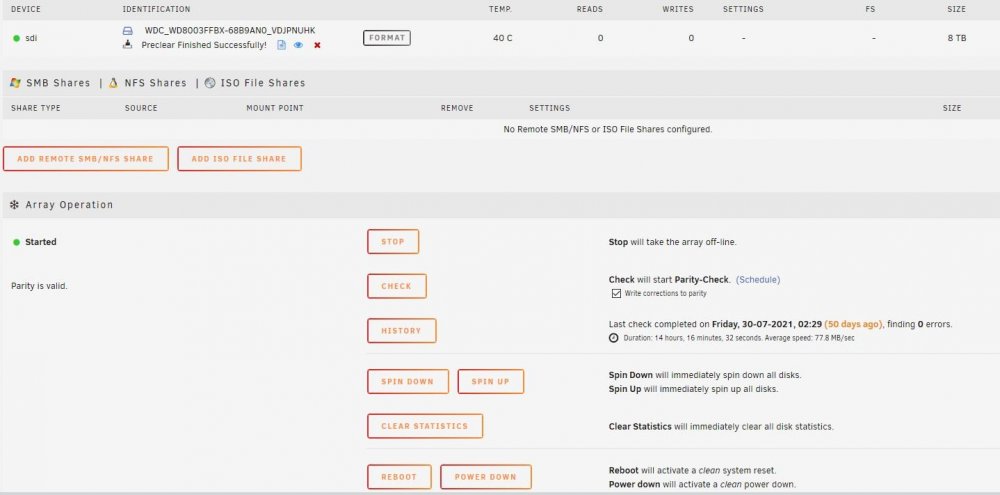
I am running 6.7.2 with 10 disks. I have successfully pre-cleared the 8TB disk with 3 cycles. Once the pre-clear terminated, the Main page shows the unassigned disk, but the format button is inactive (greyed out) and I cannot see a tick-box to activate it. I have tried stopping the array and re-starting but no change. Also spinning down all drives. Any ideas, anyone? - Thanks in advance! ukutlxd01-diagnostics-20210918-1151.zip
-
In safe mode there are no plugins showing as installed. In addition the APPS button is missing so I can't try to re-install any of them. Also, I don't have a list of what plugins were there under 6.5.0. I only have a note of the four I removed because they couldn't be updated under 6.5.0. Surely, if I try to re-start normally, I'll just hit the same problem? I have attached the syslog from the safe mode boot. It does show a number of errors, but I don't know if any are relevant to this problem. By the way, thank you for your help. 😊 ukutlxd01-syslog-20191120-1313.zip
-
@itimpi - Luckily, I've never had to reboot or power down via the console. I would have guessed reboot, but better to be sure. In safe mode I can see all the disks. Can I start the array and use the system? How do I set about establishing which plugin is causing the problem? Or is there anything in the diagnostics that indicates where the problem lies?
-
@itimpi - Thanks for the suggestions. I have tried loading the webgui by whitelisting Unraid in the adblocker and by trying in a browser with no adblocker installed, but the result is as before. The diagnostic file is attached below. What is the command to initiate a reboot from the console? There were two error messages on the console referring to missing docker and VM folders - I don't use either of these. ukutlxd01-diagnostics-20191120-1213.zip


