





Kevinb123213
Members
-
Joined
-
Last visited
-
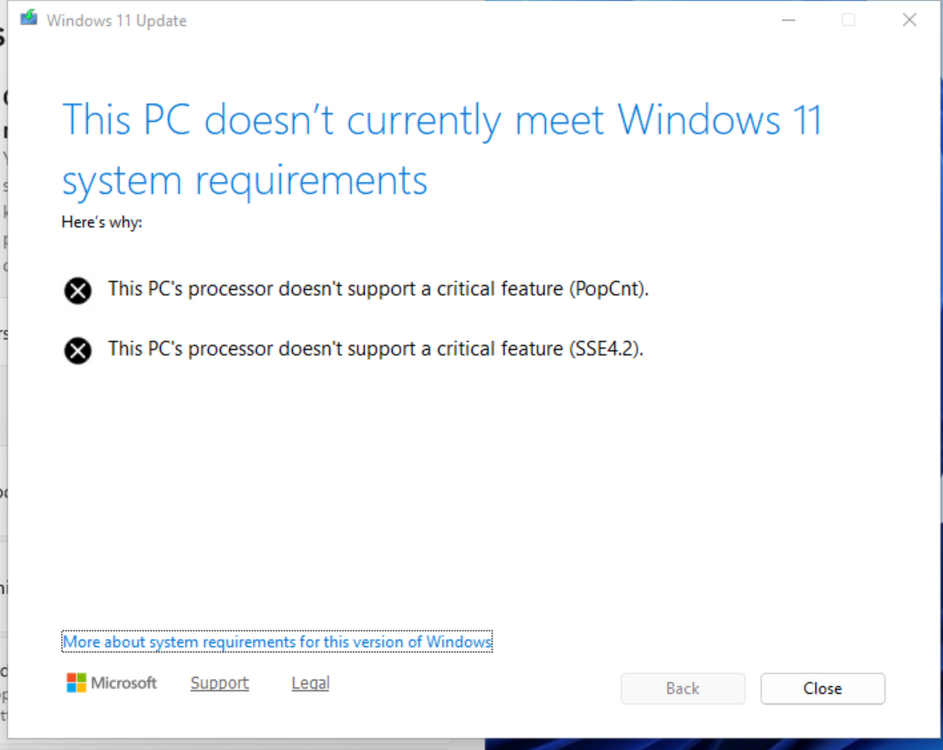
Hello, I've been trying to update my windows 11 vm to 24H2 and I get CPU not supported SSE4.2 and PopCnt. I found theres a fix on proxmox but can this be used with XML?https://forum.proxmox.com/threads/cannot-update-windows-11-to-24h2-cpu-not-supported.157850/ I'm honestly surprised Unraid doesn't support windows 11 24h2.. any help would be greatly apreciated
-
Oh, thank you for this additional info. I’m glad you were able to find a way for it to persist after reboot.
-
If you have a backup of your USB. Try and restore from there. Looks like unclean shutdowns are the cause of corrupting files.
-
TL;DR Files ending in a dash seem to indicate some sort of corruption. Long version: Found the solution. I think I should share it as it may help others. Apparently my setup cuts power and resets when I passthrough one of my GPUs - specifically the Nvidida Quadro K600. Knowing that I had an unclean shutdown, I went down the thought processes of data corruption. Which made me remember, a while back I noticed on a corrupted copy unraid usb, the dash ending files (syslinux-) appeared there too. So, I ran the following and pressed option 2 to restore from backup. fsck /boot At this point I restarted and was able to start libvirt. Now time to figure why my K600 is causing reset. -Kevin
-
Hello, I had an unclean shutdown (power cut and powered back up itself) for some reason when passing a gpu to a vm. Since then, I have not been able to start libvirt. Diag attached. My /etc/libvirt/ dir seems to have been automatically renamed to /etc/libvirt-/. What does a dash at the end of a directory signify? Can I just do the following? mv /etc/libvirt-/ /etc/libvirt/ Noteworthy errors: syslog root: /usr/sbin/libvirtd: error: Unable to initialize network sockets. Check /var/log/messages or run without --daemon for more info. libvirt 17277: error : virNetSocketNewListenUNIX:511 : Failed to bind socket to '/var/run/libvirt/libvirt-sock': Address already in use BTW, deleting libvirt img did not fix the issue. Thanks in advance, Kevin everest-diagnostics-20220926-1422.zip
-
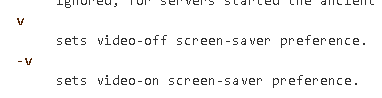
TL;DR: You can enable blanking (black screen output) as a screen saver by doing the following: 1. Backup slim.conf cp /etc/slim.conf /etc/slim.conf.orginal 2. Edit slim.conf nano /etc/slim.conf 3. look for this line. xserver_arguments -novtswitch -allowMouseOpenFail -quiet -xinerama -v -s 0 -dpms -fp /usr/share/fonts/TTF vt07 4. Change to the following xserver_arguments -novtswitch -allowMouseOpenFail -quiet -xinerama -v -s 1 dpms -fp /usr/share/fonts/TTF vt07 You can disable screen output (no signal output) as a screen saver by doing the following: 1. Repeat steps 1 - 3. 2. Change to the following xserver_arguments -novtswitch -allowMouseOpenFail -quiet -xinerama v -s 1 dpms -fp /usr/share/fonts/TTF vt07 DISCLAIMER: Do this at your own risk. You are responsible if you break your unraid setup. Edit: Is there really no way to blank the output of the screen?

-
Hello, I have a monitor that has Auto Input select. I would like to have the UnRaid GUI be able to sleep after x minutes (blank the video output) when booted into GUI mode. Is there a file I can edit to enable this or command I can execute? I do not see a way to do it the the GUI itself. Ideally, i want the monitor to automatically switch to the secondary input when Unraid's GUI blanks (sleeps) and still be able to wake via usb keyboard/mouse to resume video output. Thank you in advance, Kevin Sent from my iPhone using Tapatalk
-
OP in pre-release section by me for Unraid OS 6.10.0 RC8. Since this issue has persisted into the stable release, I am reposting here. Not sure if allowed to have two posts (prerelease/stable) for the same issue. If this is not allowed, feel free to contact me or adjust as needed. I looked at the full release notes and tried to see if the VNC package that Unraid Linux uses was the cause. I could not figure out which library/package it is. Issue: When editing or creating a VM, the VNC password field in the WebGUI template, does not allow any password greater than 8 characters. This issue was first noticed when turning on a VM just after 6.10.0-RC8 update. I was prompted that my 19 character password exceeded the 8 character limit (as shown similarly in screenshot attached). By today's standards passwords less than 8 characters are considered insecure. Reproduction steps: 1. Inside of Unraid WebGUI, navigate to VMs tab. 2. Select the "ADD VM" button below the list of currently installed VMs to create a new VM. 3. Select VM template type Linux. This shouldn't matter but these are my exact steps for testing. 4. Set primary vDisk size to "10M". 5. Set VNC Password to anything greater than 8 characters. In this case "123456789". 6. Select the button "Create VM". 7. Observe the following error: "VM reation error unsupported configuration: VNC password is 9 characters long, only 8 permitted." everestsrvr-diagnostics-20220518-1203.zip
-
Hello, As of 6.10.0 rc8, my VM's would not autostart because my vnc passwords contained more than 8 characters. This is a security issue because it imposes a limit on length of passwords which inherently limits the time it takes a malicious user to crack the password. Most platforms require a minimum of 8 characters. Reproduction Steps: 1. Go to VMs Tab -> Select any VM's icon and Edit. 2. Change VNC passsword to anything that contains more than 8 characters. 3. Start the recently edited VM. 4. Observe the message in the screenshot above. NOTE: I did not have this issue on RC7. Thank you all in advance, Kevin everestsrvr-diagnostics-20220511-2103.zip

