





Bitbass
Members
-
Joined
-
Last visited
Everything posted by Bitbass
-
In case someone else stumbles across this (including me) here's what I did. And it worked fine this time, but who knows if each situation will be a little different. I imagine the first command has the potential to destroy things, so use caution: sudo wipefs /dev/sdf sudo wipefs -o 0x1000 -f /dev/sdf sudo fdisk -l sudo xfs_repair /dev/sdf1 sudo mount /dev/sdf1 /mnt/sdf I also modified fstab because of the partition being in there. It might end up being a problem for me later, but I know where to go then. Thanks for getting me headed in the right direction, even if I had trouble seeing it!
-
It's quite possible it was in a RAID previously. That would have been some time ago. This was the piece I was missing from my understanding. I wasn't aware that "linux_raid_member" wasn't put there by Unraid. Sorry for the confusion. I'll explore wipefs. Thanks!
-
That drive would have been attached through an HBA. I think it's a 9207, but I could be wrong. No RAID enabled on that. Unraid definitely sees the drives as individuals. Unrelated, so I hope I'm not going to confuse things. I also have a Dell R710 with a H700(?) and I have to explicitly create RAID0's for each drive if I want to pass those through without RAID being applied. That's not the case with this instance of Unraid. Just giving you some context for my familiarity with these.
-
Sorry, I guess I'm missing what you're asking. It came out of the array in Unraid, which has no parity. I guess an array drive? I'm treating Unraid like a JBOD, but the drives are all assigned in Unraid.
-
It's a data drive from a no-parity Unraid system.
-
I'm not concerned about that. If, for some reason, I had Unraid drives but no Unraid server available to me, how do I read the drives? I appreciate that you guys are giving me workarounds to my situation, but it's not really answering my question. How can I read an Unraid XFS formatted drive in an Ubuntu system when it's marked as "linux_raid_member"?
-
I have the Unraid instance, just trying to avoid all of the shutdowns and shuffling that will go along with it
-
I already have it out of the Unraid system and in the Ubuntu system. I could move things around, but that's multiple reboots I'd like to avoid. Guess I thought there would be an easy way to do this.
-
Other way around, I want to mount an Unraid XFS formatted drive in Ubuntu and I'm not able to.
-
I’ve been looking all over and can’t find details of this. So, please be kind and show me how bad my search-fu is. Pulled a drive out of Unraid and I’m trying to read it in Ubuntu, while preserving the data. Ubuntu sees the drive but it’s tagged as “linux_raid_member” and I’m unable to mount the XFS partition. I’ve seen references to removing the MD tag using mdadm but I can’t sort out how to make that work. Bottom line, I want to read a XFS drive out of Unraid in an Ubuntu system. Try not to flame me too hard, I really did search for this.
-
You're probably right, but I'm going off of what I had before. I'll look at changing it.
-
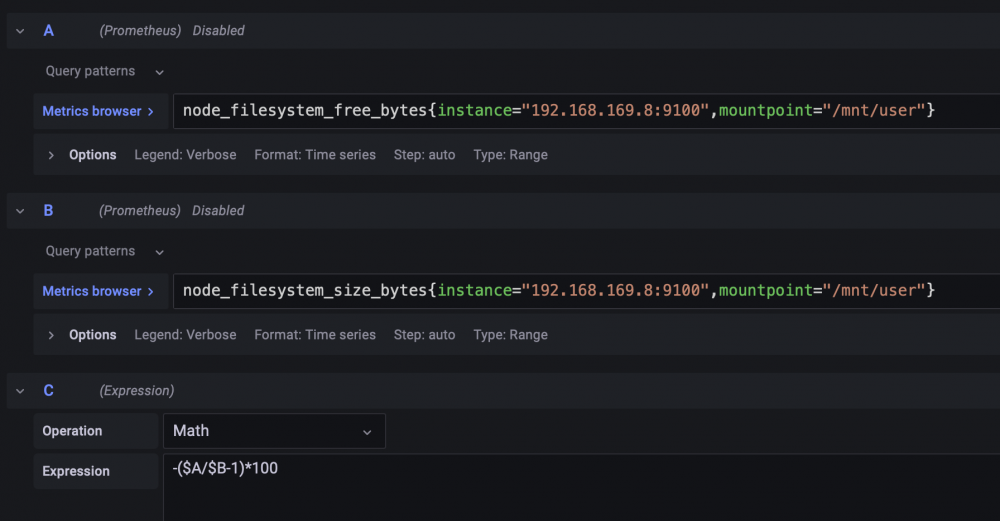
Took a little noodling but I got to where I wanted to be:
-
Not so concerned about Influx. I want to replicate this with the Prometheus plugin, if I can. I figured this out but it's only available bytes. I guess I can do a calculation with the total bytes.

-
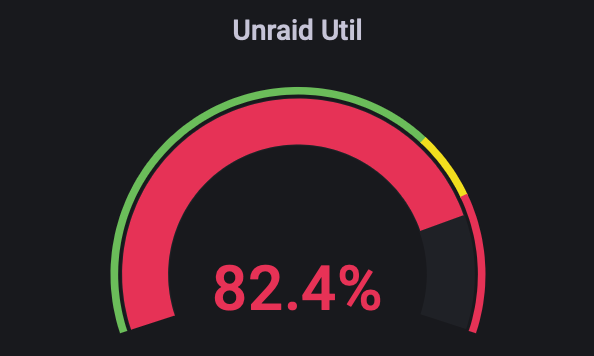
Currently have this in my dashboard: The query is pulling out of Influx.

-
Is there an array space metric that I'm missing? I currently capture array used and total space through telegraph (I think) using "disk" and "/mnt/user" and pulling the space from there. Trying to move to Prometheus entirely.
-
For some reason, "value" is reporting incorrectly in the exporter but "raw_value" is correct. I'll let this run for a while and let you know if I have any problems. Thanks for making this!
-
Check that out! Works like a charm, although Grafana is reporting one of the drives at 119c. It shows up as 33c in the Unraid dashboard and in the actually Need Exporter Metrics page. Not sure what's going on there.
-
Is there a way to get the Node Exporter to report on HDD temps? It looks like it has all of the other smartd metrics but I don't see temp.
-
I've been running the hddtemp docker to Telegraf for a long time now and for a number of my HDD's it will show "0" in Grafana about 75% of the time. The other 25% of the time it will read the correct temp. I'm posting this in General because I'm not sure if there's a better way to do this. I think these drives are actually responding with "0" for the temp or hddtemp is reporting it that way. It's not a null value. I have Prometheus running but the Node Exporter doesn't do smartd temps. Should I keep fighting at figuring out why my temps don't report correctly, configure Grafana to not except a "0" value, or is there a different way of capturing hdd temps that I should be going with? Is there a way to have the Node Exporter plugin report temps? These are all consumer grade drives, mostly IronWolf 8TB. All connected to the MoBo SATA ports.
-
Well, I just figured it out because of Wireshark. I had set the MTU to 9000 on the target system to support jumbo frames. This isn't a bad thing, unless its crossing to another network through a firewall and the firewall isn't happy about having to fragment it. I changed the target system MTU to 1500 and it started working immediately. I'm not certain it was the firewall, but it's pretty likely. My Mac, which has always been set to 1500, was always able to connect. No fragmentation. Thanks for helping me work through this! Sometimes you just need to voice ideas to have the answer present itself.
-
You're in luck, because I am a network guy by trade! What I lack is the understanding of how the plug-ins talk to the networking or how Unraid itself does networking. It doesn't necessarily behave like a router or firewall and that gets me turned around some times. I might just have to figure out how to pull a pcap from my network and look at the actual TCP session. The verbose curl output isn't quite enough detail and it's only curl.
-
I don't think it's routing related. I get an immediate response from the Ubuntu server target, which is also in the same target network. And my Mac is in the same source network (192.168.169.0/24) and it can connect to the Unraid target without issue. The default route is set correctly in both Unraid systems for their respective subnets and there are no firewall rules that would allow the Mac (as source) or the Ubuntu (as target) to work while preventing other things. I'm pretty sure this has something to do with Unraid (which one?) getting confused about talking to another Unraid system that's on a different subnet. I get it that this is fringe stuff and that it works for everyone else. I'm not expecting you to have the magic answer, just hoping if we keep talking about it, it might generate an idea for you, me or someone else reading this. Thanks!
-
On the primary I have several docker containers that are internally using 172.17.0.0. My primary's subnet is 192.168.169.0/24. The target subnet is 172.16.172.0/24, which you can see in the logs. The target was running docker for another container but I've turned that off. It's really only the Prom node exporter plugin on the target Unraid system. Nothing else running on there.
-
I've rebooted as part of the 6.10.3 upgrades on both sides, but I just restarted the Prometheus container on the primary and same result.
-
From the target, pinging "unraid" does not resolve. Unless there's something hard coded into the node exporter plugin related to "unraid", I'm at a loss.



