





Bitbass
Members
-
Joined
-
Last visited
-
Auto-update works perfectly. Thanks for taking care of this!
-
No problem! I'm thankful that you're putting the time into this!
-
Awesome! I tried downloading the plg file, editing it and then installing manually and it's not working. I'm guessing there's some additional packaging or perhaps I need the other files in the directory. Thanks for doing this for all of us, especially ich777! :)
-
Had the smartctl plugin (from ich777) fail after the 7.2 update so I tried your smartctl Exporter. Throws permissions errors in the logs when trying to access the drives. It can enumerate them fine, just can't pull smartctl info. I have Privileged checked on, but no other variables. Hoping this is a simple variable fix.
-
The pure Prometheus Exporter plugin appears to still be working. Would it be hard to add the smartctl metrics to that instead of fixing the separate smartctl plugin? ***Edit - I'm really concerned about drive temps more than anything. I'm mapping drive temps to Grafana to see if I've had a silent fan failure. It's easy to see over time, but sometimes harder to notice in the moment. Things like IO metrics are working in the Prom Exporter, but that might not be a smart metric. Anyway, I appreciate that you built these tools and that I've been able to take advantage of them for so long. Hope things are well with you!
-
I've been using the SmartCTL exporter plugin for a while now and it seems to be broken as of 7.2.0. The full Prometheus Exporter plugin appears to be working as I'm getting other system stats. Just nothing in /metrics for "smart". I tried installing the smartctl container (not yours) to test and that's working but throwing a permissions error when it tries to grab the stats. Makes me wonder if the plugin is also running into a permissions problem with the 7.2 update. Let me know what you need. The standard diags? Thanks!
-
I've started having problems with my PVE nodes crashing when the backup process runs. I suspect this is a recent update to PVE that I ran, which then quickly had a follow up set of patches for the kernel and the backup services on PVE. Makes me think there was a problem on the initial 8.4 patches. I ran those quick updates this week, but had another node crash last night during the backup. At least I suspect it was when the backup started, because the only node that crashed last night was the one node that had a backup scheduled. I'm now looking at what the possible causes might be. There are no additional patches available on the no-sub repo for PVE as of this morning. I might just have to wait for that to make it's way down from the Ent repo. As part of the recent patches I did update to PVE 8.4 and all of the PVE backup components were updated to the same release. I noticed that PBS has been updated to 3.4. Estimate on when we'll get that updated to this container for Unraid? I have no idea if that will help, but I'm trying to rule out whatever I can. Thanks for building this container!
-
The upgrade process was trivial! Thanks for the confirmation!
-
Because it's in the pool it'll just rebuild the pool. Makes sense. Thanks!
-
I just want to make sure it really is this simple before I blow things up and have to come begging for help. I have 2x256GB NVMe sticks in a BTRFS RAID1 pool. Balance and Scrub have never been run on the pool. I have Docker and a few shares on the cache pool. The Mover is set to hourly. I know that's more aggressive than usual but I had a reason. I can adjust that if necessary. I have 2x512GB NVMe sticks I'll be upgrading to. I have had VM turned on in the past, but it's not currently on. Looks like I do this: https://docs.unraid.net/unraid-os/manual/storage-management/#replace-a-disk-in-a-pool Simply shut the system down, replace one of the drives, start it up, assign the new drive in the missing cache pool slot, format the new drive and let it be part of the pool. Let things settle down and then repeat the process for the other drive. Should I run the Balance or Scrub for BTRFS? Anything else I'm missing? Do I need to do anything post replacement to expand the space?
-
Awesome! Thanks for the quick response!
-
@ich777 You had previously released a smartctl add-on plugin to the Prometheus exporter. I have it on my primary server. I'm now looking for it on my new server app store and can't find it. Was it removed, or did I install it through some other method? Thanks!
-
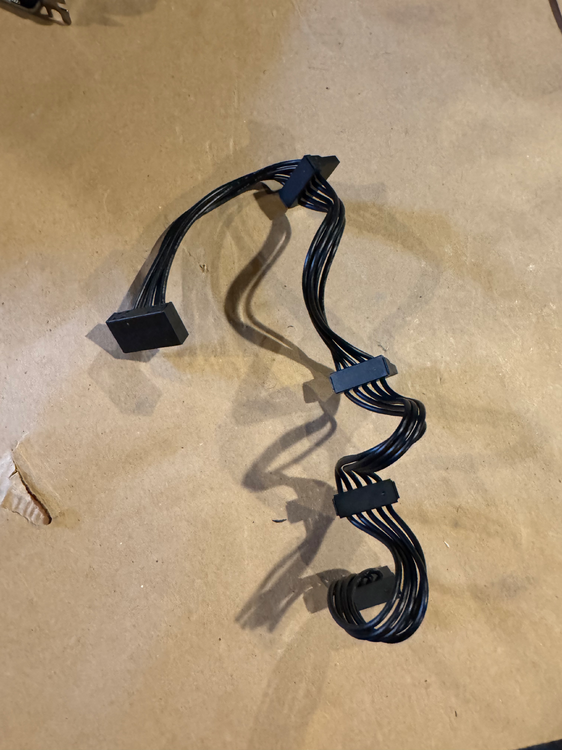
Son of a... the culprit is attached. Appreciate you hanging in there @JorgeB. Everything is running much more responsively now and the rebuild on the drive I swapped out is blazing along at normal speeds.
-
Ok, had an all morning power outage. What else can go wrong. Upon booting up Unraid with different cables for Disk15 I now have Disk15 as unmountable. Diags attached. And, I see data loss now. I know it might still be recoverable, but it's getting less likely. unraid-diagnostics-20241016-1317.zip
-
Swapped cables around a couple of times. The unmountable was jumping around and not following a cable. So, I swapped motherboards. The good news is it's more stable now. No more unmountable situation, yet. The bad news is, the repair is moving very slowly. Looking at the Syslog, I think I've traced the ATA1 errors to the sdb drive. This is a newish drive, but it is a surveillance drive. It hasn't thrown any errors yet, aside from the ATA errors. When I try to run a Short SMART on Disk15 it fails with a Host Reset. All the other disks are fine with the SMART tests. Best I can figure is that Disk15 might have been failing, or maybe not, but Disk4 had write errors, went offline, and then when I rebooted Disk15 silently broke with the ATA errors that I didn't see at first. I'm attaching the current diag file. Hopefully someone can tell me this is plausible. So, my question is, what's the best path for me to recover with minimal data loss. I have drives I can swap in. I could probably add another drive to the array now, if there's a way for me to migrate the content or rebuild onto that without data loss. Current state is that I have a new Disk4 that doesn't have content on it. I have the old Disk4 that I can mount in another system (or in Unraid if that's the right thing to do) that might have content on it, but is throwing errors. I have Disk15 with ATA errors. I have spare 8TB drives that I can swap in. unraid-diagnostics-20241016-0746.zip

