Lien1454
Members
-
Joined
-
Last visited
Everything posted by Lien1454
-
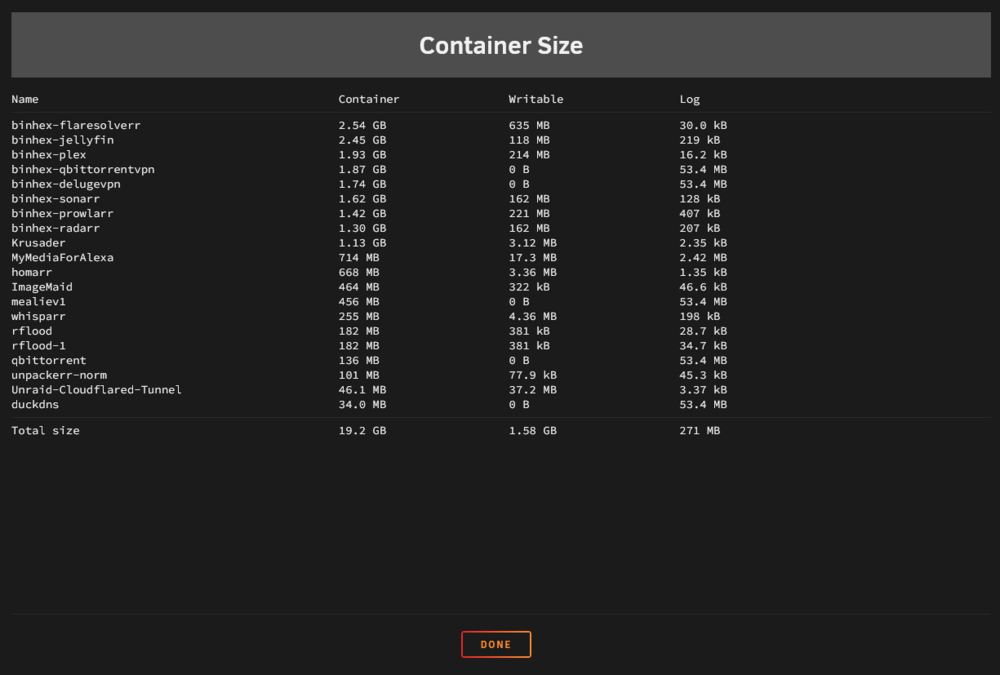
Hi, I had a docker message appear stating this....... Docker high image disk utilization Warning - Docker image disk utilization of 70% Docker utilization of image file /mnt/user/system/docker/docker.img The utilization condition shortly after was reported to have returned to normal by Fix Common Problems. I have my Docker image set to the default 20gb. root@:~# docker system df TYPE TOTAL ACTIVE SIZE RECLAIMABLE Images 19 19 12.51GB 2.207GB (17%) Containers 20 0 1.579GB 1.579GB (100%) Local Volumes 1 1 0B 0B Build Cache 0 0 0B 0B root@:~# docker volume ls reported 1 local volume. Reclaimable section above.. is that something I should do/can do? Does everything look ok with the docker? Am I correct on saying I'd need to increase the 20GB size set by default, with the total container size been at 19.2 GB. Thanks in advance for any advice
-
UNRAID: 6.12.10 I have 4 Array/Parity Drives. 3 was connected to motherboard Sata and 1 was connected to a Dell PERC H310 8-Port 6Gb/s SAS Adapter RAID Controller (flashed to IT mode). Parity was fine and never a problem till I needed 2 of the onboard SATA connectors for Pool SSDs to support TRIM. As it wasn't working on the Dell PERC H310. Powered down. Swapped 2 on board SATA connectors around. Booted back up and parity check was activated. Why was this, please? I know the DELL controllers are stable as I have never had an issue with running any of the 3 I have. 2 of which reside in another build. I'd researched this before I did it and read that, swapping array disks like this used to be a problem but was addressed some time ago? Thanks
-
TRIM if the drive is full then emptied and refilled in a short space of time would the TRIM schedule still be fit to do what's needed? Thanks
-
Going to test with the MX500 drive now. Allowed the OS to format it and it's picked btrfs as a pool drive. Which fs is recommended for a files been downloaded at like 90 to 100mb/s regularly ? thanks another thing I wanted to ask is if an SSD for files been added and deleted over the space or a day or so. Would trim keep the SSD healthy? Are there any plugins for trim in this situation I'd need to use or just not needed?
-
Thanks I'm going to try the MX500 as I have one in another computer that I can repurpose. All plugins was disabled at the time using the disable all plugins app.
-
Thanks I set disk share to Yes as it was on auto. I've checked the docker and ensured it's linked to the ssd... /mnt/storessd/storage/ Storagessd is the device name of the ssd. Storage folder is the folder that was created when I made a share on the drive so I can network access the contents. But as you can see it's not linked via 'user' so I assume that is direct disk access? Thanks What I am noticing is when the docker is stopped the cpu continues to spike. Trying to stop the array including a large pause (with all disks spun up). Eventually the array will stop.
-
Crucial BX500 3D NAND SATA 2.5-inch SSD Drive, 500 GB Black When you say try a share how do you suggest I make a test please? Thank you.
-
Posting to request some suggestions what might be causing this.... When using a docker image and writing to a single pool SSD drive (xfs) (which is new). The download speeds are fast but then some of the CPU cores spike to red and the speed dramatically drops. It will speed back up a short while later. But it cycles like this. I don't have any cache drive plugins installed which I've read can cause this. Are there any usual suspects for this? Thanks in advance for any advice.
-
Hi, I have a question regarding the docker image. When backing up, is it a good idea to backup the docker image itself? In app data folder I understand this is where the config for each app is stored. But what I wanted to ask was. Is nothing else other than the docker app itself stored to the docker image. Nothing user specific? Thanks
-
Brilliant.. thanks. As for what will happen to the drives as a 2 slot. Will they be mirrored or striped ? Thanks
-
If I move all data which consists of docker data and add a 2nd ssd and formats at btrfs, will the following be OK.... 1: When data is moved back will everything be OK as far as docker app data? 2: with 2 same size ssds as 2 slot pool will this mirror the 1st ssd ? Thanks
-
Its ok... just realised I never changed the slots back to 1 slot. changing that brought it back to normal. PHEW!!!!
-
So I had a Cache drive added as a single pool drive with app data and other stuff on it. I wanted to add another SSD. so I stopped the array and put cache pool to 2 slots and added the other drive thinking it would increase the capacity. Both drives shows Unmountable: Unsupported or no file system. So I stopped the array and removed the new cache drive. nothing has been formatted. But the original SSD cache drive still shows Unmountable: Unsupported or no file system. Can I get this back to the original state?
-
Ah right, ok I'll give that ago. thanks for replying
-
Hi I want to swap out a Pool SSD that is old and showing signs of failure. I've moved everything off it and now I want to keep everything as is (apart from the failing SSD) and importantly not impact on the parity since I'm not changing anything on the actual array. So I don't make a mess of this I wanted to ask for direction please with the New Config tool. Do I choose ALL and this will keep the parity intact? Thanks in advance
-
If the motherboard dies and you replace it with another board that's different. Providing the drives are all connected will unraid find them and everything is fine? With the unraid usb stick. The boot process is the same for any machines and won't be any problems changing the mobo? Thanks
-
Am I better off doing cache --> array Or just cache only? Thanks
-
So would you say an ssd is more suitable?
-
Hi The Hard drive I have the docker image on never spins down. Is this normal? Is it because of dockers writing logs within the image? Is there anything I can do to limit the drive spinning all the time like have it in ram via an app or is that just not possible or advisable ? Thanks in advance to any helpers with this.
-
Unpackerr. In FOLDER mode.... I have it set up to unpack to another folder. The unpacked folder and files have permissions of Read/Write Read only Read only. I want to be able to delete on an SMB share. I've used both... UN_FILE_MODE UN_DIR_MODE variables and although it says it's setting them to 0777 thats not the case and I'm unable to delete them?
-
Hi, Is there a anything that will allow me to change the order that icons are displated ? I've attached a pic and for example if I wanted to move the shut down red button to the far right of the icons. Can this be done? Thanks in advance to any helpers

-
Can a disk be added to the array but excluded in the parity ? So I have 3 drives. 2 x 4tb and a 640gb 1 x 4tb = parity So if I was to add another 4tb can I add it to the array without parity being created for that drive? Or does it have to be added as a pool disk ? Thanks
-
So I've moved some stuff but then trying to move the system folder gave me this error? I stopped both the vm and dockers before attempting to move the folder. rsync: [receiver] write failed on "/mnt/cache240gb/system/docker/docker.img": Read-only file system (30) rsync: [receiver] chown "/mnt/cache240gb/system/docker/.docker.img.YXMAeD" failed: Read-only file system (30) rsync: [receiver] rename "/mnt/cache240gb/system/docker/.docker.img.YXMAeD" -> "docker/docker.img": Read-only file system (30) rsync error: error in file IO (code 11) at receiver.c(378) [receiver=3.2.3] rsync: [sender] write error: Broken pipe (32)
-
Hi, I have a few questions if anyone can help please? Q1: I currently have my appdata folder set to a Cache drive. However I am wanting to move the appdata to another Cache drive that I have recently added which has a larger size. I've tried to use mover to move them from one cache drive to the other by selecting the new cache and option prefer. Mover takes action but does not move the files to the newly selected Cache drive. I have 4 pool drives 3 or which are older SSDs I'm repurposing and 1 HDD. I'm trying to move files from the 120gb Corsair drive at the top called Cache to Cache240gb drive. Both Cache240gb & Cacheoczdump are on an add in sata card. So I'm trying to work out if I'm misunderstanding how this should work considering it's not moving to or from the actual array. Or if there is some issue with the add in sata card. Q2: I was also wondering if I have the file system set correctly for the pool drives? Some are xfs and some are btrfs?

-
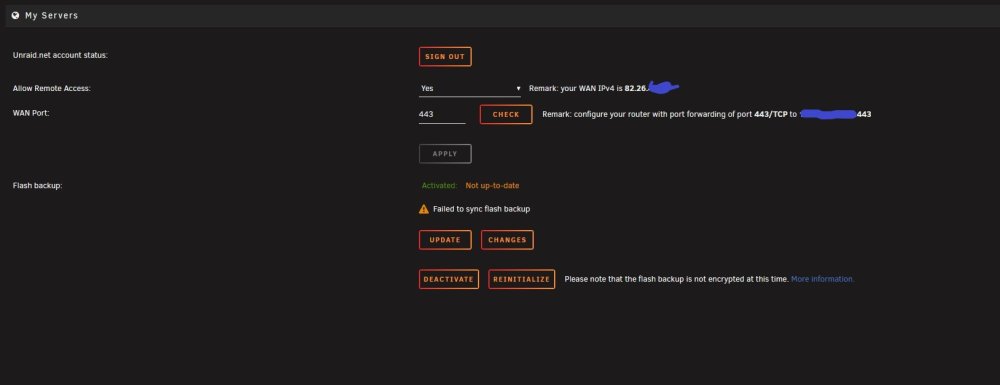
I've updated the My Servers plugin. Tried update and reinitialize buttons. Still not working. There are no other ports I need to forward other than 443 if I want to enable remote?